
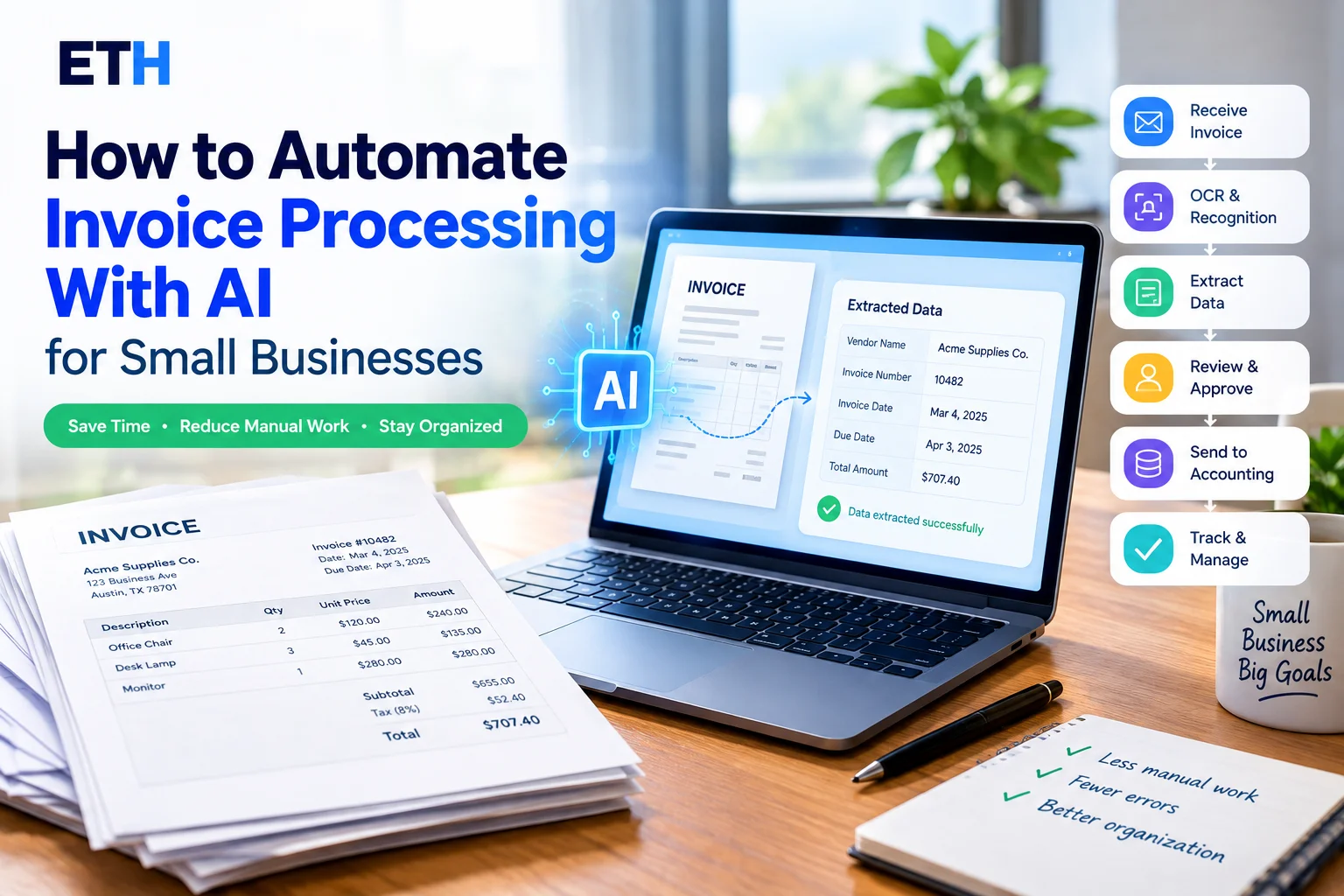
Every invoice that arrives in your inbox can create the same repetitive work: open the file, find the vendor name, invoice number, dates, tax, and total, enter the information into a spreadsheet or accounting system, and save the original document.
Handling a few invoices manually may be manageable. But when invoices arrive regularly from multiple vendors, manual data entry can become time-consuming and make it easier to enter the wrong number or miss an important document.
That’s where AI invoice processing can help.
AI invoice processing uses document recognition, OCR, machine learning, or related automation technologies to read invoices and extract useful information into structured data. A business can then review the extracted information and send approved data to a spreadsheet, accounting system, or another business workflow.
This guide explains how to automate invoice processing with AI for small businesses, including how the technology works, what information AI can extract, how to build a workflow, which types of tools to consider, and how to handle financial documents safely.
One important point comes first: AI can reduce repetitive invoice data entry, but it should not be treated as a replacement for human review. The goal is to make invoice processing more organized and efficient while keeping people involved in verification and approval.
If you’re new to AI automation, our guide on AI automation for repetitive tasks explains how businesses can automate other routine workflows beyond invoice processing.
Quick answer: To automate invoice processing with AI, collect invoices in one place, use an AI document-processing tool to extract important fields, review the extracted information against the original invoice, and send approved data to your spreadsheet or accounting software. Start with a small batch of real invoices before automating the entire process.
What Is AI Invoice Processing?
AI invoice processing means using software to read invoices and convert the information inside them into structured, usable data.
Instead of manually opening an invoice and typing each value into another system, an AI-powered tool can identify information such as the vendor name, invoice number, invoice date, due date, tax, and total.
A typical AI invoice-processing workflow combines several capabilities:
- OCR: Optical character recognition can convert text in scanned documents or images into machine-readable text.
- Document recognition: Software identifies the type and structure of the document.
- Field extraction: The system identifies important invoice fields and extracts their values.
- Structured data: Extracted information is organized into fields, rows, records, or another usable format.
- Workflow automation: Approved data can be exported or passed to another business system.
The exact technology varies between providers. Some tools use templates or rules for specific document types, while others use machine-learning models designed to handle different invoice layouts.
Manual vs. AI-Assisted Invoice Processing
| Process | Manual Processing | AI-Assisted Processing |
|---|---|---|
| Reading invoices | Person reads each document | Software reads and analyzes the document |
| Data entry | Values are typed or copied manually | Fields can be extracted automatically |
| Different layouts | Person interprets each format | Software attempts to identify fields across layouts |
| Verification | Person checks the entered information | Person reviews extracted information |
| Record organization | Depends on the existing filing system | Structured data can make records easier to search and organize |
AI-assisted processing does not eliminate the need for oversight. Instead, it can shift some of the work from repetitive typing to reviewing and approving information.
A Simple Example
Imagine a small landscaping company that receives PDF invoices from several suppliers.
An assistant currently opens each invoice and manually enters the vendor name, invoice number, date, tax, and total into a spreadsheet.
With an AI-assisted workflow, the invoices could be sent to a document-processing tool. The tool extracts the relevant fields, and the assistant compares those values with the original invoices before approving them.
The assistant still has an important role, but less of the process depends on repetitive data entry.
What Information Can AI Extract From an Invoice?
The exact fields supported depend on the tool and document format, but invoice-processing systems commonly work with information such as:
- Vendor name
- Vendor address
- Invoice number
- Invoice date
- Due date
- Purchase order number
- Line-item descriptions
- Quantities
- Unit prices
- Subtotal
- Tax
- Total amount
- Payment terms
Not every tool extracts every field, and extraction results can vary depending on the invoice layout, image quality, and provider.
Line items can also be more complicated than simple header fields because they often appear inside tables with different structures.
For that reason, businesses should test a tool using their own invoices before relying on it for regular processing.
How Does AI Invoice Processing Work?
Although individual tools work differently, the general process looks like this:
Invoice received → Document reading → Data extraction → Human review → Structured data → Accounting or business system
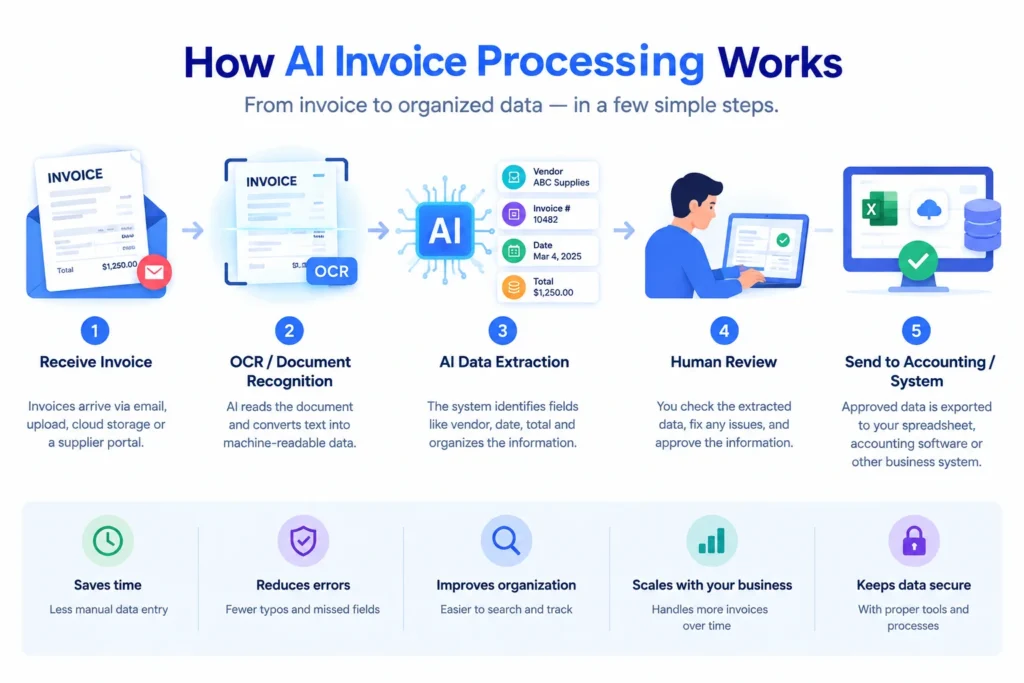
Step 1: Receive the Invoice
Invoices can arrive through:
- Email attachments
- PDF uploads
- Scanned paper documents
- Photos or images
- Cloud storage
- Supplier portals
The first goal is to bring invoices into a consistent workflow.
For example, a small business might use a dedicated email address for vendor invoices instead of mixing invoices with everyday correspondence.
Step 2: Read the Invoice
If the invoice is a scan or image, OCR can recognize the characters and convert them into machine-readable text.
A digitally generated PDF may already contain selectable text, while scanned documents depend more heavily on image quality.
Poor-quality scans, unusual fonts, shadows, or distorted images can make extraction more difficult.
Step 3: Identify Important Fields
After reading the document, the software needs to determine what different pieces of information represent.
For example, an invoice may contain several numbers. The system needs to distinguish the invoice number from the purchase order number, subtotal, tax, and final total.
Depending on the tool, this can involve document layout, labels, rules, templates, machine-learning models, or combinations of these techniques.
Step 4: Convert the Information Into Structured Data
Once information has been identified, the extracted values can be organized into structured fields.
For example:
| Vendor | Invoice Number | Date | Due Date | Total |
|---|---|---|---|---|
| Example Supply Co. | 10482 | 03/04 | 04/03 | $1,240.00 |
The values above are illustrative only.
Structured data makes invoice information easier to search, export, analyze, or send to another system.
Step 5: Review the Extracted Information
This is an important part of the workflow.
A person should compare important extracted values against the original invoice before the information is finalized.
Pay particular attention to:
- Invoice number
- Invoice date
- Due date
- Tax
- Total amount
- Vendor information
A small extraction error can create a larger problem if incorrect information is automatically passed into another system.
Step 6: Send Approved Data to the Next System
After review, approved information can be sent to the next stage of the workflow.
Depending on the tool, that could mean:
- Exporting to a spreadsheet
- Creating or updating an accounting record
- Sending data through an automation platform
- Adding information to a database
- Passing data to another internal business system
Available integrations vary by provider, so check the tool’s current documentation before choosing it.
What You Need to Automate Invoice Processing With AI
You don’t need a complicated setup to start.
A basic workflow generally needs:
- A consistent invoice source — such as an email inbox or folder.
- An AI invoice or document-processing tool — for reading and extracting information.
- A destination for the data — such as a spreadsheet or accounting system.
- A review process — someone who verifies important information.
- Secure document storage — for keeping original invoices and related records.
Start with the simplest workflow that solves your current problem.
You can add more automation later after you know which parts of the process are reliable.
How to Automate Invoice Processing With AI: Step-by-Step
Now let’s turn the concept into a practical workflow for a small business.
Step 1: Map Your Current Invoice Process
Before choosing a tool, understand how invoices currently move through your business.
Ask:
- Where do invoices arrive?
- Who receives them?
- What information do you enter manually?
- Where do you store the original invoices?
- Where should the extracted information go?
- Who reviews and approves invoices?
- What happens after approval?
This prevents a common automation mistake: automating a poorly defined process without fixing the underlying workflow.
Step 2: Choose an AI Invoice Processing Tool
Look for features that match your actual needs.
Important considerations include:
- Invoice field extraction
- OCR for scanned documents
- Support for your invoice file types
- Structured data export
- Spreadsheet or accounting integrations
- Email or folder-based processing
- Automation capabilities
- Usage limits
- Data storage and retention policies
- Privacy and security documentation
A freelancer processing a small number of invoices may need a much simpler setup than a growing company handling invoices from dozens of vendors.
Step 3: Connect Your Invoice Source
Next, decide how invoices will enter the system.
Depending on the tool, you may be able to use:
- A dedicated email inbox
- File uploads
- A watched folder
- Cloud storage
- Another supported document source
For example, a business could ask vendors to send invoices to a dedicated address such as invoices@yourbusiness.com.
The exact setup depends on the software you choose.
Step 4: Define the Fields You Need
Don’t try to extract everything immediately.
Start with the fields that your business actually uses.
A basic setup could include:
| Vendor | Invoice Number | Invoice Date | Due Date | Total | Tax |
|---|---|---|---|---|---|
| Example Supply Co. | 10482 | 03/04 | 04/03 | $1,240.00 | $85.30 |
Once the basic workflow is reliable, you can consider adding:
- Purchase order numbers
- Line items
- Payment terms
- Product descriptions
- Quantities
- Unit prices
Starting small makes it easier to identify problems.
Step 5: Test the Workflow With Realistic Invoices
Don’t judge an AI invoice-processing tool using only one clean sample.
Test it with different invoice types, such as:
- Digital PDFs
- Scanned invoices
- Invoices from different vendors
- Invoices with different layouts
- Documents containing many line items
- Invoices with unusual formatting
Record which fields are extracted correctly and where corrections are required.
If you test a tool yourself, screenshots of the actual extraction results can make your article or tutorial more useful because they provide firsthand evidence.
Step 6: Add Human Review
Before approved information reaches your accounting records or payment workflow, include a review step.
A reviewer can compare the extracted information with the original invoice and correct anything that is wrong or missing.
For example, if the AI reads $1,240.00 as $1,240.80, the reviewer can catch the error before it reaches the next system.
Over time, you may identify which invoices or fields require the most attention.
Step 7: Send Approved Data to Your Business System
Once the information has been reviewed, send it to the appropriate destination.
Depending on your setup, that might be:
- A spreadsheet
- Accounting software
- An ERP system
- An automation platform
- An internal database
Only move approved information forward.
This helps prevent an extraction error from automatically spreading through multiple systems.
Step 8: Monitor and Improve the Workflow
Invoice automation should not be treated as completely set-and-forget.
Review the workflow periodically.
Look for:
- Repeated extraction errors
- Vendors whose invoice layouts cause problems
- Missing fields
- Duplicate invoices
- Usage-limit issues
- Failed integrations
- Changes in your invoice volume
If a particular vendor repeatedly causes extraction problems, you may need to adjust your workflow or use a tool that handles that document format better.
Example of an AI Invoice Processing Workflow
Consider a small marketing agency that receives invoices from freelancers, software companies, printing providers, and advertising platforms.
A simple workflow could look like this:
Vendor invoice → Email inbox → AI processing → Data extraction → Human review → Accounting system → Payment workflow
Here’s how it could work:
- Invoice arrives: The vendor sends an invoice to the business’s dedicated invoice inbox.
- AI processes the document: The document-processing tool reads the invoice.
- Data is extracted: Vendor name, invoice number, dates, tax, and total are captured.
- Employee reviews the data: The extracted information is compared with the original invoice.
- Approved information is recorded: The verified data is added to the spreadsheet or accounting system.
- Payment follows the normal approval process: The business handles payment according to its existing procedures.
The important point is that AI handles document reading and data extraction, while people remain responsible for reviewing information and making financial decisions.
Best AI Tools for Invoice Processing
There isn’t one invoice-processing tool that is suitable for every small business.
The right option depends on your invoice volume, document formats, technical requirements, existing software, and budget.
Here are several types of tools worth evaluating.
Nanonets
Nanonets provides AI-powered document processing capabilities that can be used for extracting information from business documents, including invoices.
It can be worth evaluating if you want document extraction combined with broader workflow capabilities.
Check the provider’s current documentation for available invoice features, integrations, pricing, and usage limits.
Docsumo
Docsumo is a document-processing platform that focuses on extracting information from documents, including financial documents.
It may be relevant for businesses that need structured extraction and document review capabilities.
Check its current official documentation before making a purchasing decision.
Parseur
Parseur is designed for extracting structured information from documents and emails.
It can be particularly relevant to workflows where invoices arrive as email attachments and the extracted information needs to be passed to another application.
Check the current Parseur documentation for supported document types, integrations, pricing, and usage limits.
Google Document AI
Google Cloud Document AI provides document-processing capabilities and includes specialized processors for certain document types.
It is generally more suitable for businesses or developers that are comfortable working with cloud services and APIs.
Review Google’s current documentation and pricing before using it in a production workflow.
Microsoft Azure AI Document Intelligence
Microsoft Azure AI Document Intelligence provides document-analysis and extraction capabilities, including support for invoice processing.
It can be relevant to organizations already using Microsoft Azure or other Microsoft cloud services.
As with any cloud service, check the current official documentation for available models, pricing, data handling, and integration options.
If you want to explore document-processing tools beyond invoices, see our guide to the best free AI document processing tools for small businesses.
Quick Comparison
| Tool | Potential Use Case | Invoice Processing | Technical Level | Pricing |
|---|---|---|---|---|
| Nanonets | Document extraction and workflow automation | Available | Beginner to intermediate | Check current provider pricing |
| Docsumo | Financial-document extraction and review | Available | Beginner to intermediate | Check current provider pricing |
| Parseur | Email and document data extraction | Available | Beginner-friendly to intermediate | Check current provider pricing |
| Google Document AI | Developer-focused document processing | Invoice processor available | Technical | Check current Google Cloud pricing |
| Microsoft Azure AI Document Intelligence | Cloud-based document extraction | Invoice model available | Technical | Check current Azure pricing |
This table is intended as a starting point rather than a ranking. Features, pricing, limits, and integrations can change, so verify the current information on each provider’s official website.
If you want to explore document processing beyond invoices, see our guide to Best Free AI Document Processing Tools for Small Businesses.
You can also download our free AI document processing PNG if you need a ready-to-use visual for a presentation, article, tutorial, or educational project.
Free vs. Paid AI Invoice Processing
Cost is an important consideration for small businesses, but the cheapest option isn’t necessarily the easiest to operate.
Some providers may offer free plans, trials, or limited usage options. Others may charge based on documents, pages, credits, API usage, or another pricing model.
Free options may be useful when:
- You process a small number of invoices.
- You want to test the workflow.
- You only need basic extraction.
- You are still deciding whether automation is worthwhile.
Paid plans may become useful when:
- Your invoice volume increases.
- You need more processing capacity.
- You need additional integrations.
- You want more automation features.
- Your business requires additional workflow or support capabilities.
Before choosing a plan, check the provider’s current pricing page and terms.
Don’t choose a tool solely because it has a free option. A plan that doesn’t support your required workflow may create more manual work instead of reducing it.
Benefits of Automating Invoice Processing With AI
When properly configured, AI invoice processing can provide several practical benefits.
Less repetitive data entry
Instead of manually copying the same invoice fields into another system, the software can extract the information for review.
Better organization
Structured invoice data can make it easier to organize information from multiple vendors.
More searchable information
When invoice fields are stored as structured data, businesses may be able to search by vendor, invoice number, date, or other fields.
More consistent workflows
A defined workflow can help employees process invoices using the same basic steps.
Fewer manual copying errors
Automated extraction can reduce some errors caused by copying information manually. However, it can introduce different types of extraction errors, which is why review remains important.
Easier scaling
As invoice volume grows, automation may help businesses handle more documents without increasing manual data entry at the same rate.
These benefits aren’t guaranteed. Results depend on the quality of your invoices, the tool you choose, and how well the workflow is configured and monitored.
Limitations and Risks of AI Invoice Processing
AI invoice processing can be useful, but it isn’t perfect.
Extraction errors
The system may misread a number, select the wrong field, or incorrectly identify a total.
Poor-quality scans
Blurry, skewed, or low-resolution documents can make extraction more difficult.
Unusual invoice layouts
Invoices with unusual designs may not be handled as reliably as familiar formats.
Handwritten information
Handwritten text can be more difficult for automated systems to interpret than clear printed text.
Duplicate invoices
If the same invoice arrives more than once, an automated workflow may process it twice unless you have a duplicate-detection process.
Missing fields
Some invoices may not contain a purchase order number, due date, tax amount, or other field you normally expect.
Incorrect totals
A mistake in a subtotal, tax amount, or total can affect downstream records if it isn’t caught during review.
Privacy concerns
Invoices can contain sensitive business and financial information.
Before uploading invoices to a third-party service, understand how the provider handles uploaded documents and associated data.
Integration problems
A connection between two systems can fail, map fields incorrectly, or stop working after a software change.
For these reasons, businesses should design invoice automation with appropriate review and error-handling steps.
How to Use AI Invoice Processing Safely
Invoices are business and financial documents, so security should be part of the workflow from the beginning.
Review extracted information
Compare important fields with the original invoice before finalizing the record.
Understand the provider’s data policies
Read the provider’s privacy and data-handling documentation before uploading sensitive business documents.
Look for information about:
- Data storage
- Data retention
- Access controls
- Deletion
- Data processing
- Third-party access
Keep original invoices
Don’t rely exclusively on extracted data.
Keep the original documents according to your business’s record-keeping requirements.
Limit access
Only give financial-document access to people who need it.
Use strong passwords and multi-factor authentication where available.
Maintain backups
Keep appropriate backups rather than relying on a single service as the only location for important records.
Review before payment or reporting
If extracted information will influence payments, financial reports, or tax-related records, review it before using it for those purposes.
This article provides general information rather than legal, accounting, tax, or compliance advice. Record-keeping and tax requirements can vary depending on your business and location. Consult a qualified accountant or tax professional when you need advice specific to your situation.
Common Invoice Automation Mistakes to Avoid
1. Automating before understanding the current workflow
If you don’t understand how invoices currently move through your business, it becomes difficult to know what should actually be automated.
2. Choosing a tool only because it is free
A free plan may have document, page, integration, or feature limitations.
3. Ignoring usage limits
A workflow that works during testing may stop when you exceed your plan’s processing allowance.
4. Testing only one invoice
One clean invoice doesn’t tell you how a tool will perform across different vendors and layouts.
5. Skipping human review
Sending extracted financial information directly into your records without appropriate verification can create avoidable errors.
6. Uploading sensitive documents without checking data policies
Understand how the provider handles your information before using the service for real business documents.
7. Building an unnecessarily complicated workflow
Start with a few important fields and one destination.
Add complexity only when you have a clear reason.
8. Forgetting about duplicate invoices
Create a process for identifying duplicate documents before they affect your records or payment workflow.
When Should a Small Business Automate Invoice Processing?
AI invoice automation may be worth exploring when:
- You receive invoices regularly.
- Employees repeatedly enter the same invoice information.
- You work with many vendors.
- Vendors use different invoice layouts.
- Manual invoice entry takes meaningful administrative time.
- You need structured invoice data for reporting or accounting workflows.
Manual processing can still make sense when:
- You only receive a few invoices each month.
- Most invoices are unusual one-off documents.
- Your current process is already quick and organized.
- Setting up automation would take more effort than manual processing.
Automation isn’t automatically better for every business.
The right question is whether the technology solves a real repetitive problem without creating more complexity than it removes.
Frequently Asked Questions
Can AI automate invoice processing?
AI can automate parts of invoice processing, including document reading and data extraction. Review, approval, and payment decisions may still require human involvement.
How does AI extract data from invoices?
AI invoice-processing systems can use OCR, document analysis, machine-learning models, templates, rules, or combinations of these technologies to identify fields such as invoice numbers, dates, vendor information, tax, and totals.
Is AI invoice processing accurate?
Accuracy varies depending on the tool, invoice layout, document quality, and fields being extracted.
No extraction system should be assumed to be error-free. Review important information against the original invoice before finalizing it.
Can small businesses automate invoice processing for free?
Some providers offer free plans or trials, but availability and limits vary.
A free option may be sufficient for testing or low-volume workflows. Check the provider’s current pricing and usage terms before relying on it for regular business processing.
What information can AI extract from an invoice?
Depending on the tool, common fields include vendor name, invoice number, invoice date, due date, purchase order number, line items, subtotal, tax, total, and payment terms.
Can ChatGPT process invoices?
General-purpose AI assistants can be useful for occasional document analysis or extracting information from an uploaded invoice, depending on the current product capabilities and plan.
However, dedicated invoice-processing systems may provide specialized features such as structured extraction, batch processing, workflow controls, or business-system integrations.
Because invoices can contain sensitive financial information, review the relevant provider’s current data and privacy policies before uploading real business documents.
Is AI invoice processing secure?
Security depends on the provider, the service configuration, and how your business handles the documents.
Review the provider’s security and privacy documentation, understand storage and retention practices, restrict access to sensitive records, and follow your organization’s security procedures.
Can AI invoice processing connect to accounting software?
Some invoice-processing tools provide integrations or export options for accounting and business systems.
Support varies by provider, so confirm that your accounting software and desired workflow are supported before choosing a tool.
Final Thoughts
AI invoice processing can reduce repetitive data entry and help small businesses organize information from invoices more efficiently.
The most practical approach is to start small.
First, understand how invoices currently arrive and where their information needs to go. Then choose an AI document-processing tool that fits your document types and existing software. Test it with real-world invoices, review the extracted information, and only then expand the workflow.
Most importantly, don’t treat AI extraction as a substitute for financial judgment.
A good invoice automation workflow combines AI for document processing and data extraction with human review for verification and approval.
If you’re learning how to automate invoice processing with AI for small businesses, a gradual, review-first approach can help you determine whether automation actually saves your business time without adding unnecessary complexity.
About the Author
Hi, We are the founders of EveryTechHub. We share beginner-friendly guides on AI tools, blogging, and technology based on hands-on testing and real experience. Read more about us.