
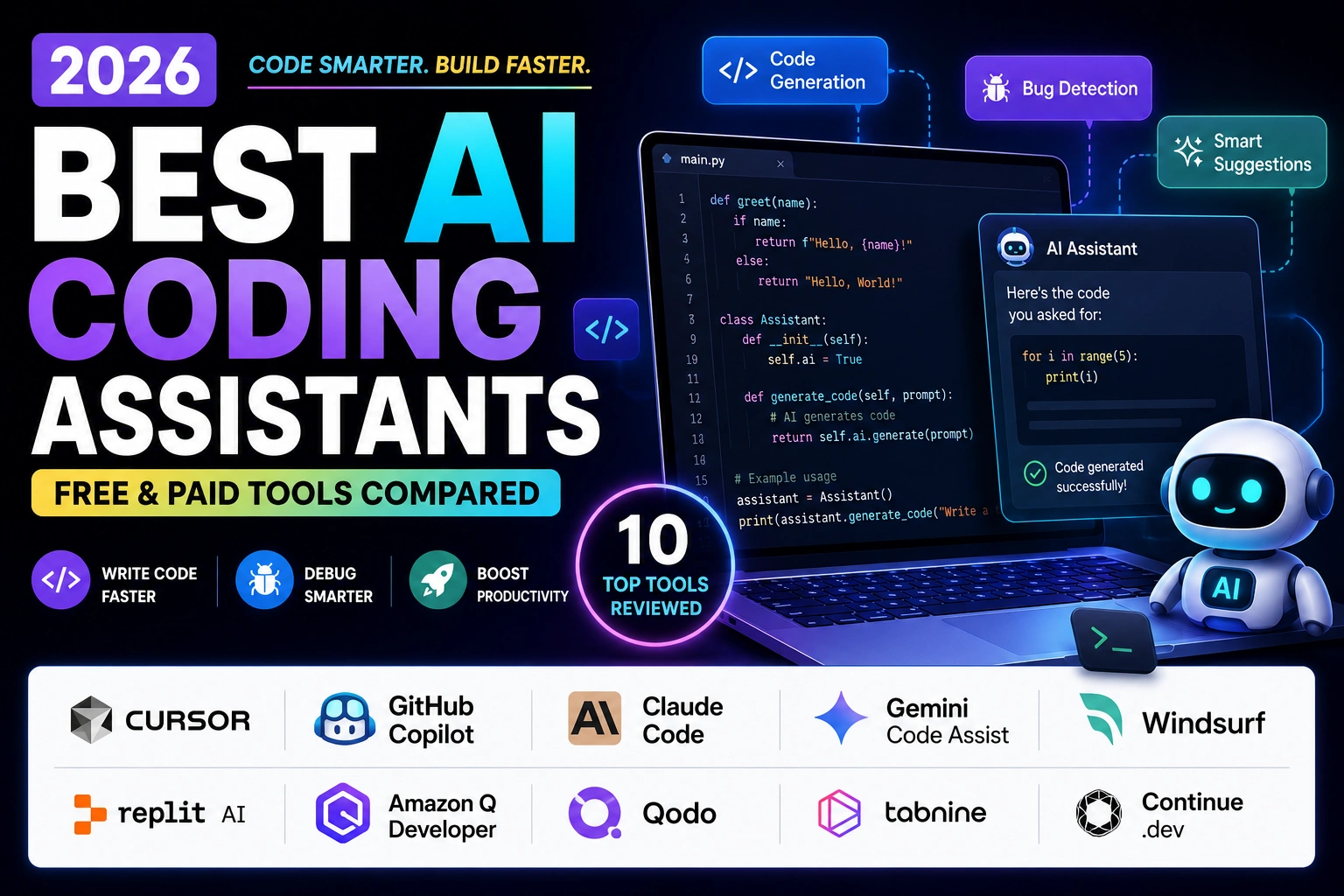
Best AI Coding Assistants are no longer a nice-to-have for developers — they’ve quietly become part of the standard toolkit, the same way Git or Stack Overflow once were. Whether you’re a student writing your first Python script or a startup founder shipping a product with a two-person engineering team, the right AI coding assistant can save hours every single week.
I’ve spent the last few weeks digging through the current crop of tools, checking their official pricing pages, and comparing what they actually deliver versus what their marketing pages promise. Some of what I found surprised me — a couple of well-known tools have changed dramatically in just the past two months, and one popular free option has actually been discontinued. So this isn’t a “top 10 list” recycled from 2024. It’s a fresh look at where things stand right now.
Let’s get into it.
What Is an AI Coding Assistant?
An AI coding assistant is a tool, usually built into your code editor or terminal, that uses a large language model (LLM) to help you write, understand, fix, and improve code.
Think of it as a very well-read pair-programming partner. You type a comment describing what you want, and it suggests the code. You paste in a broken function, and it tells you what’s wrong. You ask it to write tests for a file, and it does that too.
Some assistants just autocomplete a line or two as you type. Others, often called “agents,” can read your entire codebase, plan out a multi-step change, edit several files, and even run your tests to check their own work.
How AI Coding Assistants Work
Most modern coding assistants are built on top of large language models like Claude, GPT, or Gemini. Here’s the simplified version of what happens behind the scenes:
- Context gathering — the tool looks at your open file, related files, and sometimes your whole repository to understand what you’re working on
- Prompting — your request (or your code itself) gets turned into a prompt sent to the AI model
- Generation — the model predicts and generates code, explanations, or edits based on patterns it learned from enormous amounts of public code and documentation
- Application — the suggestion appears inline, in a chat panel, or is applied directly to your files, depending on the tool
The newer “agentic” tools add a loop on top of this: they can write code, run it, look at the output or error message, and try again — without you manually copying and pasting each step.
If you’re curious how this compares to using AI tools for other parts of building a product, our guide on AI vs Human Content Creation covers some of the same underlying technology from a content angle.
Benefits of Using the Best AI Coding Assistants
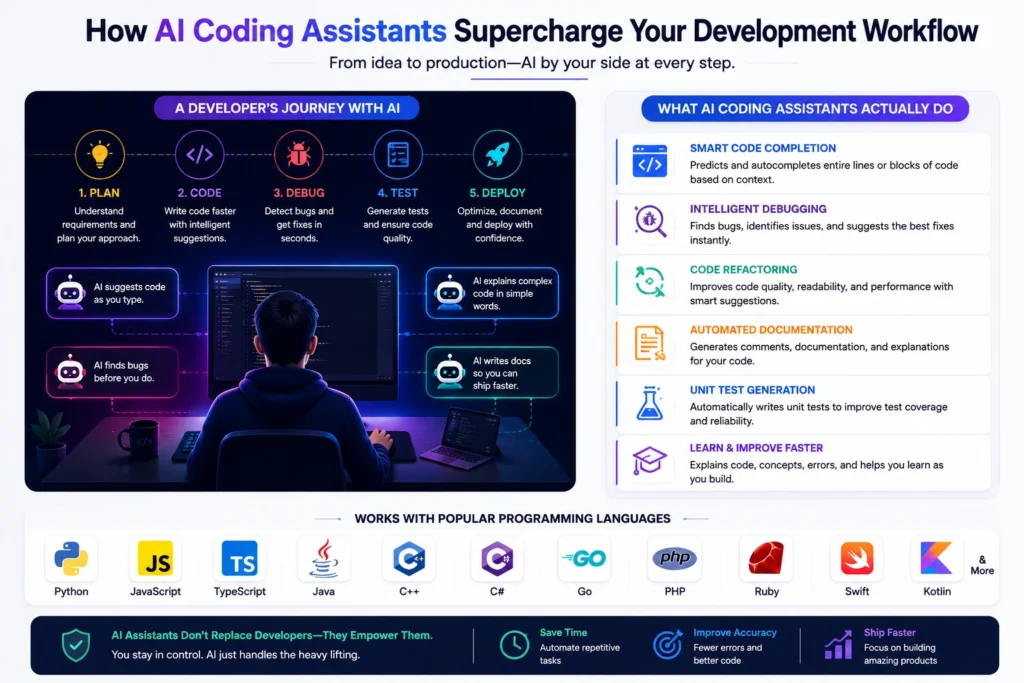
The benefits of using the best AI coding assistants go beyond just “writing code faster.” A few that stood out most in my testing and research:
- Less time on boilerplate. Repetitive code — API routes, form validation, config files — gets generated in seconds instead of copied from an old project.
- Faster debugging. Pasting an error message and getting a plausible explanation beats scrolling through ten browser tabs.
- Learning support. Beginners can ask “why does this work” and get a real explanation, not just a fix.
- Lower barrier to entry. People without a formal computer science background can build working software, especially with tools that support natural-language prompting.
- Faster prototyping. Ideas go from sketch to working demo much quicker, which matters a lot for solo founders and small teams.
- Better documentation habits. Since writing docs and comments is so fast with AI help, many developers actually end up documenting more, not less.
None of this replaces understanding your code. The tools are best used as an accelerant, not a replacement for judgment.
Who Should Use AI Coding Assistants?
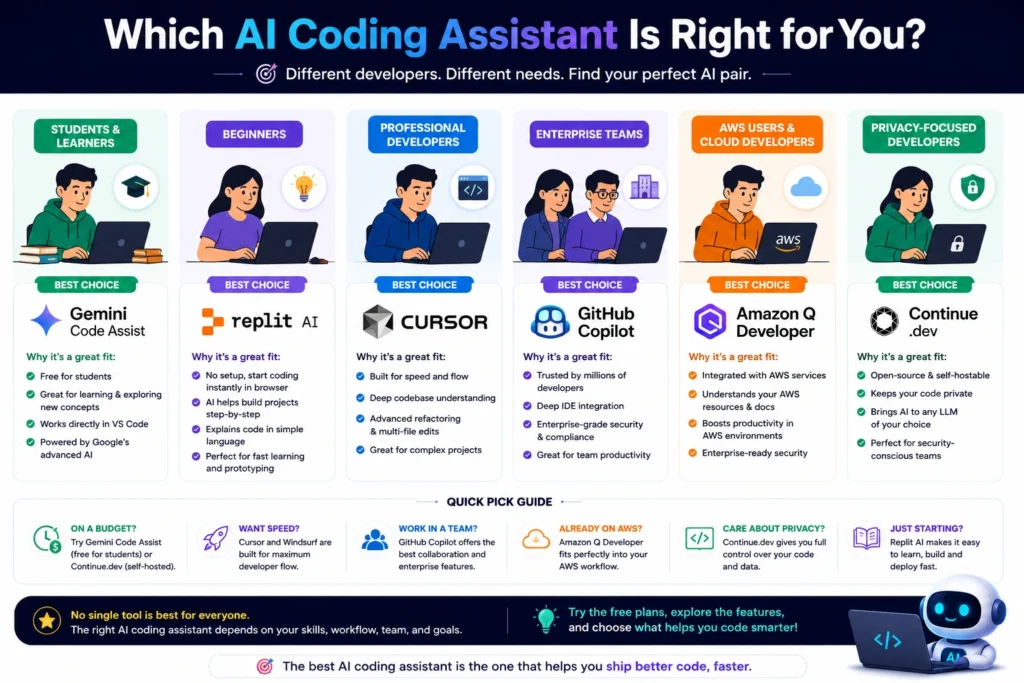
Pretty much anyone who writes code regularly can get value from one of these tools, but the right pick depends on who you are:
- Beginners and students benefit from tools with strong explanations and generous free tiers
- Freelancers and solo developers want a good balance of price and capability
- Startups and small teams usually care most about speed and multi-file agent capability
- Agencies often need to switch between many codebases and languages quickly
- Enterprise engineering teams need security, compliance, and admin controls above everything else
- Non-technical founders may prefer tools that lean more toward natural-language, end-to-end app generation — if that’s you, our guide to the Best AI App Builders in 2026 is a better starting point than a code editor.
How We Chose the Best AI Coding Assistants
For this list of the best AI coding assistants, I focused on a handful of things that actually matter day to day, rather than just feature-list length:
- Real-world usefulness across common tasks like completion, debugging, and refactoring
- Pricing transparency — including free tiers and what “unlimited” actually means in practice
- IDE and language support
- Agentic capability — can it handle multi-file, multi-step tasks, or just single-line suggestions?
- Company track record and stability — this mattered more than I expected, since a couple of tools on this list have changed ownership or pricing structure in just the past few months
- Security and privacy practices, especially for anyone working with client or proprietary code
Pricing on AI tools changes often — sometimes month to month. I’ve noted the details as accurately as I could at the time of writing, but you should always confirm current pricing on each tool’s official website before subscribing.
Quick Comparison Table
| Tool | Best For | Free Plan | Starting Price | Supported Languages | IDE Support | AI Model | Overall Rating |
|---|---|---|---|---|---|---|---|
| Cursor AI | Professional developers | Yes (Hobby) | $20/mo (Pro) | All major languages | Cursor (VS Code fork) | Claude, GPT, Gemini | 4.7/5 |
| GitHub Copilot | Beginners & teams | Yes | $10/mo (Pro) | All major languages | VS Code, JetBrains, Visual Studio, Neovim | GPT, Claude models | 4.6/5 |
| Claude Code | Professional developers, agentic work | No (needs paid plan) | $20/mo (via Claude Pro) | All major languages | Terminal, VS Code, JetBrains | Claude Sonnet/Opus | 4.7/5 |
| Gemini Code Assist | Google Cloud teams | Limited (team plans only) | $19/user/mo (Standard) | All major languages | VS Code, JetBrains, Cloud Console | Gemini | 4.3/5 |
| Windsurf | Agentic, multi-file editing | Yes | $20/mo (Pro) | All major languages | Windsurf IDE | Claude, GPT, in-house SWE model | 4.4/5 |
| Replit AI | Beginners, browser-based building | Yes (Starter) | $20–25/mo (Core) | All major languages | Replit (browser IDE) | Claude, GPT | 4.2/5 |
| Amazon Q Developer | AWS-based teams | Yes (legacy, new signups closed) | $19/user/mo (Pro) | All major languages | VS Code, JetBrains, Visual Studio | Claude models | 3.9/5 |
| Qodo | Code review & test generation | Yes (Developer) | $30/user/mo (Teams) | All major languages | VS Code, JetBrains | Multiple models | 4.3/5 |
| Tabnine | Privacy-focused teams | Yes | $9–12/user/mo | All major languages | VS Code, JetBrains, Visual Studio, Neovim | Proprietary + private model hosting | 4.1/5 |
| Continue.dev | Open-source enthusiasts (legacy) | Yes (free/open-source) | Free (project discontinued) | All major languages | VS Code, JetBrains | Any (bring-your-own-model) | 3.8/5 |
Ratings reflect a mix of hands-on impressions, verified feature sets, and publicly available user feedback as of this writing. Ratings and pricing can shift quickly in this space, so treat the table as a starting point, not gospel.
Quick summary: If you want a full AI-native code editor, Cursor and Windsurf lead the pack. If you’d rather keep VS Code exactly as it is, GitHub Copilot or Tabnine slot in more quietly. If you live in the terminal and want an autonomous agent for heavy lifting, Claude Code is the standout. If your infrastructure is AWS or Google Cloud, Amazon Q Developer or Gemini Code Assist tie in more naturally, though both have seen notable changes recently that I’ll cover below.
Detailed Reviews
1. Cursor AI
Overview: Cursor is a full code editor built as a fork of VS Code, with AI woven into nearly every part of the experience — inline completions, multi-file “Composer” edits, and background agents that can work on tasks while you do something else.
Best For: Professional developers and teams who want a dedicated AI-first editor rather than a plugin bolted onto their existing setup.
Key Features:
- Unlimited Tab-style code completions on paid plans
- Multi-file editing and codebase-aware chat
- Access to multiple frontier models (Claude, GPT, Gemini) from one interface
- Background/cloud agents for longer-running tasks
- Privacy mode that avoids using your code for model training
Pros:
- Genuinely strong at understanding large codebases
- Model flexibility — not locked into one AI provider
- Frequent feature updates
Cons:
- Pricing has become more complex since it moved to a credit-based system
- Can get expensive quickly for heavy daily use on premium models
- Slight learning curve if you’re deeply attached to standard VS Code extensions
Pricing: Cursor offers a free Hobby tier, Pro around $20/month, with higher Pro+, Ultra, and Teams tiers for heavier usage. Paid plans include a monthly credit pool tied to the plan price, and usage on premium models draws down that pool. Pricing structures like this can change, so verify current numbers on the official Cursor website.
Why We Recommend It: For developers who want the deepest AI integration into their actual coding environment, Cursor is one of the most capable options available right now.
2. GitHub Copilot
Overview: Copilot was one of the first mainstream AI coding assistants, and it’s still one of the safest, most widely supported choices — especially if you already live inside GitHub’s ecosystem.
Best For: Beginners, students, and teams who want a well-supported tool that plugs into their existing editor without switching to a new one.
Key Features:
- Inline code completions and Next Edit Suggestions
- Chat and agent mode inside VS Code, JetBrains, Visual Studio, and Neovim
- Deep GitHub integration (pull requests, issues, Actions)
- Broad language support across nearly every popular framework
Pros:
- Easiest tool on this list to get started with
- Strong free tier for casual and student use
- Backed by Microsoft/GitHub with wide IDE compatibility
Cons:
- Recently shifted to usage-based billing on top of subscription fees, which adds some complexity
- Slightly behind newer agentic tools on complex, multi-file autonomous tasks
- Enterprise pricing can carry extra requirements
Pricing: Copilot has a free tier, with Pro around $10/month and Pro+ around $39/month for individuals; Business and Enterprise plans are priced per user. As of mid-2026, Copilot moved to a usage-based “AI Credits” model layered on top of the base subscription price, so actual cost depends on how much you use premium chat and agent features. Confirm current details on the official GitHub Copilot page.
Why We Recommend It: If you want the lowest-friction way to try an AI coding assistant inside the editor you already use, Copilot remains a dependable starting point.
3. Claude Code
Overview: Claude Code is Anthropic’s terminal-based coding agent. It’s less of a traditional autocomplete tool and more of an autonomous assistant that can read your repository, plan multi-step changes, edit files, run commands, and check its own work.
Best For: Developers comfortable working from the command line who want strong reasoning on complex, multi-file tasks — large refactors, migrations, or working through an unfamiliar codebase.
Key Features:
- Deep codebase understanding with a large context window
- Runs from the terminal, and also integrates with VS Code, JetBrains, and the desktop app
- Strong performance on multi-step agentic coding tasks
- Usage shared with regular Claude chat under the same subscription
Pros:
- Excels at large, complex, multi-file tasks
- Transparent about what it’s doing at each step
- Frequent capability improvements from Anthropic
Cons:
- No dedicated free tier — you need at least a Claude Pro subscription or API credits
- Usage limits are shared with regular Claude.ai chat, so heavy use of both can eat into the same quota
- Terminal-first workflow has more of a learning curve for beginners
Pricing: Claude Code is bundled into Claude subscription plans rather than sold separately — Pro is around $20/month, with Max plans around $100 and $200/month for heavier usage, plus pay-as-you-go API pricing for teams building automation on top of it. Check the official Claude Code page for the latest plan details, since Anthropic has adjusted usage limits more than once this year.
Why We Recommend It: For developers who want an AI agent that can genuinely take on a large chunk of work independently, Claude Code is one of the strongest options for serious, complex coding tasks.
4. Gemini Code Assist
Overview: Google’s AI coding assistant integrates tightly with Google Cloud and offers one of the largest context windows in the category, which helps with big, sprawling codebases.
Best For: Teams already built on Google Cloud infrastructure who want their coding assistant to understand GCP services natively.
Key Features:
- Large context window for handling bigger codebases in one session
- Works inside VS Code, JetBrains IDEs, and the Google Cloud console
- Code generation, explanation, transformation, and unit test generation
- Enterprise data-handling guarantees around not training on your private code
Pros:
- Strong context window helps with large, cross-file refactors
- Solid choice for teams already invested in Google Cloud
- Reasonable pricing for the Standard team tier
Cons:
- Google has shifted the individual free-tier setup multiple times in 2026, so the on-ramp for solo developers is less stable than competitors
- Less third-party IDE support than Copilot or Tabnine
- Best value is really tied to being on Google Cloud already
Pricing: Team plans run roughly $19–23/user/month (Standard) and $45–54/user/month (Enterprise). Google has made changes to how individual developers access Code Assist during 2026, including nudging some free users toward its newer Antigravity tool, so it’s worth double-checking the current individual access options on the official Gemini Code Assist page before you build a workflow around it.
Why We Recommend It: If your team already runs on Google Cloud, Gemini Code Assist’s native integration makes it worth a serious look, even with the recent packaging changes.
5. Windsurf
Overview: Windsurf (formerly Codeium) is an AI-native code editor built around an agent called Cascade, designed to make multi-file, autonomous editing feel smooth rather than bolted-on.
Best For: Developers who want a strong agentic editing experience without necessarily paying Cursor’s premium pricing.
Key Features:
- Cascade agent for multi-file, context-aware edits
- Unlimited Tab autocomplete on every plan, including free
- In-house model options alongside third-party models like Claude and GPT
- Daily and weekly usage quotas instead of a single monthly credit pool
Pros:
- Competitive pricing relative to Cursor
- Cascade handles multi-step tasks well
- Free tier is genuinely usable, not just a demo
Cons:
- Switched from a credit system to daily/weekly quotas in 2026, which takes some getting used to
- No support yet for bringing your own API keys the way Cursor allows
- Smaller third-party plugin ecosystem than VS Code-based tools
Pricing: Windsurf offers a free tier, Pro around $20/month, a higher Max tier around $200/month for heavy users, and Teams around $40/user/month. Confirm current tiers on the official Windsurf website, since the pricing structure changed earlier this year.
Why We Recommend It: Windsurf is a strong middle-ground pick for developers who want a dedicated AI editor with capable agent features at a reasonable price.
6. Replit AI
Overview: Replit is a browser-based coding environment with a built-in AI Agent that can build, deploy, and host applications without you setting up any local environment at all.
Best For: Beginners, students, and anyone who wants to go from idea to a deployed, working app without installing anything on their computer.
Key Features:
- Full browser-based IDE with instant hosting and deployment
- Agent mode that can scaffold and build entire small applications from a prompt
- Real-time collaboration for teams working in the same project
- No local setup required — works from any device with a browser
Pros:
- Extremely beginner-friendly, especially for people without a dev environment set up
- Deployment is built in, so there’s no separate hosting step
- Good for fast prototyping and MVPs
Cons:
- Uses effort-based, usage-billed AI credits that can add up quickly on complex tasks
- Less suited to large, professional codebases than dedicated editors
- Costs can be harder to predict than flat-fee competitors
Pricing: Replit has a free Starter tier, Core around $20–25/month with a monthly credit allowance, and a Pro tier around $100/month for small teams. Because AI Agent usage is billed based on task complexity, actual monthly cost can vary a lot — check the official Replit pricing page before committing to a workflow that leans heavily on the Agent.
Why We Recommend It: For beginners or anyone who wants to build and ship something quickly without a local setup, Replit AI removes a lot of the usual friction.
7. Amazon Q Developer
Overview: Amazon Q Developer is AWS’s coding assistant, built with deep integration into AWS services, IAM, CloudFormation, and Lambda. Worth noting upfront: AWS closed new signups for Q Developer’s IDE plugins and paid subscriptions in mid-2026, positioning its newer tool, Kiro, as the successor.
Best For: Existing AWS-based development teams, at least for now — new users are better off evaluating Kiro or one of the other tools on this list.
Key Features:
- Deep AWS service awareness (Lambda, CloudFormation, IAM)
- Security vulnerability scanning and hardcoded-secret detection
- Java version upgrade automation for legacy codebases
- Chat and inline completion support
Pros:
- Excellent for AWS-specific tasks and legacy code modernization
- Free tier was historically generous compared to some competitors
- Strong security-scanning features
Cons:
- AWS has stopped onboarding new users to this product as of mid-2026, with support planned to wind down over time
- Less capable than Cursor or Claude Code on general, non-AWS coding tasks
- Future updates are uncertain given the shift toward Kiro
Pricing: A free tier and a Pro tier around $19/user/month have existed historically. Given the product’s transition status, check the official Amazon Q Developer page directly for the latest word on availability before adopting it for a new project.
Why We Recommend It: If you’re already deep in an AWS-based codebase, Amazon Q Developer can still be useful today, but given AWS’s own direction toward Kiro, it’s not where I’d recommend starting a new workflow in 2026.
8. Qodo
Overview: Qodo (formerly CodiumAI) focuses less on writing new code and more on what happens after — code review, test generation, and catching bugs before a pull request gets merged.
Best For: Teams that want to strengthen their code review and test coverage process rather than just generate more code faster.
Key Features:
- Automated test generation that follows your project’s existing test patterns
- Multi-agent PR review that checks for bugs, security issues, and missing test coverage
- Open-source PR-Agent foundation for teams that want to inspect or self-host the review logic
- Works alongside your existing coding assistant rather than replacing it
Pros:
- Strong, genuinely useful test generation for common code patterns
- Review quality holds up well in independent benchmarks
- Flexible deployment options, including self-hosted
Cons:
- Priced at the higher end for team plans
- Test generation is weaker on complex business logic with heavy external dependencies
- Best used as a complement to a completion tool, not a replacement
Pricing: Qodo offers a free Developer tier, with Teams plans around $30/user/month and custom Enterprise pricing. Check the official Qodo website for current numbers.
Why We Recommend It: If your team already has a coding assistant but wants better automated code review and test coverage, Qodo fills a real gap that most completion-focused tools don’t cover well.
9. Tabnine
Overview: Tabnine has been in the AI coding space since 2018, and it has built its whole identity around privacy — self-hosted and air-gapped deployment options that keep your code from ever leaving your infrastructure.
Best For: Privacy-conscious teams and regulated industries where sending code to a third-party cloud isn’t an option.
Key Features:
- Self-hosted, VPC, and fully air-gapped deployment options
- Code completion, chat, and agent capabilities
- Works across VS Code, JetBrains, Visual Studio, and Neovim
- SOC 2 compliance and strong IP protection guarantees
Pros:
- Best-in-class privacy and deployment flexibility
- More affordable than several competitors at the individual level
- Long track record in the space
Cons:
- Review and agentic capabilities lag slightly behind Cursor or Claude Code on complex tasks
- Self-hosted setup takes more technical effort than a plug-and-play SaaS tool
- Smaller community and plugin ecosystem than GitHub Copilot
Pricing: Tabnine’s individual paid plans generally sit in the $9–12/month range, with Enterprise plans around $39/user/month for advanced deployment and admin controls. Verify current tiers on the official Tabnine website.
Why We Recommend It: For teams where “our code cannot leave our network” is a hard requirement, Tabnine is one of the few tools built specifically around that constraint.
10. Continue.dev
Overview: Continue.dev built a strong reputation as the leading open-source, bring-your-own-model coding assistant — free, flexible, and able to run entirely local models through Ollama. Important update: Cursor’s parent company, Anysphere, acquired Continue.dev in mid-2026, and the standalone product is being wound down, with recurring billing disabled and cloud data scheduled for deletion.
Best For: Historical reference and developers curious about the open-source coding assistant space — not recommended for new adoption right now.
Key Features (as they existed before the wind-down):
- Free, Apache 2.0-licensed, with the code fully public on GitHub
- Model-agnostic — worked with OpenAI, Anthropic, Gemini, Bedrock, Azure, or fully local models
- Chat, autocomplete, edit, and agent modes inside VS Code and JetBrains
- No vendor lock-in, since you supplied your own API keys or ran models locally
Pros:
- Was genuinely one of the best free, privacy-friendly options available
- Excellent flexibility for developers who wanted full control over model choice
- Strong community following before the acquisition
Cons:
- No longer under active development as a standalone product
- Cloud-hosted data is being deleted, and the GitHub repository has gone read-only
- Not a safe choice to build a new workflow around today
Pricing: The core tool was free, with a paid Continue Hub team tier around $20/seat/month before the shutdown. Since the product is being discontinued, pricing is largely moot going forward — check the official Continue.dev site for the current status before relying on it.
Why We Recommend It: We’re including Continue.dev because it was genuinely influential in the open-source AI coding space, but given its acquisition and wind-down, developers looking for a free, model-agnostic option today should look at other open-source agents instead, or consider GitHub Copilot’s free tier as a starting point.
Best Picks
- Best Overall: Cursor AI — the strongest balance of capability, model flexibility, and day-to-day usability
- Best for Beginners: GitHub Copilot — the gentlest learning curve with the widest IDE support
- Best for Professional Developers: Claude Code — unmatched at complex, multi-file agentic work
- Best for Students: Replit AI — zero setup, works from any browser, and includes free hosting
- Best Free AI Coding Assistant: GitHub Copilot’s free tier — the most reliable no-cost option currently available
- Best Enterprise Solution: Tabnine — self-hosted and air-gapped deployment for strict compliance needs
- Best Open-Source Option: None of the tools on this list are fully open-source and actively maintained right now, following Continue.dev’s shutdown — worth watching this space, as newer community projects may fill the gap
- Best Value for Money: Windsurf — strong agentic features at a price that undercuts several competitors
Real-World Use Cases
AI coding assistants show up in nearly every stage of the development process:
- Writing code: generating boilerplate, functions, and entire components from a natural-language description
- Debugging: pasting an error and getting a plausible root cause and fix
- Code completion: predicting the rest of a line or block as you type
- Code refactoring: restructuring messy code into cleaner, more maintainable patterns
- Documentation: generating comments, docstrings, and README files
- Unit testing: writing test cases that follow your project’s existing conventions
- Learning programming: explaining unfamiliar code or concepts in plain language
- Building web apps: scaffolding front-end and back-end code from a single prompt
- Building mobile apps: generating boilerplate for React Native, Flutter, or native codebases
- API development: generating endpoints, request validation, and API documentation
- Code explanation: breaking down what an unfamiliar function or file actually does
If you’re building a product around one of these workflows without deep coding knowledge, it’s also worth browsing our roundup of the Best AI App Builders in 2026, which covers tools that go a step further than code assistants.
Common Mistakes to Avoid When Using AI Coding Assistants
- Blindly trusting generated code. AI-written code can look confident and still be wrong. Always review and test it.
- Pasting sensitive data into prompts. Client credentials, API keys, and proprietary logic shouldn’t go into a tool without checking its data policy first.
- Ignoring the free tier limits. Several tools quietly changed from monthly credit pools to usage-based billing in 2026 — read the fine print so you’re not surprised by a bill.
- Using one tool for everything. A completion tool, an agentic tool, and a code-review tool often solve different problems — don’t assume one does it all.
- Skipping version control discipline. AI agents that touch multiple files make committing in small, reviewable chunks more important, not less.
- Assuming “AI-generated” means “production ready.” Treat AI output as a draft from a fast, occasionally overconfident junior developer.
Tips for Getting Better Results from AI Coding Assistants
- Be specific in your prompts. “Fix this” gets worse results than “this function throws a null pointer error when the input array is empty — fix it and add a test case.”
- Give it context. Point the tool at related files or paste relevant code so it isn’t guessing at your project’s conventions.
- Review diffs, not just outcomes. Especially with agentic tools, read what actually changed before accepting it.
- Use smaller, focused tasks. Multi-step agents perform better on a clearly scoped task than a vague, sprawling one.
- Keep your dependencies and docs updated. Assistants trained on older data can suggest outdated APIs; recent documentation in context helps a lot.
- Try the free tier first. Every tool on this list has some kind of free or trial option — use it before committing to a paid plan.
Privacy and Security Considerations
Before connecting any AI coding assistant to a real project, it’s worth understanding a few things:
- Check the data retention policy. Some tools use your code to improve their models unless you opt out or use a specific privacy mode.
- Watch for secrets in your codebase. Hardcoded API keys or credentials can end up in a prompt without you realizing it — several tools now scan for this automatically, but don’t rely on it entirely.
- Understand where your code is processed. Cloud-based tools send code to remote servers; self-hosted or local-model options (like Tabnine’s air-gapped deployment) keep everything on your own infrastructure.
- Read your employer’s or client’s policy. Many companies now have explicit rules about which AI tools are approved for use on proprietary code — check before you install anything.
A Quick Note on Monetization
A few links in this article may be affiliate links, meaning we could earn a small commission if you sign up through them, at no extra cost to you. That said, every recommendation here reflects what I’d actually suggest to a friend — I’d rather you try a free plan first and only upgrade once you’re sure a tool earns its price.
Conclusion
There isn’t a single “best” AI coding assistant anymore — there’s a best one for your situation. Someone building a portfolio project in a browser has very different needs than an engineering team maintaining a decade-old AWS codebase. The good news is that nearly every tool on this list offers some kind of free tier, so testing two or three before committing to a subscription costs you nothing but a bit of time.
It’s also worth remembering how fast this space moves. In the time it took to research this article, one tool got acquired and shut down, another changed its billing model twice, and a third quietly pulled its free individual tier. Whatever you choose, check the official pricing page right before you subscribe.
Final Verdict
- If you want the most capable, AI-native code editor: Cursor AI
- If you want the safest, most beginner-friendly starting point: GitHub Copilot
- If you need serious agentic power for complex, multi-file work: Claude Code
- If you’re building from a browser with zero local setup: Replit AI
- If your non-negotiable is privacy and self-hosting: Tabnine
- If you want stronger code review and test coverage alongside your existing tool: Qodo
There’s no universal winner here, and honestly, that’s a good thing — it means there’s a genuinely good option no matter your budget or workflow.
Frequently Asked Questions About Best AI Coding Assistants
1. What are the best AI coding assistants for complete beginners? GitHub Copilot and Replit AI are usually the easiest starting points. Copilot works inside a familiar editor with a solid free tier, while Replit removes setup entirely since everything runs in the browser.
2. Are AI coding assistants free to use? Most of the tools on this list offer some kind of free tier, though limits vary widely — some cap monthly completions, others limit chat or agent requests. Fully unlimited free access is rare among the paid-tier tools.
3. Can AI coding assistants replace human developers? Not currently, and not for the foreseeable future. They’re strong at accelerating routine tasks, but architectural decisions, business context, and judgment calls still need a human in the loop.
4. Which AI coding assistant is best for large codebases? Cursor and Claude Code both handle large, complex codebases well, thanks to strong context handling and multi-file editing capability. Gemini Code Assist also stands out for its large context window.
5. Is it safe to use AI coding assistants with proprietary or client code? It depends on the tool’s data policy. Tools like Tabnine offer self-hosted or air-gapped deployment specifically for this concern. Always check a tool’s privacy settings before using it on sensitive code.
6. What’s the difference between an AI code completion tool and an AI coding agent? Completion tools mainly predict the next few lines as you type. Agentic tools, like Claude Code or Cursor’s background agents, can plan and execute multi-step tasks across several files with less manual guidance.
7. Do I need a powerful computer to use AI coding assistants? No, for most cloud-based tools. The AI processing happens on the provider’s servers, not your machine, so even a modest laptop works fine for tools like Copilot, Cursor, or Replit.
8. Which AI coding assistant works best with AWS or Google Cloud? Amazon Q Developer was built for AWS-heavy teams, though AWS has since shifted new users toward its Kiro tool. Gemini Code Assist is the natural fit for teams on Google Cloud.
9. What happened to Continue.dev? Continue.dev, a popular open-source AI coding assistant, was acquired by Cursor’s parent company in mid-2026. The standalone product is being wound down, so it’s not a good choice for new projects right now.
10. How much should I expect to pay for a good AI coding assistant? Individual plans on most tools fall somewhere between $10 and $30 per month, with some usage-based billing layered on top for heavier use. Free tiers are usually enough to evaluate whether a tool fits your workflow before paying anything.
11. Can AI coding assistants help me learn to code faster? Yes, if used thoughtfully. Asking “why” a suggestion works, rather than just accepting it, turns the tool into a genuine learning aid instead of a crutch.
12. Do AI coding assistants support languages other than Python and JavaScript? Yes. Every tool on this list supports a wide range of languages, including Java, C++, Go, Rust, PHP, and more, though quality can vary slightly by language and how much training data exists for it.
About the Author
Hi, We are the founders of EveryTechHub. We share beginner-friendly guides on AI tools, blogging, and technology based on hands-on testing and real experience. Read more about us.
Disclaimer: Features, AI models, and pricing for the tools mentioned in this article may change over time. Readers should verify the latest information on each tool’s official website before making a purchase decision.
If you’re also exploring how AI fits into the rest of your workflow — from building an app to automating your marketing — check out our related guides on the Best AI Workflow Automation Tools in 2026, Best AI Website Builders in 2026, Best AI Marketing Automation Tools in 2026, Best AI Project Management Tools in 2026, Best AI CRM Software, and Best AI Chatbots for Customer Service. And if you’re just trying to grow traffic to a new site, our piece on How to Increase Website Traffic Organically is a good next read.