
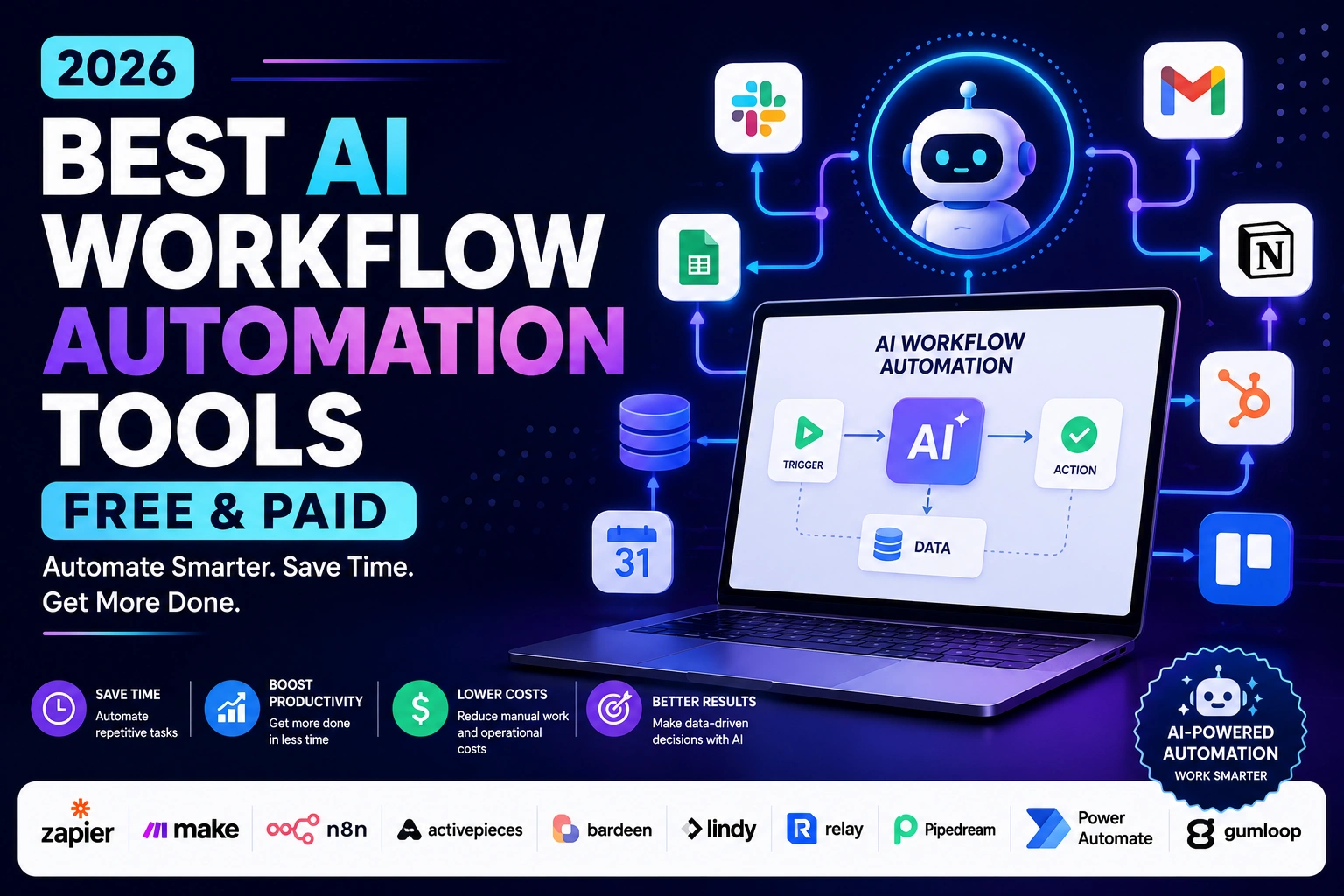
Best AI Workflow Automation Tools are the reason a lot of small teams now run like companies twice their size. If you’ve ever copied a lead from an email into a spreadsheet, then into a CRM, then sent a Slack message about it by hand, you already know the problem these tools solve. This guide walks through the ones actually worth your time in 2026, what they cost, and who each one fits best.
We’re not going to tell you there’s one “best” tool for everyone, because there isn’t. A solo blogger and a 40-person agency need completely different things from an automation platform. What we will do is give you an honest, tested-against-reality look at ten of the strongest options on the market right now, so you can pick the one that matches your actual workflow instead of the one with the loudest marketing.
What Are AI Workflow Automation Tools?
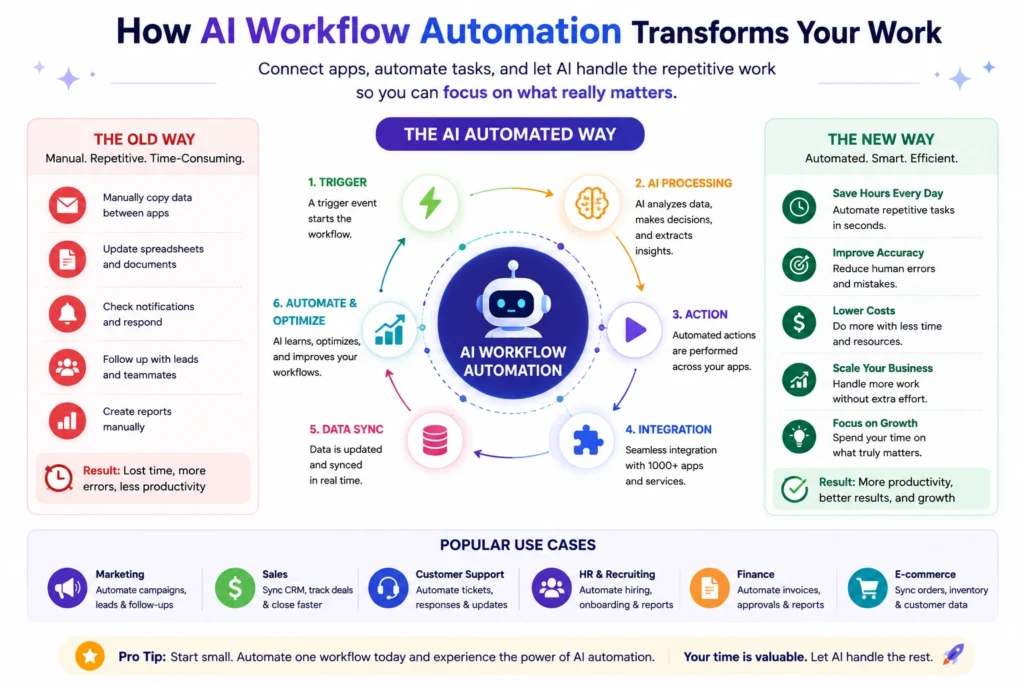
At their core, workflow automation tools connect the apps you already use — Gmail, Slack, Notion, your CRM, your spreadsheet — and let them talk to each other without you copying and pasting between them.
The “AI” part is newer. Instead of just moving data from Point A to Point B, today’s tools can also read that data, make a judgment call, and decide what to do next. Think of the difference like this:
- Traditional automation: “When a new email arrives with the subject ‘invoice,’ save the attachment to Google Drive.”
- AI-powered automation: “When a new email arrives, figure out if it’s an invoice, extract the amount and due date, and only notify me if it’s over $500.”
That second example needs something closer to reasoning than rules. That’s what modern platforms like Zapier AI, Lindy AI, and Gumloop are built around — natural language instructions, AI agents that make decisions, and workflows that adapt instead of breaking the moment something looks slightly different than expected.
If you’re new to this space, picture it as building a chain of dominoes. One thing happens (a trigger), and it knocks over the next thing (an action), and so on down the line. AI just makes the dominoes a little smarter about which direction to fall.
Why Businesses Are Using AI Workflow Automation in 2026
A few years ago, workflow automation was mostly a “nice to have” for tech-savvy teams. That’s changed. Here’s what’s actually driving adoption this year:
- Hiring costs are up, so automation fills the gaps. Instead of hiring an ops assistant to manually update spreadsheets, small businesses now automate that work for the cost of a monthly subscription.
- AI models got good enough to trust with real decisions. Summarizing a support ticket, categorizing a lead, or drafting a reply used to require a human. Now an AI agent can do a rough draft, and a person just reviews it.
- Every major SaaS tool now has an API or a native integration. That means automation platforms can connect almost anything — your CRM, your accounting software, your project board — without custom development.
- Remote and distributed teams need fewer manual handoffs. When your team is spread across time zones, automated workflows keep things moving even when nobody’s watching.
- No-code tools removed the technical barrier. You don’t need to know how to code to build a working automation anymore. Drag, drop, connect.
None of this means automation replaces people. In most of the businesses we’ve looked at, it replaces the boring 20% of a job so someone can spend more time on the part that actually needs a human brain.
Benefits of Using the Best AI Workflow Automation Tools
If you’re on the fence about whether this is worth the monthly cost, here’s what teams typically see once a workflow is up and running:
- Fewer manual errors. Copy-paste mistakes, forgotten follow-ups, and typos in data entry mostly disappear once a machine handles the transfer.
- Faster response times. A new lead can get a personalized reply within seconds instead of sitting in an inbox until someone gets to it.
- More consistent processes. Every new customer, every new hire, every invoice gets the exact same treatment, every time.
- Lower operational costs. You can often avoid hiring for repetitive tasks, or free up existing staff for higher-value work.
- Better visibility. Most platforms log every run, so you can see exactly what happened and when, which is harder to track with manual processes.
- Scalability without the growing pains. A workflow that handles 10 leads a day can usually handle 500 without redesigning anything.
The best AI workflow automation tools earn their keep by quietly doing the unglamorous work in the background — and that’s exactly why the category has grown so fast.
How We Chose the Best AI Workflow Automation Tools
We didn’t just pull a list of popular names. Choosing the best AI workflow automation tools for this guide meant weighing a handful of practical factors:
- Ease of use — Can a non-technical person actually build something useful, or does it require a developer?
- Integration depth — How many apps does it genuinely connect to, and how well do those connections work?
- AI capability — Does the tool just move data, or can it actually reason, summarize, and make decisions?
- Pricing transparency — Is it clear what you’re paying for, or does the bill balloon once you start using it?
- Reliability — Do workflows run consistently, or do they silently fail?
- Support for different skill levels — Is there a path for total beginners as well as technical teams who want more control?
- Real-world reviews — We factored in what actual users report about long-term use, not just onboarding experience.
Pricing and features in this space change often, sometimes month to month, so treat every number below as a snapshot rather than gospel. Always check the official pricing page before you commit.
Quick Comparison Table
| Tool | Best For | Free Plan | Starting Price | AI Features | Integrations | Overall Rating |
|---|---|---|---|---|---|---|
| Zapier AI | Overall use, biggest app library | Yes (100 tasks/mo) | ~$19.99/mo | AI fields, Copilot, AI agents | 8,000+ | 4.7/5 |
| Make | Visual, complex workflows | Yes (1,000 credits/mo) | ~$9–12/mo | AI Agents (2026) | 2,500+ | 4.6/5 |
| n8n | Developers, self-hosting | Yes (self-hosted, unlimited) | ~$24/mo (cloud) | AI Workflow Builder | 500+ nodes | 4.6/5 |
| Activepieces | Open-source teams | Yes (1,000 tasks/mo) | ~$25/mo | AI Agents, MCP support | 280+ | 4.4/5 |
| Bardeen AI | Browser-based sales tasks | Yes (limited credits) | ~$20/mo | Web scraping agents | 100+ | 4.3/5 |
| Lindy AI | Building AI employees/agents | No (trial only) | ~$49.99/mo | Full AI agent builder | 3,000+ | 4.4/5 |
| Relay.app | Human-in-the-loop workflows | Yes (200 steps/mo) | ~$19–29/mo | AI steps with approval gates | 100+ | 4.6/5 |
| Pipedream | Developers, code-level control | Yes (generous limits) | ~$45/mo | AI-assisted code steps | 2,700+ | 4.5/5 |
| Power Automate | Microsoft-heavy organizations | Partial (with M365) | ~$15/user/mo | Copilot, AI Builder | 1,000+ | 4.3/5 |
| Gumloop | Visual AI agent workflows | Yes (limited credits) | ~$37/mo | Multi-model AI canvas | 100+ | 4.3/5 |
Ratings reflect a general impression based on user feedback, feature depth, and value for money. Pricing shown is approximate and subject to change — always verify on the official site.
Detailed Reviews
1. Zapier AI
Overview: Zapier is the name most people think of first when they hear “workflow automation,” and for good reason. It’s been around the longest, has the largest app directory, and has steadily layered AI features — like Copilot for building Zaps with plain-English prompts and AI-powered fields — on top of its existing engine.
Best For: Beginners and businesses that want the widest possible app coverage without worrying whether their tools are supported.
Key Features:
- Over 8,000 app integrations
- AI Copilot that builds workflows from natural language descriptions
- Multi-step “Zaps” with filters, paths, and conditional logic
- Built-in tools like Tables, Forms, and Interfaces
- AI Agents for autonomous multi-step tasks
Pros:
- Unmatched integration library
- Very beginner-friendly interface
- Strong documentation and community support
- Reliable uptime and execution
Cons:
- Task-based pricing can get expensive fast as volume grows
- Complex workflows are cheaper to build on some competitors
- Free plan is fairly limited for real business use
Pricing: Zapier offers a free plan (around 100 tasks a month), with paid plans starting near $19.99/month for roughly 750 tasks, scaling up through Team and Enterprise tiers. Pricing changes fairly often, so double-check current numbers on Zapier’s official site before subscribing.
Why We Recommend It: If you want the safest bet with the least risk of “does this even connect to my tools” — Zapier is usually the answer. It’s not always the cheapest, but it’s the most dependable starting point for beginners.
2. Make
Overview: Make (formerly Integromat) is built around a visual, flowchart-style canvas that shows you exactly how data moves through your workflow. It appeals to people who want more control than Zapier offers without needing to write code.
Best For: Users who like to see and fine-tune the logic behind their automations visually.
Key Features:
- Drag-and-drop visual workflow builder
- Credit-based pricing (pay for what you use)
- Built-in AI Agents introduced in 2026
- Routers, iterators, and error-handling paths for complex logic
- Strong API and webhook support
Pros:
- Often cheaper than Zapier for equivalent usage
- Visual builder makes complex logic easier to understand
- Frequent updates and active development
Cons:
- The credit system takes some getting used to
- Steeper learning curve than Zapier for total beginners
- Smaller app library than Zapier
Pricing: Make has a free plan with a monthly credit allowance, and paid plans generally start in the $9–$12/month range for higher credit tiers. Because Make bills per module execution, your real cost depends heavily on workflow complexity — check Make’s pricing page for the latest structure.
Why We Recommend It: For anyone who wants Zapier-level power at a lower cost and doesn’t mind a slightly steeper learning curve, Make is one of the best value picks in this list.
3. n8n
Overview: n8n is the open-source option in this space, and it’s a favorite among developers and technical teams. You can self-host it for free or use n8n’s cloud version if you’d rather skip server management.
Best For: Developers and technically inclined teams who want full control and don’t mind a bit of setup.
Key Features:
- Open-source, self-hostable for free
- Visual editor with the option to add custom JavaScript or Python code
- AI Workflow Builder for generating workflows from prompts
- Execution-based cloud pricing with unlimited workflows and users
- Strong community and template library
Pros:
- Free and unlimited if self-hosted
- Extremely flexible for custom logic
- Active open-source community
- No vendor lock-in
Cons:
- Self-hosting requires some technical know-how
- Cloud execution limits can be restrictive for high-frequency workflows
- Less beginner-friendly than Zapier or Make
Pricing: The self-hosted Community Edition is free (you only pay for hosting). n8n Cloud plans start around $24/month for a limited number of executions, scaling up from there. Full details are on n8n’s official site.
Why We Recommend It: If you have even a little technical comfort and want to avoid recurring software fees long-term, self-hosted n8n is one of the most cost-effective options available.
4. Activepieces
Overview: Activepieces is a newer, open-source automation platform that’s leaning hard into AI agents and the Model Context Protocol (MCP), a standard that helps AI tools use other software more reliably.
Best For: Teams that want an open-source alternative to Zapier with modern AI-agent capabilities baked in.
Key Features:
- Open-source with a hosted cloud option
- Native AI Agents and MCP support
- Visual, no-code flow builder
- Growing library of integrations (“pieces”)
- Used by teams at companies like Roblox and ClickUp
Pros:
- Generous free tier for small-scale use
- Open-source flexibility, including self-hosting
- Actively developed with frequent new features
Cons:
- Smaller integration library than Zapier or Make
- Some advanced features still maturing
- AI credit overages can add up on heavier workflows
Pricing: Activepieces offers a free plan with limited active flows, with paid plans generally starting around $25/month for expanded usage. See Activepieces’ pricing page for current tiers.
Why We Recommend It: For budget-conscious teams that still want AI agents and MCP support without a steep price tag, Activepieces punches above its weight.
5. Bardeen AI
Overview: Bardeen started as a browser extension for automating repetitive web tasks and has since evolved into more of an AI agent platform, particularly popular with sales and go-to-market teams doing prospecting and data extraction.
Best For: Sales teams and individuals who need to scrape, enrich, or move data directly from the browser.
Key Features:
- Chrome extension for in-browser automation
- AI-powered web scraping and data extraction
- Playbooks for common sales and research tasks
- Works alongside tools like LinkedIn, Google Sheets, and CRMs
Pros:
- Very effective for lead generation and prospecting
- Low learning curve for browser-based tasks
- Useful even on a free or low-cost plan
Cons:
- Narrower focus than full workflow platforms like Zapier or Make
- Fewer native integrations outside the browser environment
- Less suited to complex, multi-app workflows
Pricing: Bardeen offers a free tier with limited credits, and paid plans typically start in the $20/month range. Check Bardeen’s official pricing for current details.
Why We Recommend It: If your biggest time drain is manually pulling data off websites or LinkedIn profiles, Bardeen solves that specific problem better than most general-purpose tools.
6. Lindy AI
Overview: Lindy takes a different approach: instead of building step-by-step automations, you describe what you want in plain language and Lindy builds an AI “employee” — an agent that can handle emails, calls, scheduling, and more.
Best For: Businesses that want to delegate entire tasks to an AI agent rather than assemble a workflow themselves.
Key Features:
- Natural language agent builder
- Voice and phone call automation
- Thousands of integrations through connected apps
- Pre-built templates for common business functions like recruiting and support
Pros:
- Very approachable for non-technical users
- Genuinely useful for tasks that require judgment, not just data transfer
- Fast to get a working agent up and running
Cons:
- No permanent free plan, only a trial
- Costs can climb with voice minutes and premium actions
- Less granular control than a visual workflow builder
Pricing: Lindy AI’s paid plans generally start around $49.99/month, with higher tiers for more usage and an Enterprise option for larger teams. Always confirm current pricing on Lindy’s official site, since usage-based add-ons can affect your final bill.
Why We Recommend It: For someone who wants an AI agent that handles a task end-to-end — like triaging inbound emails or booking calls — instead of a rules-based workflow, Lindy is one of the most capable options around.
7. Relay.app
Overview: Relay.app is built around a simple but important idea: not every automated task should run without a human checking it first. It bakes “human-in-the-loop” approval steps directly into AI workflows.
Best For: Teams that want AI assistance but still want a person to review or approve key steps before they go out.
Key Features:
- Human-in-the-loop approval steps built into workflows
- Clean, beginner-friendly visual builder
- AI steps for drafting, summarizing, and decision support
- Slack and email-native approval flows
Pros:
- Excellent for teams nervous about fully autonomous AI actions
- Easy to learn, even for non-technical users
- Strong user ratings for usability
Cons:
- Smaller integration library than the bigger platforms
- AI credits can run out faster than expected on heavy use
- Less suited to very large-scale enterprise automation
Pricing: Relay.app has a free plan with limited monthly steps, and paid plans generally starting in the $19–$29/month range. Pricing details are available on Relay’s official site.
Why We Recommend It: If the idea of a fully autonomous AI agent sending emails on its own makes you nervous, Relay’s approval-gate design is a genuinely useful middle ground.
8. Pipedream
Overview: Pipedream sits closer to the developer end of the spectrum. It blends a no-code interface with the ability to drop in custom code steps in Node.js, Python, Go, or Bash, giving technical teams a lot of flexibility.
Best For: Developers who want visual workflow building without giving up code-level control.
Key Features:
- Thousands of integrations plus custom code steps
- Support for multiple programming languages within workflows
- Generous free tier for testing and small projects
- API-first design that’s friendly for developers
Pros:
- Extremely flexible for custom logic
- Strong for connecting APIs that other tools don’t support well
- Free tier is genuinely usable, not just a demo
Cons:
- Less beginner-friendly than Zapier or Make
- Interface leans technical, which can intimidate non-developers
- Recently acquired by Workday, so its long-term roadmap may shift toward that ecosystem
Pricing: Pipedream offers a free plan with solid usage limits, and paid plans typically starting around $45/month for expanded credits and connected accounts. Check Pipedream’s official pricing for the latest.
Why We Recommend It: For developers who find Zapier and Make too restrictive but don’t want to build everything from scratch, Pipedream hits a nice middle ground.
9. Microsoft Power Automate
Overview: If your business already runs on Microsoft 365, Power Automate is likely sitting right there waiting to be used. It’s deeply integrated with Outlook, SharePoint, Teams, and the rest of the Microsoft ecosystem, and it extends into robotic process automation (RPA) for desktop tasks.
Best For: Organizations already invested in the Microsoft ecosystem.
Key Features:
- Deep integration with Microsoft 365 apps
- Copilot and AI Builder for AI-assisted automation
- Robotic Process Automation for desktop and legacy applications
- Per-user or per-flow licensing options
Pros:
- Excellent fit for Microsoft-centric organizations
- RPA capability that most competitors don’t offer
- Backed by Microsoft’s security and compliance infrastructure
Cons:
- Licensing can be genuinely confusing across user, flow, and bot-based plans
- Less useful if your tools live outside the Microsoft ecosystem
- Premium connectors and RPA can push costs up quickly
Pricing: Basic cloud flows using standard connectors may be included with an existing Microsoft 365 subscription. The Premium plan typically runs around $15 per user per month, with separate bot-based pricing for RPA. Confirm current licensing on Microsoft’s official Power Automate pricing page.
Why We Recommend It: For a company already paying for Microsoft 365, Power Automate is often the path of least resistance — the tool is already available, and it plays nicely with everything else in the ecosystem.
10. Gumloop
Overview: Gumloop is a visual, AI-native automation builder designed around agent workflows rather than simple app-to-app triggers. It supports multiple AI models within a single workflow, which is useful for teams experimenting with different approaches.
Best For: Teams building AI-driven workflows that go beyond simple data transfer, like research agents or content pipelines.
Key Features:
- Visual canvas built specifically for AI agent workflows
- Support for multiple AI models in one workflow
- Slack-native agent interaction
- Templates for common AI-driven use cases
Pros:
- Strong fit for AI-first workflows, not just data automation
- Flexible multi-model support
- Modern, clean interface
Cons:
- Smaller integration library than the established players
- Usage-based pricing can be harder to predict
- Less mature ecosystem and community compared to Zapier or Make
Pricing: Gumloop offers a limited free tier, with paid plans generally starting around $37/month depending on usage. Pricing is usage-based, so check Gumloop’s official site for current numbers before committing.
Why We Recommend It: If your automation needs are less about “move data from A to B” and more about “have an AI agent research, write, and decide,” Gumloop is built with that use case in mind.
Best Picks
Best Overall: Zapier AI — the widest integration library and the most dependable choice if you’re not sure which tool to start with.
Best for Beginners: Zapier AI, closely followed by Relay.app for its clean, approachable interface.
Best for Small Businesses: Make — strong power-to-price ratio for teams that need more than basic automation but aren’t ready for enterprise pricing.
Best for Agencies: Zapier AI or Make, depending on whether client workflows lean toward breadth of integrations (Zapier) or visual complexity (Make).
Best Open-Source Tool: n8n — free to self-host, fully customizable, and backed by an active community.
Best Enterprise Solution: Microsoft Power Automate — particularly strong for organizations already standardized on Microsoft 365.
Best Budget-Friendly Tool: Activepieces — open-source roots, a workable free tier, and modern AI-agent features without enterprise pricing.
Use Cases
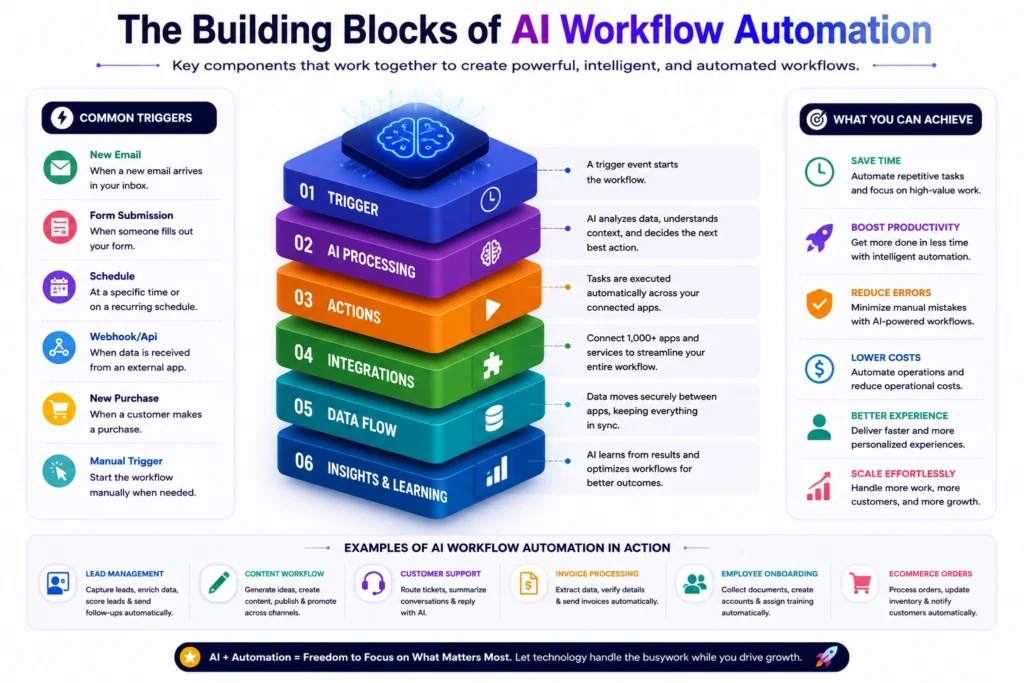
Marketing: Automatically sync new leads from landing pages into your email platform, tag them based on behavior, and trigger drip campaigns without manual list management. If you’re looking to automate your marketing campaigns specifically, check out our guide to the Best AI Marketing Automation Tools in 2026.
Sales: Route new inquiries to the right sales rep, auto-enrich contact records with company data, and get Slack alerts the moment a high-value lead fills out a form.
Customer Support: Automatically triage incoming tickets by urgency, draft first-response replies for agents to review, and escalate anything that mentions a refund or complaint. Many teams pair this with a dedicated tool from our Best AI Chatbots for Customer Service guide.
HR: Automate onboarding checklists, send welcome emails, provision software accounts, and remind managers about 30-60-90 day reviews without a spreadsheet in sight.
Finance: Pull invoice data from email attachments, flag anything over a certain amount for approval, and sync approved expenses straight into your accounting software.
Content Creation: Automatically repurpose a blog post into social captions, schedule them across platforms, and log everything into a content calendar. For a deeper look at where automation should and shouldn’t replace a human writer, see our piece on AI vs Human Content Creation.
Project Management: Create tasks automatically from incoming emails or form submissions, notify team members of deadline changes, and generate weekly status summaries. If this is a priority for you, our Best AI Project Management Tools in 2026 guide covers dedicated options too.
E-commerce: Sync inventory across sales channels, send automated shipping updates, and flag abandoned carts for a follow-up email sequence.
If any of this sounds like it overlaps with building out your CRM or website infrastructure, it’s worth also looking at our guides on the Best AI CRM Software and Best AI Website Builders in 2026 — automation tends to work best once those foundations are already in place. And if you’re building custom internal tools around these workflows, our Best AI App Builders in 2026 roundup is a useful companion read. For teams focused on growth overall, pairing workflow automation with a plan from our How to Increase Website Traffic Organically guide tends to compound results nicely.
Final Verdict
There’s no single winner here, and honestly, anyone telling you there is probably hasn’t tested enough of these tools against real workflows.
If you want the safest, most broadly compatible starting point, Zapier AI is hard to beat. If you’re comfortable with a bit more complexity in exchange for lower costs, Make is excellent value. Technical teams who want full control — and don’t mind rolling up their sleeves — will get the most long-term mileage out of n8n. Teams nervous about AI acting on their behalf without a check-in should look at Relay.app. And if you’re already deep in the Microsoft ecosystem, Power Automate is probably sitting right there, ready to use.
The right move for almost everyone is to start on a free plan, build one real workflow that solves an actual problem you have this week, and see how it feels before committing to a paid tier.
Frequently Asked Questions About Best AI Workflow Automation Tools
1. What are the best AI workflow automation tools for beginners? Zapier AI and Relay.app tend to be the friendliest for people who have never built an automation before. Both use plain-English setup and visual builders that don’t require any coding knowledge.
2. Are AI workflow automation tools free? Most platforms on this list offer a free plan, but they’re usually limited by task volume, number of active workflows, or feature access. Free plans are great for testing, but most businesses eventually need a paid tier for real day-to-day use.
3. Do I need to know how to code to use these tools? No. Most of the tools covered here — including Zapier, Make, Relay.app, and Lindy AI — are designed for non-technical users. Tools like n8n and Pipedream offer optional coding for extra flexibility, but it’s not required to get started.
4. What’s the difference between Zapier and Make? Zapier focuses on simplicity and has a larger app library, while Make uses a visual, flowchart-style canvas that gives you more granular control over complex logic. Many users find Make cheaper for equivalent usage, but slightly harder to learn.
5. Which tool is best for small businesses on a budget? Make and Activepieces tend to offer the best balance of features and cost for small businesses. Both have usable free tiers and reasonably priced paid plans compared to some competitors.
6. Can these tools replace human employees? Not entirely. They’re best at handling repetitive, rules-based, or data-heavy tasks. Anything requiring nuanced judgment, relationship management, or creative decision-making still benefits from human oversight, even when an AI agent drafts the first pass.
7. Is n8n really free? The self-hosted Community Edition is free software, though you’ll need to pay for hosting (often just a few dollars a month on a basic server). n8n Cloud, the fully managed version, is a separate paid product with its own pricing tiers.
8. How do I choose between a workflow tool and a full AI agent platform like Lindy? If your main need is connecting apps and moving data with some logic in between, a workflow tool like Zapier or Make is usually the right fit. If you want something closer to a virtual employee that can handle open-ended tasks like phone calls or email triage, an agent platform like Lindy AI is worth considering.
9. Do AI workflow automation tools work with e-commerce platforms like Shopify? Yes. Most of the major tools, including Zapier, Make, and n8n, have direct integrations with popular e-commerce platforms, allowing you to automate order processing, inventory syncing, and customer notifications.
10. How much should I expect to pay per month? It varies widely based on usage. A solo user or small business testing the waters might spend $0–$30/month on a free or entry-level plan, while a growing team running dozens of workflows could reasonably spend $100–$500+/month depending on volume and features.
About the Author
Hi, We are the founders of EveryTechHub. We share beginner-friendly guides on AI tools, blogging, and technology based on hands-on testing and real experience. Read more about us.
Disclaimer: Features and pricing for the tools mentioned in this article may change over time. We’ve done our best to reflect accurate information as of publication, but readers should verify the latest pricing and features on each tool’s official website before making a purchase decision. Some links in this article may be affiliate links, which means we may earn a small commission at no extra cost to you if you choose to sign up through them.