
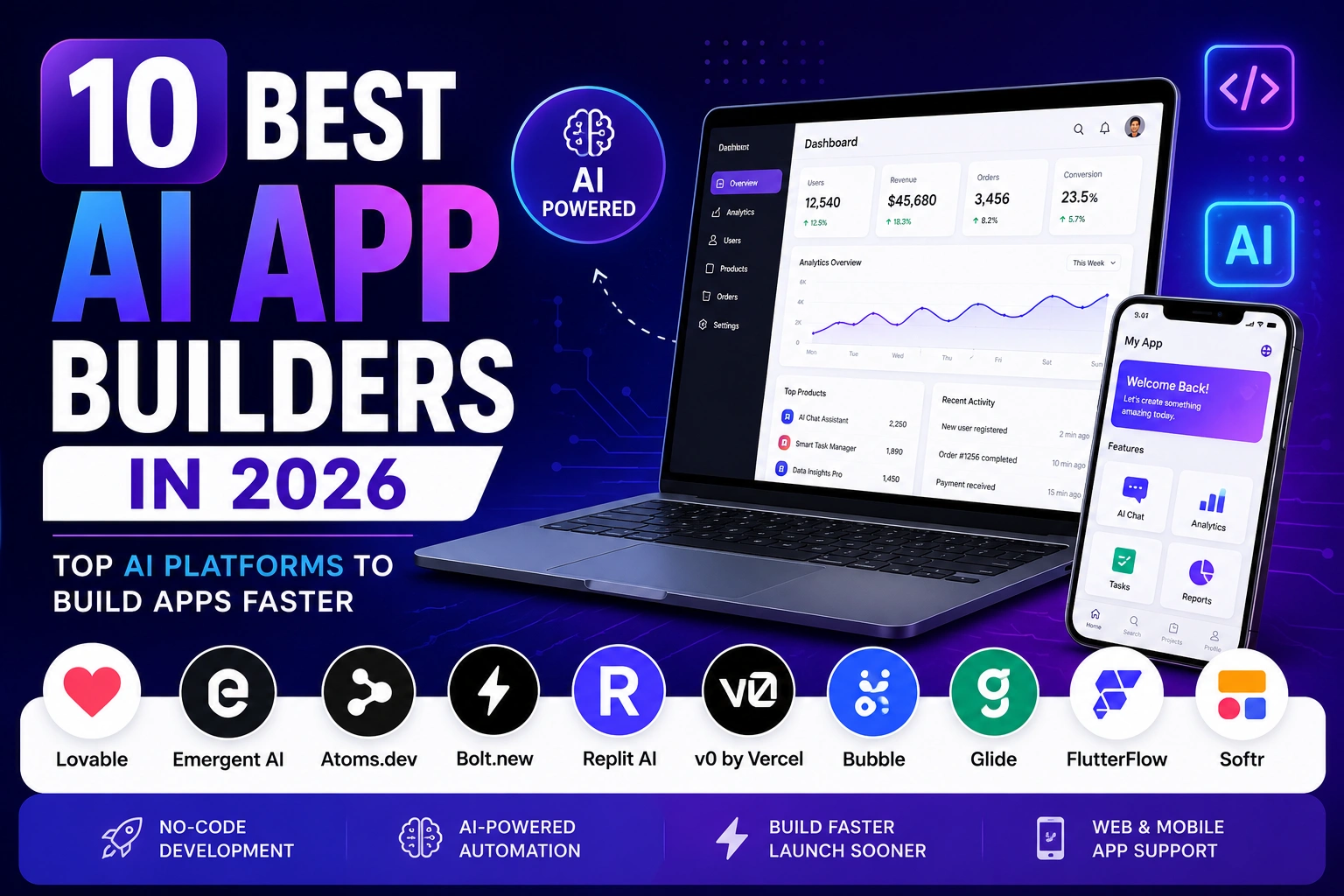
Best AI App Builders have quietly become the fastest way for anyone — not just developers — to turn an idea into a working web or mobile app. Whether you’re a solo founder testing a concept or an agency shipping client projects, the right AI app builder can compress weeks of development into a single afternoon of prompting.
That said, “AI app builder” has turned into a crowded category almost overnight, and not every tool is built for the same job. Some are meant for quick prototypes. Others generate production-grade, exportable code. A few are built specifically for people who’ve never written a line of code in their life. Picking the wrong one usually means hitting a wall three weeks into a project — right when you need it least.
We spent time testing, comparing pricing pages, and reading through real user feedback on ten of the most talked-about platforms right now: Lovable, Emergent AI, Atoms.dev, Bolt.new, Replit AI, v0 by Vercel, Bubble AI, Glide, FlutterFlow, and Softr. Below, we break down what each one actually does well, who it’s for, and where it falls short.
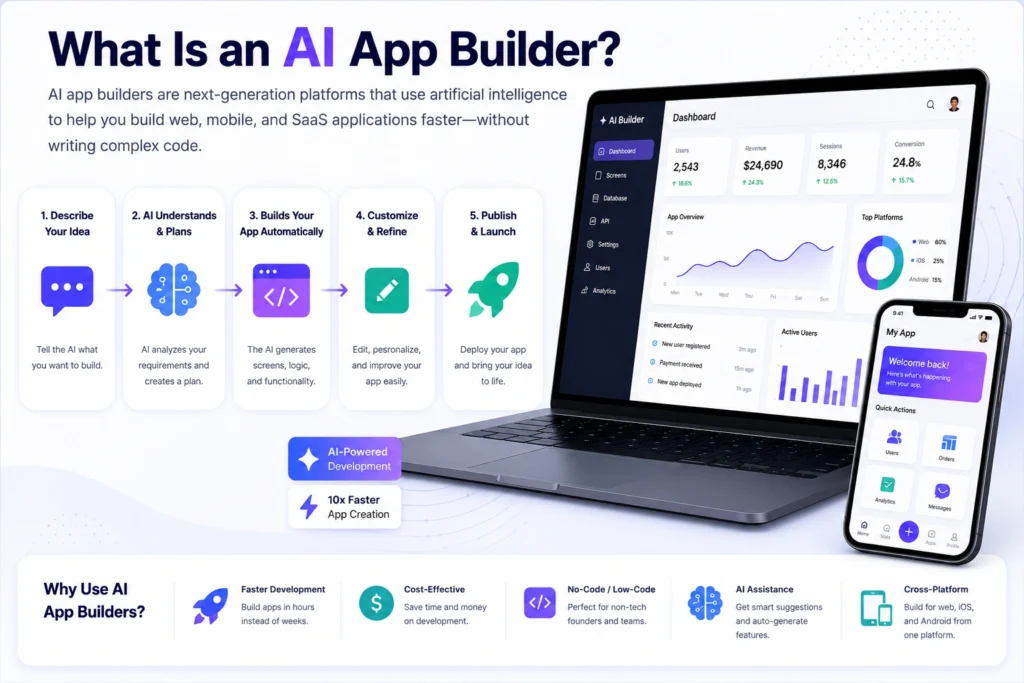
What Is an AI App Builder?
An AI app builder is a platform that turns plain-English descriptions into working software — usually a web app, a mobile app, or both. Instead of writing code line by line, you describe what you want (“a booking app with login, calendar, and payments”), and the AI generates the interface, the database structure, and often the backend logic behind it.
Some platforms generate real, exportable code (React, Flutter, Next.js) that you own outright. Others are more visual, no-code environments where AI speeds up the design process but the underlying system stays inside the platform. Neither approach is objectively better — it depends on whether you eventually want to hand the project to a developer, or whether you’re happy running everything inside one tool long-term.
Why Businesses Are Using AI App Builders in 2026
A few things have converged to push AI app builders into the mainstream this year.
- Cost pressure. Hiring a development team for an MVP can run into five figures before a single customer signs up. AI builders let founders validate an idea for the price of a monthly subscription.
- Speed to market. What used to take a six-week sprint can now go from prompt to a live, testable link in a day.
- Non-technical founders building real products. Marketers, consultants, and small business owners are shipping internal tools and client-facing apps without hiring a single engineer.
- Agencies scaling delivery. Agencies are using these tools to turn around client prototypes and MVPs faster, then handing off cleaner code to developers for the harder engineering work.
- Better AI models under the hood. The code these tools generate in 2026 is simply more reliable than what came out of similar tools even a year or two ago.
If you’re also planning to build out a marketing site alongside your app, it’s worth reading our guide to the Best AI Website Builders in 2026, since several of these tools overlap with that category.
How We Evaluated the Best AI App Builders
We didn’t just skim marketing pages. Our comparison weighed:
- Output quality — does the generated app actually work, or does it need heavy cleanup?
- Code ownership — can you export and walk away, or are you locked into the platform?
- Ease of use — how steep is the learning curve for a total beginner?
- Pricing transparency — are credits and usage costs predictable, or do bills spiral?
- Scalability — can the app grow from prototype to real product without a rebuild?
- Support for non-coders vs. developers — some tools clearly favor one audience over the other.
Pricing in this space changes often, sometimes month to month, so we’ve noted approximate figures throughout — always double-check the official pricing page before subscribing.
Who Should Use AI App Builders?
- Beginners and non-technical founders who want to validate an idea without hiring anyone.
- Startups that need a working MVP to show investors or early users fast.
- Freelancers and agencies that want to speed up client delivery without cutting corners.
- Developers who want AI to handle repetitive scaffolding so they can focus on the harder logic.
- Small businesses that need an internal tool — an inventory tracker, a client portal, a booking system — without a custom dev budget.
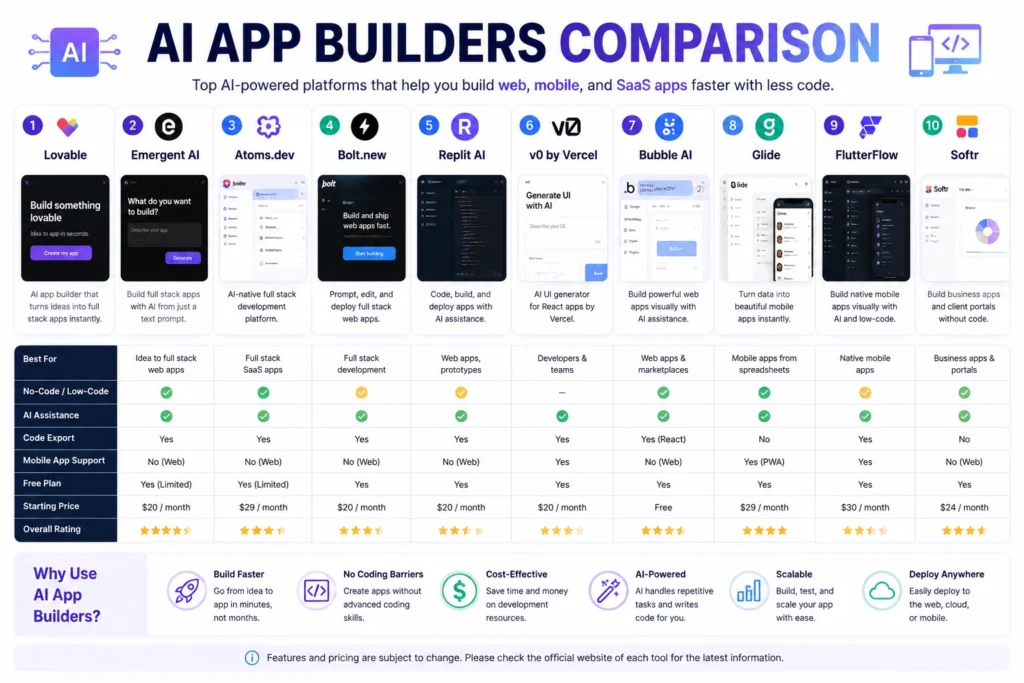
Quick Comparison Table
| Tool | Best For | Free Plan | Starting Price | No-Code Support | Code Export | Overall Rating |
|---|---|---|---|---|---|---|
| Lovable | Full-stack web apps from prompts | Yes (daily credits) | ~$25/month | Partial | Yes (GitHub) | 4.6/5 |
| Emergent AI | Multi-agent full-stack builds | Yes (limited credits) | ~$20/month | Partial | Yes | 4.4/5 |
| Atoms.dev | SaaS MVPs with built-in business tools | Yes (daily credits) | ~$20/month | Partial | Yes | 4.3/5 |
| Bolt.new | Fast prototyping and MVPs | Yes (1M tokens/month) | ~$20/month | Partial | Yes | 4.5/5 |
| Replit AI | Full dev environment + AI agent | Yes | ~$20–25/month | Partial | Yes | 4.5/5 |
| v0 by Vercel | Frontend UI and React components | Yes | ~$20/month | Partial | Yes | 4.3/5 |
| Bubble AI | Complex no-code web apps | Yes | ~$29/month | Yes | No | 4.2/5 |
| Glide | Simple internal tools and mobile apps | Yes | ~$49/month | Yes | No | 4.1/5 |
| FlutterFlow | Native mobile apps | Yes | ~$39/month | Partial | Yes (Flutter) | 4.5/5 |
| Softr | Client portals and business apps | Yes | ~$49/month | Yes | No | 4.2/5 |
Pricing and free-plan limits change frequently. Always confirm current numbers on each provider’s official site before subscribing.
Detailed Reviews
1. Lovable
Overview: Lovable has become one of the most popular AI app builders for people who want to describe an app in a chat window and watch a working React front end and Supabase-backed database appear in minutes. It’s built for speed, and it shows.
Best For: Founders and small teams building full-stack web apps and MVPs without a dedicated engineering team.
Key Features:
- Chat-based building with a visual editor for tweaks
- Supabase integration for authentication and databases out of the box
- GitHub sync so you can hand code to a developer later
- One-click deployment with custom domains on paid plans
Pros:
- Very fast from idea to working prototype
- Clean, modern default UI output
- Strong community and template library
Cons:
- Credits can burn quickly on complex builds
- Backend logic still sometimes needs manual cleanup
- Real running costs can exceed the sticker price once you factor in Supabase usage
Pricing: Lovable offers a free tier with daily credits, with paid plans starting around $25/month and a Business tier around $50/month. Enterprise pricing is custom. Pricing and credit allocations change often, so verify current details on lovable.dev before subscribing.
Why We Recommend It: For a solo founder or small team that wants to go from idea to a live, testable app fast, Lovable is one of the most reliable options on this list right now.
2. Emergent AI
Overview: Emergent takes a multi-agent approach — different AI agents handle planning, coding, testing, and deployment as if you had a small dev team working behind the scenes. It’s aimed squarely at people building real, full-stack products, not just landing pages.
Best For: Startups and small teams that want a more autonomous, end-to-end build process.
Key Features:
- Multi-agent architecture (architect, developer, tester roles working together)
- Generates real, exportable code with GitHub sync
- Supports both web apps and mobile builds via Expo/React Native
- Large context window on higher tiers for handling bigger codebases
Pros:
- Handles more complex logic without losing track of the project
- Generated code is generally clean and exportable
- Reasonable entry price for a full-stack tool
Cons:
- Credit-based pricing can feel unpredictable for heavy builders
- Mobile apps still need manual App Store/Google Play submission
- Newer platform, so the community and template ecosystem are smaller
Pricing: Emergent offers a free tier with limited credits, a Standard plan around $20/month, and higher Pro and Team tiers for power users and agencies. Confirm current credit allocations on emergent.sh since usage-based pricing shifts as the platform evolves.
Why We Recommend It: If you want something closer to “AI engineering team” than “AI autocomplete,” Emergent’s multi-agent workflow is worth testing on the free tier before committing.
3. Atoms.dev
Overview: Atoms.dev bundles AI app building with business-launch tools — think market research, SEO, and payment integration — into one workflow. It’s designed for founders who want to go from idea to a sellable product without stitching together a dozen separate tools.
Best For: Entrepreneurs and solopreneurs launching SaaS tools or small e-commerce products.
Key Features:
- Multi-agent system covering research, product planning, engineering, and SEO
- Built-in Stripe integration for payments
- One-click deployment with custom domains
- Visual editor for post-generation tweaks
Pros:
- Covers more of the “launch” process than most competitors
- Genuinely useful for non-technical founders
- Free plan is generous enough to test real workflows
Cons:
- Credit-based pricing means costs scale with usage
- Smaller community compared to more established tools
- Less mature for highly custom or complex applications
Pricing: Atoms.dev has a free tier with daily credits, with paid plans starting around $20/month for 100 credits and scaling up for heavier usage. Pricing is credit-based, so check atoms.dev directly for current tiers.
Why We Recommend It: For someone who wants app-building and go-to-market tools in one place, Atoms.dev fills a niche most other builders on this list don’t cover.
4. Bolt.new
Overview: Bolt.new (from StackBlitz) is known for one of the most impressive first impressions in this category — describe an app, and it appears in the browser almost instantly, fully editable. It’s a favorite for rapid prototyping.
Best For: Developers and founders who want to prototype fast and iterate visually.
Key Features:
- Token-based system tied to project complexity
- In-browser editing with live preview
- Integrations with Figma, GitHub, Stripe, and Supabase
- Supports web apps and mobile builds via Expo
Pros:
- Extremely fast initial generation
- Generous free tier for testing
- Good for quick client demos and proof-of-concepts
Cons:
- Can lose context and introduce bugs on larger, more complex projects
- Token consumption scales with codebase size, which can surprise heavy users
- Best treated as a prototyping tool rather than a long-term production home
Pricing: Bolt offers a free plan with a generous monthly token allowance, with paid plans starting around $20/month and team pricing per seat. Check bolt.new for current token limits, since this is one of the more frequently updated pricing structures in the category.
Why We Recommend It: If your priority is speed — showing a client or investor something tangible within minutes — Bolt.new is hard to beat for that first draft.
5. Replit AI
Overview: Replit has evolved from a browser-based coding playground into a full AI-powered development environment. Its Agent feature can plan, write, debug, and deploy full-stack apps from plain-English instructions, all inside one workspace.
Best For: Developers and technical founders who want AI assistance without leaving a real coding environment.
Key Features:
- Replit Agent for autonomous multi-step builds
- Full IDE with code execution, not just a chat interface
- Built-in deployment and hosting
- Collaboration tools for teams
Pros:
- More flexible than pure no-code tools since you can drop into real code anytime
- Strong for both learning and production use
- Wide language and framework support
Cons:
- Usage-based Agent costs can add up beyond the base subscription
- Steeper learning curve for complete non-coders
- Deployment costs are separate from the subscription fee
Pricing: Replit has a free Starter tier, a Core plan around $20–25/month with monthly usage credits, and higher Pro/Teams tiers for collaborative work. Because Replit’s pricing structure has changed more than once recently, it’s worth confirming current rates on replit.com.
Why We Recommend It: For anyone who wants AI assistance but doesn’t want to give up direct access to real code, Replit strikes a good balance between no-code convenience and developer control.
6. v0 by Vercel
Overview: v0 focuses specifically on the front end — describe a component, a page, or a full layout, and it generates production-ready React code styled with Tailwind and shadcn/ui. It’s less of a full app builder and more of a serious UI accelerator.
Best For: Frontend developers and teams already working in the Next.js/Vercel ecosystem.
Key Features:
- Text-to-component and text-to-page generation
- Agentic workflows that can plan and execute multi-step UI tasks
- Direct GitHub import and Vercel deployment
- Clean, consistent output using shadcn/ui components
Pros:
- Exceptional for fast, polished UI work
- Fits naturally into existing React/Next.js projects
- Output is genuinely production-ready, not just a rough draft
Cons:
- Frontend-only — no built-in backend or database logic
- Best suited to teams who already know React
- Costs can climb quickly for teams needing collaboration features
Pricing: v0 has a free tier with starter credits, a Premium plan around $20/month, and Team and Business tiers scaling up from there. Check v0.dev for current credit allocations, since v0’s pricing has shifted a few times this year.
Why We Recommend It: If you already have developers on staff and just need to move faster on interface work, v0 is one of the sharpest tools available for that specific job.
7. Bubble AI
Overview: Bubble has been a no-code mainstay for years, and its AI features now let you describe an app and get a working structure — database, workflows, and interface — that you can then refine visually. It remains one of the most powerful true no-code platforms for complex logic.
Best For: Non-technical founders building complex, database-driven web apps.
Key Features:
- Visual workflow editor alongside AI-assisted generation
- Native hosting and database (no separate backend needed)
- Large plugin marketplace for extending functionality
- Strong support for user roles, permissions, and complex logic
Pros:
- Handles genuinely complex applications well
- No code export needed — everything runs inside Bubble
- Mature ecosystem with extensive documentation and community support
Cons:
- Pricing is based on Workload Units, which can be hard to predict at scale
- Steeper learning curve than some AI-first competitors
- No code export if you ever want to leave the platform
Pricing: Bubble offers a free plan, with paid tiers starting around $29/month for Starter and scaling to $119/month or more for Growth and Team plans. Because Bubble bills by usage (Workload Units) rather than a flat fee, actual costs vary — check bubble.io for current details.
Why We Recommend It: For a non-technical founder who wants to build something more complex than a simple prototype and is comfortable staying inside one platform long-term, Bubble remains one of the most capable options.
8. Glide
Overview: Glide turns spreadsheets and databases into clean, mobile-friendly apps, often used for internal tools and simple customer-facing apps. Its AI features speed up the initial build, but the platform’s strength has always been simplicity.
Best For: Small businesses building internal tools or simple mobile apps quickly.
Key Features:
- Builds apps directly from Google Sheets, Airtable, or native tables
- Clean, mobile-first app templates
- AI-assisted app generation from a description
- Workspace-based user management
Pros:
- Very approachable for complete beginners
- Great for internal tools like inventory trackers or event apps
- Mobile-first design looks polished with minimal effort
Cons:
- Pricing scales with user counts and data updates, which can get expensive
- Less suited to complex, logic-heavy applications
- No code export
Pricing: Glide has a free plan for testing, with paid Business plans starting around $49–199/month depending on team size and usage. Because Glide bills partly on data updates, check glideapps.com to estimate real costs for your use case.
Why We Recommend It: For a small business that needs a simple internal tool up and running this week, not this quarter, Glide remains one of the fastest paths there.
9. FlutterFlow
Overview: FlutterFlow stands out because it generates actual native mobile apps using Flutter — real code you can export and take anywhere, not a web wrapper pretending to be an app. Its AI Copilot features have made the visual build process considerably faster.
Best For: Founders and agencies who need true native iOS and Android apps.
Key Features:
- Visual builder with full Flutter code export
- Firebase and Supabase native integrations
- AI Copilot for generating UI and logic from prompts
- One-click publishing to the App Store and Google Play
Pros:
- Genuine native app output, not just a responsive website
- No vendor lock-in thanks to full code export
- Trusted by teams at larger companies, which speaks to its production readiness
Cons:
- Requires managing your own backend (Firebase/Supabase) separately
- Team seats get expensive as you scale collaborators
- More of a learning curve than pure chat-based builders
Pricing: FlutterFlow has a free plan for up to two projects, with a Basic plan around $39/month for publishing, and Growth and Business tiers scaling up with additional per-seat costs. Confirm current tiers on flutterflow.io, since seat pricing has changed more than once this year.
Why We Recommend It: If a real, installable mobile app is the end goal — not just a web app that looks like one — FlutterFlow is the strongest option on this list.
10. Softr
Overview: Softr is built for turning data (often from Airtable) into client portals, membership sites, and internal business tools without touching code. Its AI Co-Builder speeds up the initial setup considerably.
Best For: Small businesses and agencies building client portals or membership-based web apps.
Key Features:
- AI Co-Builder that generates a working app from a description
- Deep Airtable and Google Sheets integration
- Built-in user authentication and access control
- Block-based visual editor for customization
Pros:
- Excellent for client portals and gated content
- Predictable, user-count-based pricing structure
- Faster setup than building the same thing from scratch in Bubble
Cons:
- Less design flexibility than fully custom-code tools
- Pricing climbs quickly once you pass entry-level user limits
- Not built for highly complex, logic-heavy applications
Pricing: Softr offers a free tier, with paid plans typically starting around $49/month and scaling based on the number of internal and external users. Pricing structures have been updated more than once recently, so check softr.io directly.
Why We Recommend It: For an agency or small business that needs a polished client portal without hiring a developer, Softr is one of the quickest ways to get there.
Best Picks
Best Overall: Lovable — the best balance of speed, output quality, and reasonable pricing for full-stack web apps.
Best for Beginners: Bubble AI — a gentler learning curve for non-technical users who want to build something substantial.
Best for Startups: Emergent AI — the multi-agent approach handles more complex, real-world logic than simpler chat-based tools.
Best for Small Businesses: Softr — fast, predictable client portals and internal tools without a developer.
Best for Agencies: FlutterFlow — native mobile output and code export make it easier to hand off or maintain client projects long-term.
Best No-Code Platform: Glide — the fastest route from a spreadsheet to a usable mobile app.
Best AI Coding Platform: Replit AI — full development environment plus an AI agent that can actually ship production code.
Best Budget Option: Bolt.new — a genuinely usable free tier and low-cost entry point for fast prototyping.
Frequently Asked Questions About Best AI App Builders
1. What is the best AI app builder for beginners with no coding experience? Bubble AI and Softr are both strong starting points because they handle logic and hosting for you inside a visual interface. Glide is even simpler if your app is closer to a database-driven tool than a full custom product.
2. Can AI app builders replace hiring a developer entirely? For many MVPs, simple internal tools, and client portals, yes. But as an app grows in complexity — custom integrations, heavy traffic, unusual business logic — most teams eventually bring in a developer to extend what the AI built, especially for tools that generate exportable code like Lovable, Bolt.new, or FlutterFlow.
3. Are AI-generated apps secure enough for real customers? Most of these platforms use established backends (Supabase, Firebase) with standard authentication practices, which is reasonably secure out of the box. That said, it’s worth having a developer review authentication, payment handling, and data permissions before launching anything that handles sensitive customer data.
4. Which AI app builder is cheapest to start with? Bolt.new, Lovable, Emergent, and Atoms.dev all offer usable free tiers, with paid plans typically starting around $20/month. Keep in mind that credit-based tools can cost more than the sticker price once you factor in heavier usage.
5. Do these tools let me own the code, or am I locked into the platform? It depends on the tool. Lovable, Bolt.new, Replit, v0, Emergent, and FlutterFlow all support exporting real code. Bubble, Glide, and Softr keep your app running inside their platform, with no code export.
6. Can I build a mobile app, not just a website, with these tools? Yes — FlutterFlow is the strongest option for true native iOS and Android apps. Glide, Bubble, Emergent, and Atoms.dev also support mobile-friendly builds, though the underlying approach differs.
7. How accurate is AI-generated code compared to a human developer? It’s improved significantly in 2026, but it’s not flawless. Expect to do some manual cleanup, especially on complex logic, edge cases, and integrations. Simpler apps often come out nearly production-ready; more ambitious builds usually need a developer’s pass before launch.
8. Is it worth paying for a Pro plan before validating my idea? Generally, no. Every tool on this list has a usable free tier. Test your idea, build a rough version, and only upgrade once you’ve confirmed the platform fits your workflow and your app is worth the ongoing investment.
9. What’s the difference between a no-code builder and an AI coding tool? No-code builders like Bubble, Glide, and Softr keep everything inside a visual editor and their own hosting. AI coding tools like Bolt.new, Lovable, Replit, and v0 generate real code you can inspect, export, and eventually hand to a developer.
Final Verdict
There isn’t one single best AI app builder — the right pick depends entirely on who’s building and what they’re building. If you want a fast, full-stack web app and don’t mind some manual polish, Lovable or Bolt.new will get you there quickest. If you’re a non-technical founder who wants to stay inside one platform long-term, Bubble or Softr are safer bets. And if a real, native mobile app is the goal, FlutterFlow is still the strongest choice on this list.
Whichever tool you choose, start on the free plan first. Build something small and real before committing to a monthly subscription — every platform here lets you kick the tires before you pay.
Some links in this article may be affiliate links, meaning we may earn a small commission if you sign up through them, at no extra cost to you. This doesn’t affect our recommendations — we based this comparison on hands-on testing and publicly available information.
If you’re building out a broader tech stack alongside your app, you might also find our guides on Best AI Chatbots for Customer Service, Best AI CRM Software, and Best AI Project Management Tools in 2026 useful. And once your app is live, our piece on How to Increase Website Traffic Organically covers practical ways to get your first real users. If you’re curious how AI-assisted development compares to fully human-built software more broadly, our breakdown of AI vs Human Content Creation touches on similar tradeoffs in a different context.
About the Author
Hi, We are the founders of EveryTechHub. We share beginner-friendly guides on AI tools, blogging, and technology based on hands-on testing and real experience. Read more about us.
Disclaimer: Features, pricing, and plan details for every tool mentioned in this article can change at any time. We’ve done our best to reflect accurate, current information as of publication, but you should always verify the latest pricing and features on each platform’s official website before making a purchase decision.