
Running a small business often means dealing with more paperwork than expected. You may have to handle invoices, receipts, contracts, customer forms, expense records, PDFs, and scanned documents on a regular basis.
Entering all of that information manually into a spreadsheet or business system can take time and can also lead to mistakes.
This is where AI document processing can help.
AI document processing software can read PDFs, scanned documents, images, and other files, extract useful information, and sometimes organize that information into structured data. Depending on the tool, you may also be able to connect the extracted data with spreadsheets, accounting software, automation platforms, or other business systems.
The good news is that you do not necessarily need an expensive enterprise platform to get started. Some services offer free plans, free credits, free tiers, or limited free usage that can be useful for testing a workflow.
In this guide, we’ll look at some of the best free AI document processing tools for small businesses, what each option is designed to do, and what you should consider before uploading business documents.
Note: AI software pricing, free-plan limits, and features can change. Always check the provider’s official website before relying on a specific free allowance or feature.
What Is AI Document Processing?
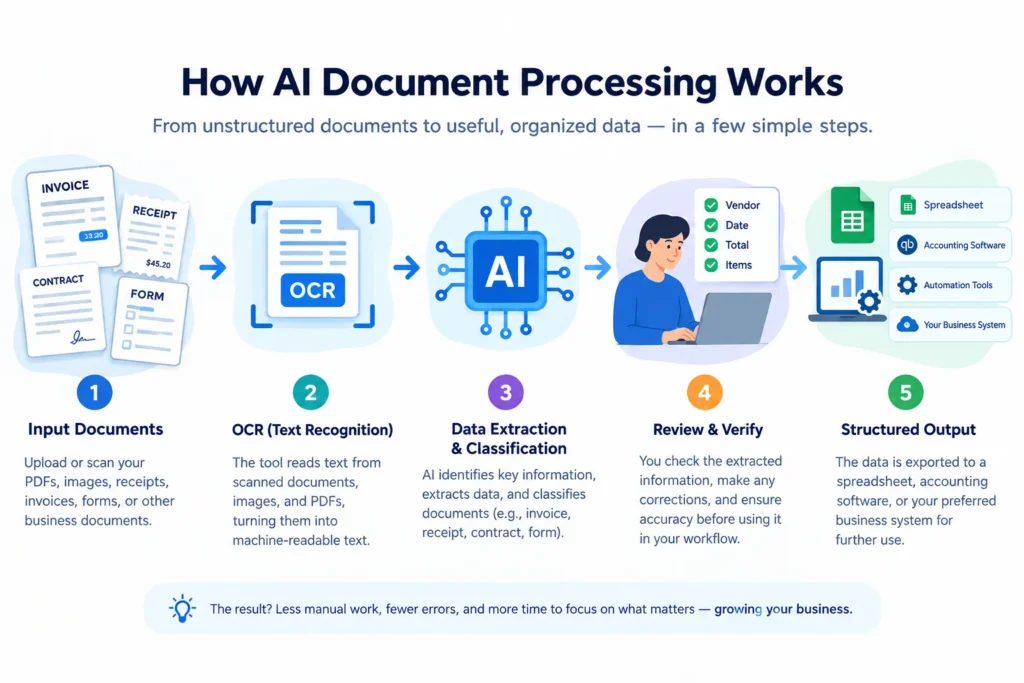
AI document processing is the use of artificial intelligence, OCR, and related technologies to read documents and turn their contents into useful information.
For example, instead of manually reading an invoice and entering the vendor name, invoice number, date, and total into a spreadsheet, an AI document processing tool may be able to identify those fields automatically.
Common tasks include:
- Data extraction: Pulling information such as names, dates, invoice numbers, and totals from documents.
- Document classification: Identifying whether a file is an invoice, receipt, contract, form, or another type of document.
- OCR: Converting text from scanned documents and images into machine-readable text.
- Invoice and receipt processing: Extracting financial information from invoices, receipts, and expense documents.
- Form processing: Capturing information from applications, customer forms, and other structured documents.
- Structured data extraction: Turning information from an unstructured document into fields, rows, or other formats that are easier to work with.
A Simple Example
Imagine a small landscaping business in the United States that receives receipts for fuel, equipment, and supplies.
Instead of manually typing information from every receipt into a spreadsheet, the owner could upload or send the receipts to a document-processing tool. Depending on the tool, the software may identify information such as the merchant, date, and total amount.
The owner can then review the extracted information before moving it into a spreadsheet or accounting workflow.
That last step is important. AI can reduce manual work, but important financial information should still be reviewed by a person.
AI Chatbots vs. Dedicated Document Processing Tools
There is also a difference between using a general AI assistant and using a dedicated document-processing platform.
For example, you might upload a PDF to a general AI chatbot and ask:
“What is the total amount on this invoice?”
That’s useful for a one-time task.
A dedicated document-processing platform is generally designed for repeatable workflows. It may allow you to process multiple documents, extract predefined fields, apply consistent rules, and send the resulting information to another system.
For occasional document questions, a general AI assistant may be enough. For repetitive business workflows, a dedicated document-processing platform may be more suitable.
What Should Small Businesses Look for in an AI Document Processing Tool?
Before choosing a tool, look beyond the word “free.” A free tool is only useful if it can handle the documents and workflow your business actually needs.
1. Free Usage
Check what “free” actually means.
Some providers offer a free monthly allowance, while others provide free credits, a limited trial, or a free tier with restricted features.
2. Document Limits
Look for limits on:
- Pages
- Documents
- Processing credits
- File size
- Monthly usage
A free plan may be suitable for occasional use but insufficient for a business processing hundreds of documents.
3. Supported File Types
Check whether the service supports the files you normally use, such as:
- JPG
- PNG
- TIFF
- Scanned documents
- Email attachments
4. OCR Capabilities
If your business works with scanned paperwork or photographed receipts, OCR is particularly important.
A tool that works well with clean digital PDFs may not perform equally well on blurry scans or difficult document layouts.
5. Data Extraction
Some tools primarily convert documents into text, while others can identify specific fields.
For example, an invoice-processing workflow might extract:
- Vendor name
- Invoice number
- Invoice date
- Due date
- Subtotal
- Tax
- Total
The more structured your workflow is, the more useful field-level extraction can become.
6. Integrations and Automation
If you want extracted information to move automatically into another system, check for integrations with tools you already use.
Depending on the provider, these may include spreadsheets, automation platforms, accounting software, or APIs.
7. Privacy and Data Handling
Business documents can contain sensitive information.
Before uploading contracts, customer records, financial documents, or other confidential files, review the provider’s privacy policy and data-handling practices.
8. Ease of Use
A powerful tool is not necessarily useful if it takes too much time to configure.
Small businesses without technical staff may prefer a simple interface, while businesses with developers may benefit from API-based tools.
Best Free AI Document Processing Tools for Small Businesses
The following tools represent different approaches to document processing. Some are dedicated document-processing platforms, while others provide document analysis or developer-oriented processing.
Because free plans and pricing can change, verify the current details on the provider’s official website before choosing a tool.
1. Parseur
Best for: Email and document parsing for small-volume workflows.
Parseur is designed to extract structured information from documents and emails. It can be useful when a business regularly receives documents through email and wants to turn that information into usable data.
You can learn more about Parseur’s document and email parsing capabilities on the official Parseur website.
Depending on the workflow, Parseur can work with documents such as PDFs and images and connect extracted information with other applications.
Potential uses include:
- Invoice processing
- Order information
- Booking forms
- Email attachments
- Business documents
Free option: Parseur offers a limited free usage option, although the exact allowance and terms should be checked on its official pricing or documentation pages before publication or implementation.
Important limitation: A limited free allowance may be suitable for testing or light use but may not be enough for a business processing a large number of documents every month.
Best use case: A freelancer or small business that receives a relatively small number of structured documents or email attachments and wants to experiment with automated extraction.
2. Nanonets
Best for: Invoice, receipt, and structured business document extraction.
Nanonets is focused on AI-powered document processing and data extraction. It can be useful for businesses that regularly work with invoices, receipts, purchase orders, and similar documents.
For current information about Nanonets’ document processing and data extraction features, see the official Nanonets website.
The platform combines OCR with AI-based extraction and supports workflows where specific information needs to be identified from documents.
Potential uses include:
- Invoice data extraction
- Receipt processing
- Purchase orders
- Financial documents
- Custom document workflows
Free option: Nanonets has offered free credits or limited free usage for testing, but the exact current offer and usage terms should be verified on the official Nanonets website.
Important limitation: Usage-based pricing can be more difficult to estimate than a simple monthly page allowance. Businesses should understand how processing and workflow features consume credits before building a large workflow.
Best use case: A small business that wants to test automated extraction from invoices or receipts before deciding whether a paid workflow is worthwhile.
3. Docsumo
Best for: Financial and structured business documents.
Docsumo focuses on intelligent document processing for documents such as invoices, receipts, financial records, and other business paperwork.
You can explore Docsumo’s current document processing capabilities and business use cases on the official Docsumo website.
Its features can include pre-trained document models, field extraction, table extraction, and tools for reviewing extracted information.
Free option: Docsumo has offered trial or limited-access options, but the availability and exact limits should be confirmed directly with the provider.
Important limitation: Businesses should verify current pricing and free usage before selecting Docsumo specifically because of a free allowance.
Best use case: A business that regularly handles financial documents and needs more structured extraction than a general-purpose AI chatbot provides.
4. Google Document AI
Best for: Businesses or developers building custom document-processing workflows.
Google Document AI is part of Google Cloud and provides document-processing capabilities through APIs and specialized processors.
Developers can explore Google’s document-processing products, processors, and documentation through Google Cloud Document AI.
It can be used for tasks such as OCR and extracting structured information from documents.
Google provides specialized processors for certain document types, including invoices and receipts.
Free option: Google Cloud provides free usage allowances for certain Document AI processing services, but the exact allowance depends on the processor and current pricing structure.
Important limitation: Google Document AI is more technical than a simple upload-and-process application. A business may need developer support to integrate it into an existing website, application, or automated workflow.
Best use case: A growing business with technical resources that wants to build document processing directly into its own software or business workflow.
5. ChatGPT, Claude, and Gemini
Best for: Occasional document questions, summaries, and information extraction.
General-purpose AI assistants can also be useful for document-related tasks.
You can explore document-analysis capabilities and current usage options through ChatGPT, Claude, and Gemini.
For example, you might upload a report and ask the AI to:
- Summarize the document
- Identify important sections
- Extract specific information
- Explain complicated language
- Compare information across documents
This approach can be much easier for beginners than configuring a dedicated document-processing platform.
Free option: Major AI assistant providers offer free tiers, but document-upload capabilities, usage limits, file limits, and available features vary.
Important limitation: General AI assistants are usually better suited to occasional document analysis than high-volume automated processing. They may not provide the same structured extraction, batch-processing, or business-system integrations as dedicated document-processing platforms.
Best use case: A freelancer, entrepreneur, or small business owner who occasionally needs to analyze a PDF, summarize a document, or extract a few pieces of information.
6. Adobe Acrobat
Best for: Businesses that work heavily with PDFs.
Adobe Acrobat is primarily known as a PDF management tool, but its newer AI-powered features can help users summarize documents and ask questions about PDF content.
This makes it different from dedicated document extraction platforms.
For current PDF tools and AI-powered Acrobat features, see the official Adobe Acrobat website.
Potential uses include:
- PDF summarization
- Asking questions about documents
- Finding information inside PDFs
- General PDF management
- Converting and organizing PDF files
Free option: Adobe provides free or limited PDF tools, while some AI-powered features may require a paid Acrobat plan or subscription.
Important limitation: Do not consider all Acrobat AI functionality permanently free. Check Adobe’s current pricing and AI feature availability before relying on it for an ongoing workflow.
Best use case: A small business that already uses Acrobat for PDF work and wants additional AI-assisted document analysis.
AI Document Processing Tools: Quick Comparison
| Tool | Best For | Free Option | Key Capability | Ease of Use |
|---|---|---|---|---|
| Parseur | Email and document parsing | Limited free usage | Structured document extraction | Beginner-friendly |
| Nanonets | Invoices and receipts | Free credits/limited usage may be available | AI data extraction | Moderate |
| Docsumo | Financial documents | Trial/free access may vary | Structured document processing | Moderate |
| Google Document AI | Custom technical workflows | Free usage may apply to eligible services | OCR and structured extraction | Technical |
| ChatGPT / Claude / Gemini | Occasional document analysis | Free tiers vary | Document Q&A and summarization | Very beginner-friendly |
| Adobe Acrobat | PDF-focused workflows | Basic tools may be free; AI features vary | PDF analysis and AI Q&A | Beginner-friendly |
Before choosing a tool, verify its current free-plan terms, pricing, and features on the official website.
How AI Document Processing Helps Small Businesses
AI document processing can be useful in several everyday business workflows.
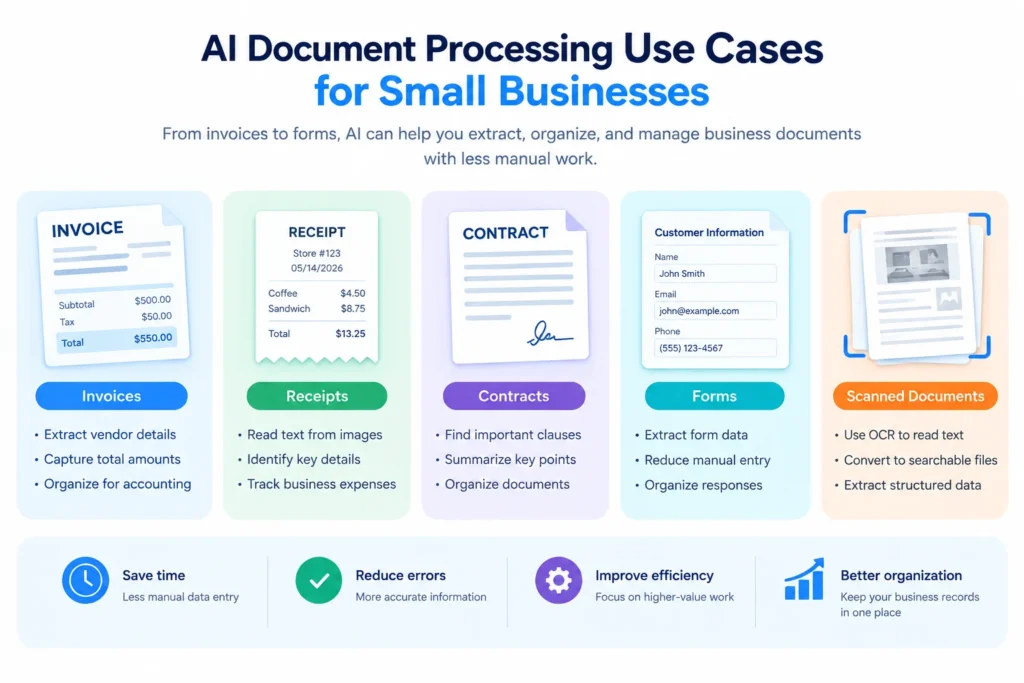
You can also download our free AI document processing PNG if you need a ready-to-use visual for a presentation, article, tutorial, or educational project.
Invoice Processing
A consulting business may receive invoices from multiple vendors every month.
Instead of manually entering each vendor name, invoice number, date, and amount, a document-processing tool may extract those fields automatically.
The information can then be reviewed before being entered into an accounting system.
Receipt Management
Small businesses often collect receipts for:
- Travel
- Fuel
- Equipment
- Office supplies
- Business meals
AI-powered extraction can help turn receipt images into structured information.
However, receipts should still be checked because image quality, unusual layouts, and handwritten information can affect extraction.
Contract and Document Review
A business owner may use a general AI assistant to summarize a lengthy contract or locate a specific clause.
This can make a document easier to review, but AI output should not replace professional legal advice when an agreement has significant legal or financial consequences.
Customer Forms
Service businesses may receive customer applications, intake forms, or other paperwork.
AI document processing can help extract information from these documents and organize it into a digital format.
Business Records and Scanned Documents
Businesses with older scanned records can use OCR to make documents searchable and extract information from them.
This can be particularly useful when information is currently stored only as images or scanned PDFs.
How to Choose the Right AI Document Processing Tool
There is no single tool that is ideal for every small business. Your choice should depend on your document type, volume, workflow, and technical requirements.
If You Mainly Need OCR
Look for a tool with strong OCR capabilities.
This is particularly important when working with scanned documents, photographs, or image-based PDFs.
If You Process Invoices and Receipts
Choose a tool that supports structured invoice or receipt extraction.
Dedicated extraction platforms may be more useful than a general chatbot when the same fields need to be processed repeatedly.
If You Need Automation
Look for integrations, APIs, and workflow automation.
For example, you might want:
Email → Document Processing → Data Extraction → Spreadsheet
or:
Invoice → AI Extraction → Accounting Workflow
If You Handle Sensitive Documents
Review:
- Privacy policy
- Data retention
- Data storage
- Security information
- Account controls
- Business terms
Do not upload confidential documents simply because a service offers free processing.
If You Process Only a Few Documents
A free AI assistant may be sufficient for occasional summaries, questions, or simple extraction tasks.
You may not need a dedicated document-processing platform.
If Your Volume Is Growing
Compare the paid pricing structure before you reach the free limit.
Pay attention to whether the provider charges per:
- Page
- Document
- Credit
- Workflow
- API request
- User
This will help you estimate future costs more realistically.
Free vs. Paid AI Document Processing Tools
Free plans can be useful, but they usually come with limitations.
Common restrictions include:
- Monthly page limits
- Document limits
- Limited processing credits
- Fewer integrations
- Limited automation
- Restricted advanced features
- Limited support
A free plan can be a good way to test whether a workflow actually works for your business.
You may consider upgrading when your document volume consistently exceeds the free allowance or when you need features such as advanced automation, custom extraction models, API access, or additional integrations.
Before paying, estimate how many documents you actually process each month.
A business that processes 20 documents may have very different requirements from one processing 2,000.
Tips for Using AI Document Processing Safely
AI document processing can involve sensitive business information, so use it carefully.
Review Extracted Information
Always check important data before using it in financial, legal, or business records.
Protect Sensitive Documents
Think carefully before uploading:
- Customer information
- Financial records
- Tax documents
- Contracts
- Employee records
- Confidential business information
Read the Provider’s Privacy Policy
Understand how the provider handles uploaded files and extracted information.
Keep Original Documents
Do not rely on an AI platform as your only copy of an important document.
Maintain your own backups where appropriate.
Use Human Verification
AI extraction should be treated as an assistive step, particularly when an error could affect money, contracts, taxes, or customer information.
Common Mistakes to Avoid
Choosing a Tool Only Because It Is Free
A free tool is not useful if it cannot process your file type or document volume.
Ignoring Usage Limits
Check page, document, credit, or request limits before building a workflow.
Forgetting About File Compatibility
Make sure the service supports the PDFs, images, scans, or other formats you actually use.
Uploading Sensitive Information Without Checking Policies
Review privacy and data-handling information first.
Assuming AI Extraction Is Perfect
Poor scans, handwriting, unusual layouts, and low-quality images can create errors.
Choosing Too Much Technology
A complicated enterprise-style workflow may be unnecessary for a business that only processes a few documents each month.
Start with the simplest solution that meets your needs.
Frequently Asked Questions
What is AI document processing?
AI document processing uses technologies such as OCR and machine learning to read documents, extract information, classify files, and convert unstructured content into more useful data.
Is there a free AI document processing tool?
Yes. Several providers offer free plans, free credits, free tiers, or limited trials. General AI assistants may also provide free document-analysis features. The exact limits vary by provider and can change over time.
Can AI extract data from PDFs?
Yes. AI document-processing tools can extract information such as names, dates, invoice numbers, totals, and other fields from many types of PDFs. Results can vary depending on the document’s quality and structure.
Can AI process scanned documents?
Yes. OCR allows AI-powered systems to recognize text in scanned documents and images. However, poor-quality scans or handwriting may reduce extraction accuracy.
What are the best free AI document processing tools for small businesses?
The right option depends on your workflow. Dedicated platforms such as Parseur, Nanonets, and Docsumo focus more heavily on structured extraction, while Google Document AI is designed for technical workflows. General AI assistants can be useful for occasional document analysis.
Is AI document processing secure?
Security depends on the provider and the service you choose. Before uploading business documents, review the provider’s privacy policy, security information, data-retention practices, and business terms.
Can AI process invoices automatically?
Yes. Some document-processing platforms are specifically designed to extract information from invoices. Depending on the tool, extracted fields can include vendor names, dates, invoice numbers, line items, and totals.
What should I check before uploading business documents to an AI tool?
Check the supported file types, usage limits, privacy policy, data-retention practices, security information, and how the provider handles uploaded documents. For sensitive documents, consider whether the service is appropriate for your specific business requirements.
Final Thoughts
The best free AI document processing tools for small businesses depend on what you actually need to process.
A freelancer who occasionally needs to summarize a contract may be perfectly comfortable using a general AI assistant. A business processing invoices and receipts regularly may benefit more from a dedicated document extraction platform. A company with technical resources may prefer an API-based solution such as Google Document AI.
The best approach is to start with your actual workflow.
Think about:
- What types of documents do you process?
- How many do you handle each month?
- Do you need OCR?
- Do you need structured data extraction?
- Do you need automation?
- Are the documents sensitive?
- What integrations do you need?
Then test a suitable free option using a few representative documents before committing to a larger workflow.
And because AI software pricing, free allowances, and features can change, always verify the current information on the provider’s official website before making a purchasing or implementation decision.
If you want to explore more AI solutions for your business, you can also check our guide to AI tools for small businesses.
About the Author
Hi, We are the founders of EveryTechHub. We share beginner-friendly guides about AI tools, blogging, and technology, with a focus on practical information that readers can use. Read more about us