
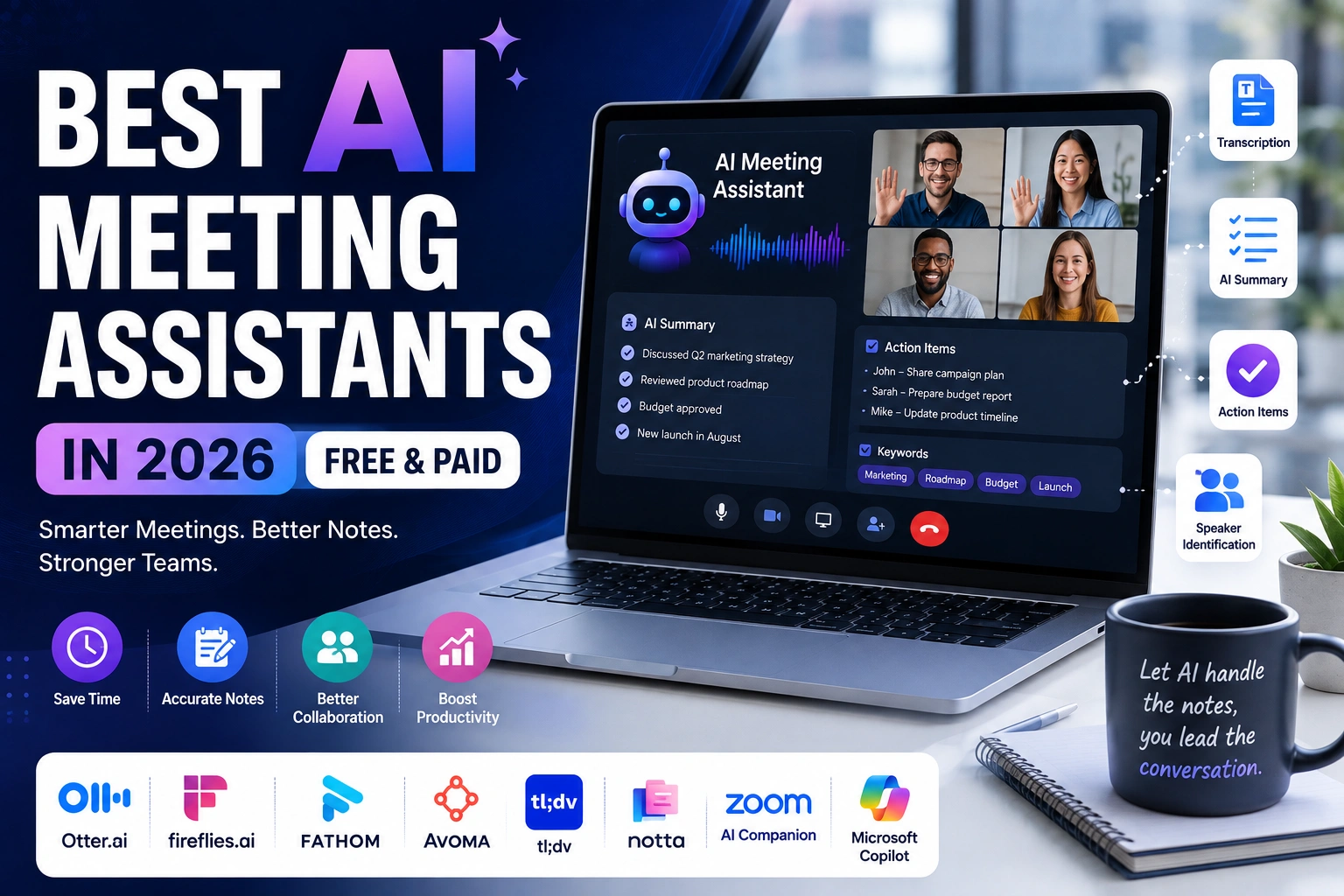
Best AI Meeting Assistants are quickly becoming a normal part of the workday for anyone who spends hours a week on Zoom, Google Meet, or Microsoft Teams calls. Instead of splitting your attention between listening and typing notes, these tools quietly record, transcribe, and summarize the conversation for you, and pull out action items and key decisions so nothing gets lost between meetings. Freelancers, sales teams, managers, students, and remote workers all use them for slightly different reasons, but the goal is the same: spend less time writing notes and more time paying attention. This guide covers the best AI meeting assistants available right now, what each does well, where it falls short, and which one fits your situation.
What Is an AI Meeting Assistant?
An AI meeting assistant is software that joins, records, or connects to your online meetings and turns the conversation into something you can use afterward — a transcript, a summary, and a list of action items. Most tools join your call as a bot (you’ll usually see it listed as a participant), or connect directly to Zoom, Google Meet, or Microsoft Teams through an integration or browser extension.
Once the meeting starts, the assistant captures the audio and, often, the video too. Speech-to-text technology converts what’s said into a written transcript, usually in real time. AI models then read through that transcript the way a person would, picking out the topics discussed, decisions made, and tasks someone agreed to handle.
The best AI meeting assistants go further by identifying who said what (speaker identification), generating a short summary, and flagging action items with the responsible person. Many also let you search across past meetings or ask questions about what was discussed.
How AI Meeting Assistants Work
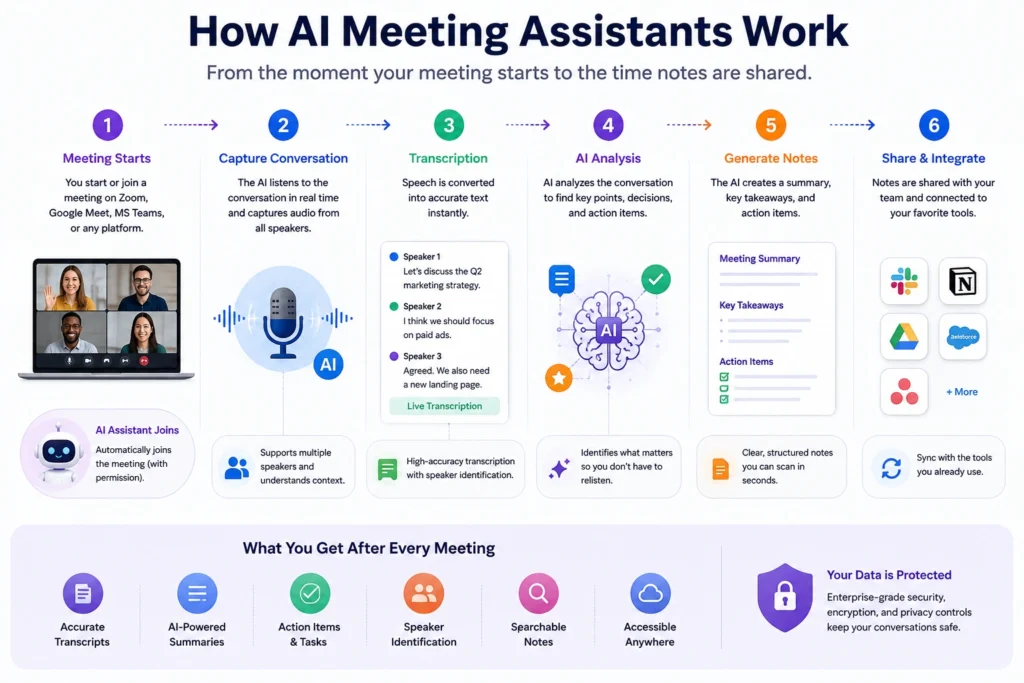
The core workflow behind most AI meeting tools follows a similar pattern:
- The meeting starts on Zoom, Google Meet, Microsoft Teams, or another platform.
- The AI captures audio (and often video) through a bot or a direct platform integration.
- The conversation is transcribed using speech-to-text AI, usually in real time.
- The AI identifies important points — decisions, questions, deadlines, and who said what.
- A summary and action items are generated, typically within minutes of the meeting ending.
- Notes are shared or stored, often synced to email, Slack, a CRM, or a searchable meeting library.
The exact steps, speed, and accuracy vary from one AI meeting note taker to another, and not every tool handles every platform the same way. It’s worth checking platform compatibility before you commit to one.
Best AI Meeting Assistants in 2026
1. Otter.ai
What It Does Otter is a well-known AI meeting transcription software focused on live transcription, searchable notes, and automated summaries for Zoom, Google Meet, and Microsoft Teams.
Best For Individuals and small teams who want reliable transcription with a well-established, easy-to-use interface.
Key Features Live transcription, speaker identification, automated meeting summaries, an AI chat feature for asking questions about past meetings, and a bot that joins Zoom, Teams, and Meet calls automatically.
Pros
- Strong transcription accuracy and intuitive interface
- Works across Zoom, Teams, and Meet
Cons
- Free and Pro plans have monthly minute caps
- Longer meetings can get cut off on lower tiers
Pricing Otter offers a free Basic plan plus paid Pro, Business, and Enterprise tiers with varying minute allowances. Check the official Otter.ai website for current pricing.
2. Fireflies.ai
What It Does Fireflies.ai is an AI meeting assistant built around unlimited transcription and AI summaries, with a strong emphasis on integrations and a searchable meeting library.
Best For Teams that want unlimited transcription with room to grow into CRM syncing and workflow automation.
Key Features Transcription, AI-generated summaries, action item detection, speaker identification, a searchable conversation library, and integrations with tools like Salesforce, HubSpot, and Slack.
Pros
- Every tier includes transcription and basic AI summaries
- Wide range of business integrations
Cons
- Advanced AI features run on a separate monthly credit system
- Storage limits apply on lower-tier plans
Pricing Fireflies has a free plan plus Pro, Business, and Enterprise tiers, with advanced AI features gated behind a credit allowance. Check the official Fireflies.ai website for current pricing.
3. Fathom
What It Does Fathom records, transcribes, and summarizes video calls, with a genuinely usable free plan and quick, structured summaries that include follow-up emails.
Best For Individuals, freelancers, and small teams who want a capable free AI meeting assistant before considering a paid upgrade.
Key Features Recording, transcription, AI summaries, meeting clips and playlists, CRM sync on paid tiers, and an AI chat feature for querying past meetings.
Pros
- Free plan includes unlimited recording and transcription
- Fast, well-organized summaries
Cons
- Advanced AI summary features are limited on the free tier
- Fewer supported languages than some competitors
Pricing Fathom offers a free plan plus paid Premium, Team, and Business tiers with expanded AI, CRM, and coaching features. Check the official Fathom website for current pricing.
4. Avoma
What It Does Avoma combines an AI meeting assistant with conversation intelligence, built for revenue teams that want notes, coaching insights, and CRM automation in one platform.
Best For Sales, customer success, and RevOps teams that want meeting notes plus call analytics and forecasting.
Key Features AI meeting notes, CRM data sync, call scoring and coaching (on higher tiers), deal and pipeline insights, and a built-in scheduler.
Pros
- Combines meeting notes with sales-focused conversation intelligence
- Strong CRM integrations for Salesforce and HubSpot
Cons
- Full sales intelligence features require paid add-ons on top of the base plan
- More complex than tools built purely for note-taking
Pricing Avoma’s base plan is priced separately from its Conversation Intelligence and Revenue Intelligence add-ons. Check the official Avoma website for current pricing.
5. tl;dv
What It Does tl;dv records and transcribes meetings with a generous free plan, plus AI-generated highlight clips, tagging, and multi-meeting reports for sales and product teams.
Best For Freelancers and small teams that want unlimited free recording, plus sales teams that eventually want coaching and CRM tools.
Key Features Unlimited recording and transcription on the free plan, AI summaries, meeting clips and tags, CRM integrations on paid tiers, and multi-meeting AI reports.
Pros
- Free plan includes unlimited recordings and transcripts
- Useful clip and tagging tools for sharing highlights
Cons
- AI summaries are capped on the free plan
- Business tier is priced significantly higher than Pro
Pricing tl;dv offers a free plan along with Pro and Business tiers, with AI limits and CRM tools varying by tier. Check the official tl;dv website for current pricing.
6. Notta
What It Does Notta is an AI meeting transcription software known for supporting many languages, plus real-time translation and a mobile-friendly workflow for capturing conversations beyond video calls.
Best For Multilingual teams, journalists, and users who need transcription for both online meetings and other spoken content.
Key Features Transcription in dozens of languages, real-time translation, speaker labels, AI-generated notes with action items, and calendar integrations for Zoom, Google Meet, Microsoft Teams, and Webex.
Pros
- Broad language support compared to many competitors
- Useful for mixed use cases beyond video meetings
Cons
- Free plan has a low per-conversation time cap
- Export and advanced features require a paid plan
Pricing Notta offers a free plan plus Pro, Business, and Enterprise tiers with different monthly minute allowances. Check the official Notta website for current pricing.
7. Zoom AI Companion
What It Does Zoom AI Companion is Zoom’s built-in AI meeting assistant, generating meeting summaries, real-time in-meeting queries, and smart recording chapters. Zoom has been shifting these capabilities into descriptively named features rather than the standalone “AI Companion” brand, so exact naming inside the app may vary.
Best For Teams already using Zoom who want AI meeting notes without adding a separate third-party tool.
Key Features Automated meeting summaries, live transcription and captions, smart recording with chapters, and the ability to ask questions about the meeting while it’s happening.
Pros
- Included with eligible paid Zoom plans at no extra cost
- No separate bot joins the call
Cons
- Only works within the Zoom ecosystem, not on Google Meet or Teams calls
- Not available on Zoom’s free Basic plan
Pricing Core AI Companion features are included with eligible paid Zoom Workplace plans. Check the official Zoom AI Companion page for current pricing.
8. Microsoft 365 Copilot for Teams
What It Does Microsoft 365 Copilot brings AI meeting recaps, notes, and action items directly into Microsoft Teams, alongside AI features across Word, Excel, Outlook, and PowerPoint.
Best For Organizations already using Microsoft 365 that want AI meeting assistant for Microsoft Teams features tied into the rest of their productivity suite.
Key Features Meeting recaps with AI-generated notes and action items, live meeting summaries, and integration with organizational data through Microsoft Graph.
Pros
- Meeting notes tie directly into Microsoft 365 apps teams already use
- Grounded in company data like emails and files
Cons
- Requires an eligible Microsoft 365 base license plus the Copilot add-on, which adds up in cost
- Less useful for teams that meet primarily on Zoom or Google Meet
Pricing Microsoft 365 Copilot is priced as an add-on license on an eligible Microsoft 365 plan. Check the official Microsoft 365 Copilot pricing page for current pricing.
Comparison Table
| Tool | Best For | Transcription | AI Summaries | Free Option | Ease of Use |
|---|---|---|---|---|---|
| Otter.ai | Individuals & small teams | Yes | Yes | Yes (capped) | Very easy |
| Fireflies.ai | Growing teams & integrations | Yes | Yes | Yes (capped) | Easy |
| Fathom | Free users & freelancers | Yes | Yes (limited free) | Yes | Very easy |
| Avoma | Sales & RevOps teams | Yes | Yes | Trial only | Moderate |
| tl;dv | Sales coaching & clips | Yes | Yes (limited free) | Yes | Easy |
| Notta | Multilingual users | Yes | Yes | Yes (capped) | Easy |
| Zoom AI Companion | Existing Zoom users | Yes | Yes | With paid Zoom plan | Very easy |
| Microsoft 365 Copilot | Microsoft Teams organizations | Yes | Yes | No | Moderate |
Which AI Meeting Assistant Is Best for You?
Best AI Meeting Assistant for Beginners: Otter.ai may be a strong choice thanks to its straightforward interface, making it easy to get useful notes from your first meeting.
Best Free AI Meeting Assistant: Fathom and tl;dv both stand out, since their free plans include unlimited recording and transcription rather than a tight minute cap.
Best for Business Teams: Fireflies.ai is particularly useful for teams that want a searchable meeting archive and a wide range of integrations.
Best for Sales Meetings: Avoma could be a good fit if your team needs conversation intelligence, coaching, and CRM automation on top of basic meeting notes.
Best for Remote Teams: Fireflies.ai or Otter.ai may work well for distributed teams that rely on searchable transcripts to stay aligned across time zones.
Best for Zoom Meetings: Zoom AI Companion is a natural option for teams already on Zoom’s paid plans, since the features are built in at no extra cost.
Best for Microsoft Teams: Microsoft 365 Copilot is particularly useful for organizations standardized on Microsoft 365, since notes stay inside the same ecosystem as email and documents.
Best for Google Meet: Otter.ai, Fathom, and tl;dv all support Google Meet directly and are worth comparing based on free-plan limits and summary style.
After meetings wrap up, teams that want to turn key takeaways into a client-ready deck can look at our guide to the Best AI Presentation Makers in 2026, and teams that want to automate what happens after notes are generated can explore the Best AI Workflow Automation Tools in 2026.
What to Look for in an AI Meeting Assistant
Transcription accuracy matters most for meetings with technical terms, accents, or overlapping speakers.
AI summaries should be concise and organized, not just a wall of transcribed text.
Action-item detection saves the most time when it correctly identifies who owns each task.
Speaker identification helps when reviewing notes from meetings with several participants.
Search and organization matter once you’ve accumulated dozens of past meetings.
Meeting platform compatibility — confirm the tool supports Zoom, Google Meet, or Microsoft Teams, whichever you use most.
Integrations with Slack, a CRM, or a calendar save extra manual work.
Collaboration features let teammates comment on or edit shared notes.
Security and privacy controls matter more for confidential or client-facing meetings.
Pricing should match how often you actually meet — a generous free plan may be enough for occasional users.
How People Use AI Meeting Assistants
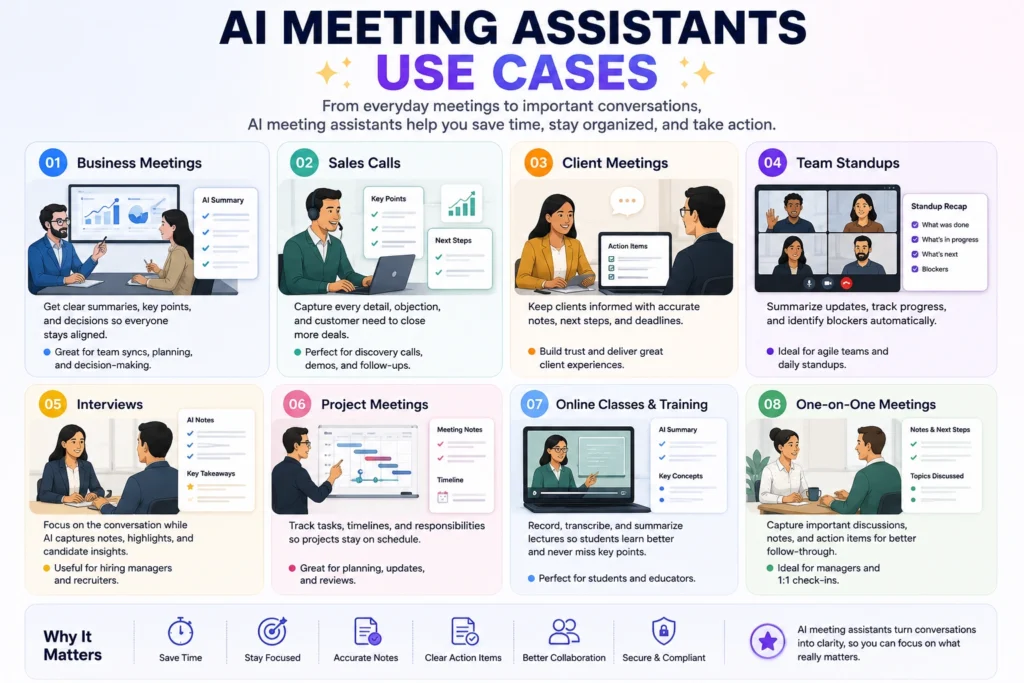
AI meeting tools show up in more places than weekly business meetings. Sales teams use an AI meeting assistant for business to capture client calls without missing details mid-pitch. Managers rely on them for standups so nobody pauses the conversation to type notes. Recruiters use them during interviews to focus on the conversation instead of scribbling, project teams keep a running record of decisions across long projects, and students use AI meeting notes to review lectures later. One-on-ones benefit too, since both people can stay present instead of splitting attention.
Are Free AI Meeting Assistants Worth It?
A free AI meeting assistant is generally worth trying before paying for anything. Free plans are usually enough for occasional meetings, light personal use, or testing whether a tool’s transcription and summary quality fit your needs.
Common trade-offs include monthly minute caps, limits on how long a single meeting can run before it’s cut off, restricted storage for past meetings, and fewer AI features like advanced summaries or CRM sync. Some tools are more generous than others, so it’s worth comparing free-tier limits directly on each provider’s website.
A paid plan starts to make sense once you’re hitting monthly caps regularly, need longer meeting coverage, or want unlimited storage, team collaboration, or CRM integration. If you only take a handful of meetings a month, staying on a free plan is often reasonable.
Are AI Meeting Assistants Safe to Use?
AI meeting assistants handle sensitive material by nature — recordings, transcripts, and sometimes confidential business details all pass through the provider’s systems. Before relying on one for client calls or internal strategy meetings, review the specific provider’s privacy policy and security documentation, since data retention periods, access permissions, and how transcripts are stored vary between tools.
Recording consent is also worth taking seriously. Depending on where you and other participants are located, recording a call may require notifying or getting agreement from everyone on the line. Many meeting bots announce themselves as participants, which helps with transparency, but it’s still worth checking your company’s policy and applicable local laws first.
No AI meeting assistant should be assumed to guarantee complete privacy or zero data retention. Read the provider’s current documentation directly, and check with your company’s IT or legal team before using one for sensitive conversations.
Limitations of AI Meeting Assistants
AI meeting notes aren’t perfect. Transcription mistakes are common with strong accents, overlapping speakers, or heavy background noise. Summaries can miss context a human listener would naturally pick up, especially in meetings with a lot of back-and-forth or inside jargon. Speaker identification isn’t always accurate on calls with several similar-sounding voices, privacy remains a valid concern for confidential meetings, and subscription costs add up for teams needing multiple paid seats. Because of this, AI-generated notes should be treated as a helpful draft rather than an official record — a quick human review before sharing notes widely is still a good habit.
Frequently Asked Questions
What is an AI meeting assistant? A tool that records or connects to your online meetings, transcribes the conversation, and generates a summary with action items, so you don’t have to take manual notes.
What is the best AI meeting assistant for beginners? Otter.ai is a good starting point thanks to its simple interface and clear free plan, though Fathom’s setup is also beginner-friendly.
Are there free AI meeting assistants? Yes. Otter.ai, Fireflies.ai, Fathom, tl;dv, and Notta all offer free plans with different limits on minutes, storage, or AI summaries.
Can AI meeting assistants work with Zoom? Yes. Most tools, including Otter.ai, Fireflies.ai, and Fathom, support Zoom directly, and Zoom AI Companion is built in for eligible paid plans.
Can AI meeting assistants work with Microsoft Teams? Yes. Otter.ai, Fireflies.ai, and tl;dv support Teams, and Microsoft 365 Copilot offers native AI meeting features built into Teams.
Can AI meeting assistants work with Google Meet? Yes. Otter.ai, Fathom, Fireflies.ai, and tl;dv all support Google Meet through a bot or browser-based integration.
Can AI meeting assistants summarize meetings automatically? Yes — it’s a core feature. Most tools generate a summary within minutes of a meeting ending, including topics, decisions, and action items.
Are AI meeting assistants safe for confidential meetings? It depends on the provider. Review its privacy policy and data-handling practices, follow your company’s recording-consent rules, and confirm security documentation before using one for sensitive discussions.
Final Verdict: Which AI Meeting Assistant Should You Choose?
There isn’t one universal winner, since the right choice depends heavily on your meeting platform, budget, and workflow.
Beginners will likely find Otter.ai the easiest entry point. Free users get the most value from Fathom or tl;dv, both of which offer genuinely unlimited free recording.
Business teams leaning toward integrations and a searchable archive tend to prefer Fireflies.ai, while sales teams needing coaching and CRM depth are better served by Avoma.
Remote teams can benefit from tools that keep meeting notes searchable across time zones. Zoom users may find Zoom AI Companion particularly convenient because it integrates directly with Zoom.
For Microsoft Teams organizations, Microsoft 365 Copilot can be a strong choice because of its integration with the wider Microsoft 365 ecosystem.
Before choosing, think through your meeting platform, the specific features you actually need, your privacy requirements, team size, and budget — then pick the tool that matches those priorities rather than the one with the longest feature list.
About the Author
Hi, We are the founders of EveryTechHub. We share beginner-friendly guides on AI tools, blogging, and technology based on hands-on testing and real experience. Read more about us.