
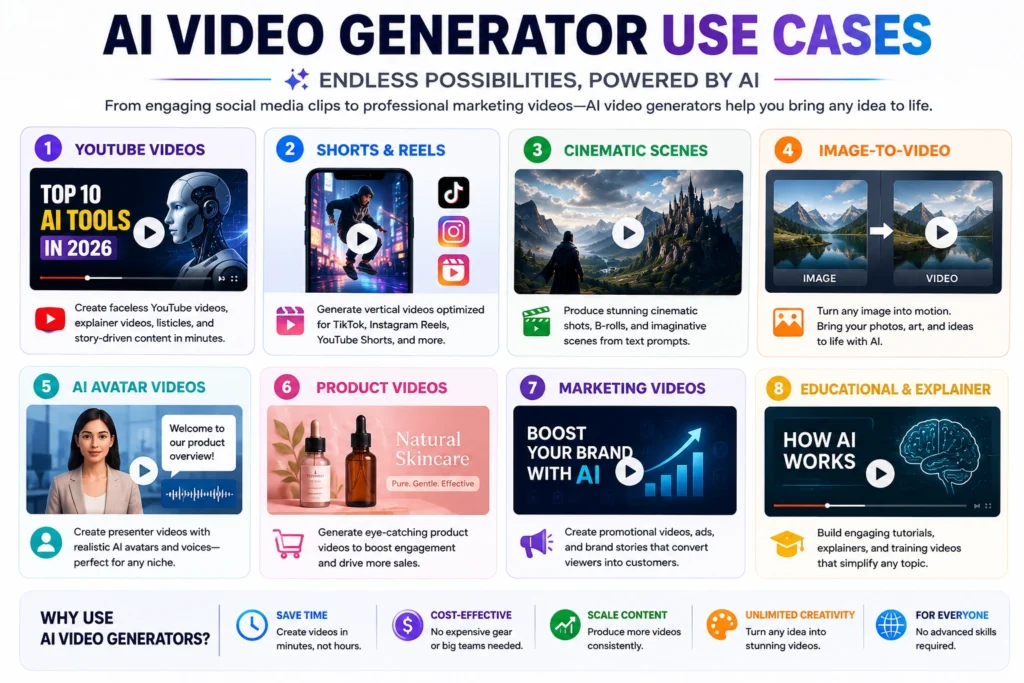
The best AI video generators in 2026 can turn a text prompt or a single photo into a finished clip in minutes, no camera or editing software required. That shift has made video production accessible to people who never touched a timeline before, generating cinematic b-roll, talking-head presenters, product demos, and social clips from nothing more than a written description or reference image.
Whether you’re a YouTuber speeding up faceless content, a small business owner who needs a product video without hiring a crew, or a marketer testing ad creative, there’s likely a tool built for your use case. This guide breaks down the strongest AI video generator tools available now, explains what each does well, and helps you match the right platform to the video you want to make.
What Is an AI Video Generator?
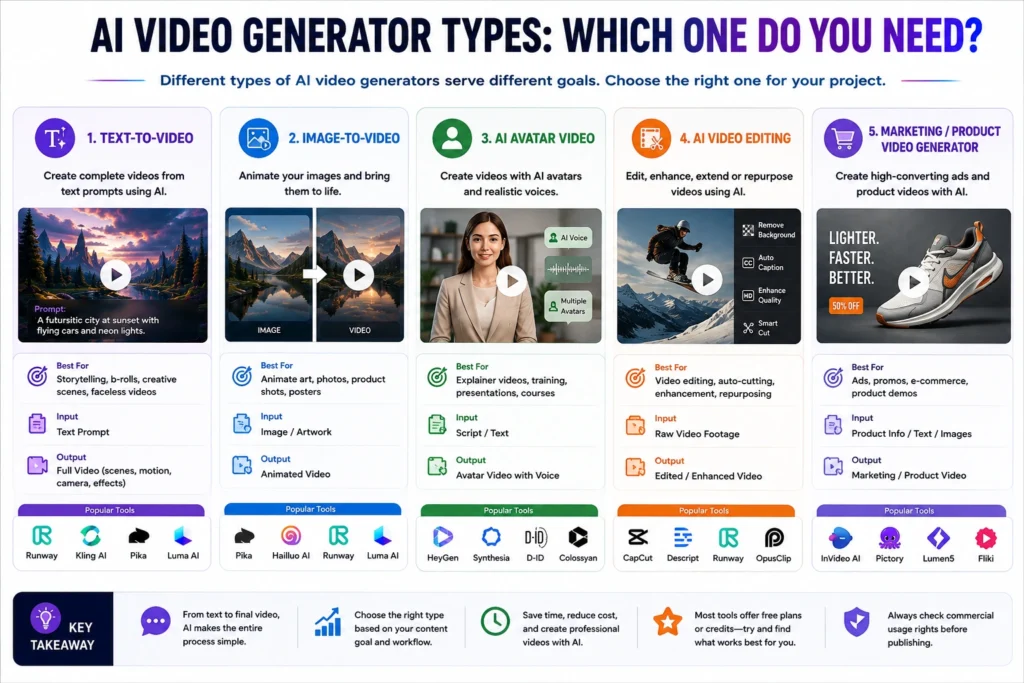
An AI video generator is software that creates video footage from a prompt instead of a camera. Type a description, upload a photo, or write a script, and the model produces moving footage that matches it. These tools fall into a few distinct categories.
Text-to-video tools generate a clip from a written prompt alone, imagining the scene, camera movement, and motion from scratch. Image-to-video tools animate an existing photo, adding camera motion or subject movement while keeping the original composition. AI avatar or presenter tools are a different category: they take a script and a digital human and produce a talking-head video, closer to a virtual spokesperson than a generative film clip. Some platforms also offer AI-assisted editing that trims, captions, or enhances footage you already shot.
Traditional editors like Premiere Pro or CapCut still require you to source or film every clip yourself. AI video creation tools remove that step, though most creators still finish their projects in a conventional editor.
How AI Video Generators Work
Most AI video generator tools follow a similar basic workflow, even though the underlying models differ significantly:
Prompt → Generation → Preview → Edit/Refine → Export.
You start by writing a text prompt, uploading a reference image, or both. The model renders a short clip, usually four to fifteen seconds. You preview the result, adjust the prompt or settings if it’s off, and generate again. Once you’re happy with individual clips, most platforms let you extend, stitch, or lightly edit them before exporting.
Results vary depending on the model, how detailed your prompt is, the quality of any input image, clip length, and settings like resolution or camera motion. A vague prompt on a budget model produces noticeably different results than a detailed prompt on a flagship model, so testing before committing credits is worth the time.
Best AI Video Generators in 2026
The platforms below span cinematic text-to-video, image animation, short-form content, and AI avatar generation. They are not interchangeable, so pay attention to what each is built for before picking one on price alone.
1. Kling AI
What It Does: Kling AI, built by Kuaishou, is a text-to-video and image-to-video generator known for photorealistic human motion and longer clips than many competitors. Its latest model generation added native audio alongside video.
Best For: Creators who want realistic human movement at moderate monthly volume.
Key Features: Text-to-video, image-to-video, native audio and lip-sync, camera motion control, longer-duration clips, and a developer API.
Pros:
- Strong photorealism, especially for human subjects
- Both a consumer web app and API access
Cons:
- Credit-based system means real cost varies by resolution and audio use
- Free tier is limited and includes a watermark
Pricing: Pricing and plans can change, so check the official website for the latest information.
2. Runway
What It Does: Runway is a professional-grade AI video creation suite offering text-to-video, image-to-video, and video-to-video editing, plus tools for motion control, lip-sync, and upscaling. It has evolved from a single model into a broader creative workspace.
Best For: Filmmakers, agencies, and creators who want fine-grained creative control.
Key Features: Multiple generation modes, reference-image character consistency, in-video editing tools, motion brushes, and a developer API.
Pros:
- Deep creative control over camera movement and scene consistency
- Frequently updated with new capabilities
Cons:
- Steeper learning curve than simpler competitors
- Credit-based pricing can get expensive for heavy users
Pricing: Pricing and plans can change, so check the official website for the latest information.
3. Google Veo
What It Does: Veo is Google’s AI video creation software, available through the Gemini app, Google Labs’ Flow, and the Gemini API. It generates clips with natively synced audio, including dialogue and sound effects, from text or image prompts.
Best For: Users already inside the Google/Gemini ecosystem who want strong prompt adherence and native audio.
Key Features: Text-to-video and image-to-video with synced audio, portrait and landscape formats, scene extension, and multi-reference-image guidance for consistent characters.
Pros:
- Strong native audio generation, including dialogue
- Integrated directly into Gemini, YouTube Shorts, and Google Vids
Cons:
- Full video generation generally requires a paid Gemini subscription
- Less specialized for pure cinematic control than dedicated tools like Runway
Pricing: Pricing and plans can change, so check the official website for the latest information.
4. Pika
What It Does: Pika is an AI video maker built around creative, stylized effects as much as straightforward generation. Alongside standard text-to-video and image-to-video, it offers signature tools like object insertion, object swapping, and physics-defying effects such as melting or exploding objects.
Best For: Social media creators who want eye-catching effects rather than strictly realistic footage.
Key Features: Text-to-video, image-to-video, video-to-video editing, branded effects (Pikaffects, Pikadditions, Pikaswaps), keyframe interpolation, and audio-driven lip-sync.
Pros:
- Distinctive creative effects not widely available elsewhere
- Good fit for TikTok, Reels, and Shorts-style content
Cons:
- Less competitive for cinematic or narrative-driven video
- Failed generations still consume credits on most plans
Pricing: Pricing and plans can change, so check the official website for the latest information.
5. Luma
What It Does: Luma‘s Dream Machine focuses on cinematic, photorealistic output with strong camera control and HDR color, aimed at creators who plan to edit and color-grade footage in post.
Best For: Creators and marketers producing polished, cinematic-looking footage.
Key Features: Text-to-video, image-to-video, video-to-video modification, camera controls, a low-cost draft mode for quick iteration, and HDR export on higher tiers.
Pros:
- Strong camera movement and 3D spatial awareness
- Draft mode helps control costs while iterating on prompts
Cons:
- Lacks native audio generation, unlike some competitors
- Native clip length is short, requiring stitching for longer sequences
Pricing: Pricing and plans can change, so check the official website for the latest information.
6. Hailuo AI
What It Does: Hailuo, built by MiniMax, is a text-to-video and image-to-video generator known for photorealistic character detail, facial expressions, and physics simulation, plus fast generation speeds.
Best For: Creators focused on realistic human subjects and short character-driven clips at a lower entry price.
Key Features: Text-to-video, image-to-video, fast rendering, strong physics and motion consistency, and a free tier with daily credits.
Pros:
- Competitive pricing relative to comparable quality
- Notably fast generation times
Cons:
- Clip lengths are shorter than several competitors
- Developed by a China-based company, so data may be processed outside the US
Pricing: Pricing and plans can change, so check the official website for the latest information.
7. Adobe Firefly Video
What It Does: Adobe Firefly is Adobe’s generative AI suite spanning images, video, and audio, with text-to-video and image-to-video built into the Firefly web app and increasingly into Creative Cloud apps like Premiere Pro.
Best For: Creators and teams already working inside the Adobe ecosystem.
Key Features: Text-to-video, image-to-video, generative extend, sound-effect generation, video translation, and integration with Photoshop, Premiere Pro, and Express.
Pros:
- Tight integration with widely used Adobe creative apps
- Commercial licensing clarity that appeals to brands and agencies
Cons:
- Less compelling value without an existing Adobe subscription
- Not positioned as the most cinematic or creatively flexible generator on this list
Pricing: Pricing and plans can change, so check the official website for the latest information.
8. HeyGen
What It Does: HeyGen is primarily an AI avatar and presenter video platform, not a cinematic generative video tool. Write or paste a script, choose a digital avatar, and HeyGen produces a talking-head video with lip-synced narration in dozens of languages.
Best For: Marketing teams, course creators, and businesses that need a spokesperson-style video without filming anyone.
Key Features: Hundreds of stock avatars, custom digital-twin avatars, multilingual translation with lip-sync, voice cloning, and an API for scale.
Pros:
- Fast way to produce polished presenter videos without filming
- Strong avatar realism and multilingual dubbing
Cons:
- Not built for cinematic scenes, b-roll, or narrative video
- “Unlimited” plans still cap premium features through a separate credit system
Pricing: Pricing and plans can change, so check the official website for the latest information.
9. Synthesia
What It Does: Like HeyGen, Synthesia is an AI avatar video generator rather than a filmmaking tool. It turns a script into a video narrated by a lifelike AI presenter, aimed at corporate training, onboarding, and explainer content.
Best For: Businesses producing training, HR, or explainer videos at scale across multiple languages.
Key Features: A large library of stock avatars, custom “digital twin” avatars from a short recorded clip, 120+ language voice support, and interactive overlays.
Pros:
- Long-standing reputation for corporate and L&D video use
- Broad avatar and language selection
Cons:
- Corporate, presenter-style format limits creative flexibility
- Video minutes per month are capped by plan, even on paid tiers
Pricing: Pricing and plans can change, so check the official website for the latest information.
Comparison Table
| Tool | Best For | Text-to-Video | Image-to-Video | Free Option | Ease of Use |
|---|---|---|---|---|---|
| Kling AI | Realistic human motion | Yes | Yes | Limited free tier | Moderate |
| Runway | Professional creative control | Yes | Yes | Limited free credits | Advanced |
| Google Veo | Native audio, Gemini ecosystem | Yes | Yes | Requires paid Gemini plan | Easy |
| Pika | Short-form creative effects | Yes | Yes | Limited free tier | Easy |
| Luma | Cinematic, HDR footage | Yes | Yes | No paid video on free tier | Moderate |
| Hailuo AI | Fast, low-cost realism | Yes | Yes | Daily free credits | Easy |
| Adobe Firefly Video | Adobe-integrated workflows | Yes | Yes | Free trial only | Easy |
| HeyGen | AI avatar presenter videos | Script-based | No | Limited free videos | Easy |
| Synthesia | Corporate avatar training videos | Script-based | No | Limited free minutes | Easy |
Which AI Video Generator Is Best for You?
Best for Beginners: Hailuo AI. It’s inexpensive, fast, and doesn’t require prompting expertise to get a usable first clip.
Best for YouTube Creators: Google Veo, especially if you’re already using Gemini or want vertical video that plugs into YouTube Shorts.
Best for Cinematic Videos: Luma, for creators who plan to color-grade and edit footage professionally given its camera control and HDR output.
Best for Short-Form Content: Pika, whose stylized effects and social-first formatting suit TikTok and Reels-style clips.
Best for Image-to-Video: Kling AI, particularly for animating photos of people, since its motion realism holds up well on human subjects.
Best AI Avatar Video Generator: HeyGen edges ahead on avatar realism and translation speed; Synthesia leans more corporate and training-focused.
Best for Business Videos: Adobe Firefly Video, for teams already working in Premiere Pro or Photoshop.
Best Free AI Video Generator: Hailuo AI’s daily credits make it the easiest to test seriously, though every free tier carries watermarks or resolution limits.
Best AI Video Generators for YouTube
Different YouTube formats call for different tools. For faceless videos, pairing a text-to-video or image-to-video generator for b-roll with an AI avatar tool like HeyGen for narration works better than one platform alone. For Shorts and vertical clips, Google Veo and Pika both support native vertical formatting. For intros and outros, a cinematic tool like Luma or Runway produces polished, reusable brand footage. For product videos, Adobe Firefly Video’s integration with existing product photography is often the most practical route.
AI video tools speed up production, but they don’t replace the judgment involved in scripting, pacing, and editing a video that actually holds a viewer’s attention. If you’re building a full faceless YouTube workflow, our guide to the Best AI Tools for YouTube Automation in 2026 covers the research, scripting, and publishing tools that pair well with the generators above.
Are Free AI Video Generators Worth It?
Free AI video generators are genuinely useful for testing whether a tool’s style and output quality fit your project before you pay. Most free plans are enough to learn the interface and see how a model handles motion or realism.
Free tiers come with consistent trade-offs across nearly every platform on this list:
- Watermarks on exported videos, which usually rule out commercial use
- Limited credits, often just enough for a handful of clips per month
- Resolution caps, commonly 480p or 720p rather than full HD
- Generation limits, sometimes daily rather than monthly
For casual experimentation, free plans are worth using. For serious or commercial content, most creators eventually move to a paid plan for watermark-free, higher-resolution output with commercial rights.
How to Choose the Best AI Video Generator
Use this framework to narrow down the many AI video generator tools available:
- Video type — cinematic footage, social clips, or a talking-head presenter point to different tools.
- Quality — check recent sample outputs rather than marketing screenshots, since quality changes fast.
- Text-to-video vs. image-to-video — decide whether you’re generating from scratch or animating existing images.
- Editing features — some platforms include trimming and extension tools; others expect a separate editor.
- Generation speed — matters more for high-volume creators than one-off projects.
- Resolution — confirm whether 1080p or 4K requires a higher-tier plan.
- Credits and pricing — understand how credits map to actual video minutes.
- Commercial usage rights — verify whether your plan allows monetized or client work.
- Ease of use — weigh a simple interface against deeper control.
- Watermarks — check whether removal requires a paid upgrade.
Limitations of AI Video Generators
AI video generation has improved rapidly, but it isn’t a finished replacement for traditional production. Common limitations include:
- Inconsistent results — the same prompt can produce noticeably different quality across attempts.
- Character consistency — keeping a character’s appearance the same across multiple clips remains difficult.
- Motion problems — hands, complex interactions, and fast movement can still glitch or distort.
- Text and logo accuracy — on-screen text and brand logos often render incorrectly.
- Limited control — getting an exact camera angle or timing can take many regenerations.
- Generation costs — credit systems mean real costs can climb quickly for iterative workflows.
- Commercial-use considerations — usage rights vary by platform and plan, so verify before using output commercially.
- Need for human editing — most usable projects still require stitching, color correction, or audio work afterward.
Setting these expectations early saves frustration later. For businesses layering AI video into a broader content pipeline, our guide to the Best AI Marketing Automation Tools in 2026 covers how video fits alongside other automated marketing workflows.
Frequently Asked Questions
What is an AI video generator? A tool that creates video footage from a text prompt, an image, or a script, without filming. Depending on the platform, it can produce cinematic clips, social content, or AI avatar presenter videos.
What is the best AI video generator for beginners? Hailuo AI is a good starting point thanks to its low cost, fast generation, and simple interface. Google Veo is also beginner-friendly if you’re already using Gemini.
Can AI generate videos from text? Yes. Text-to-video tools like Runway, Kling AI, Luma, and Google Veo generate original footage directly from a written prompt describing the scene, subject, and camera movement.
Can AI turn images into videos? Yes. Image-to-video tools animate a still photo, adding camera motion, subject movement, or transitions while preserving the original composition.
What is the best AI video generator for YouTube? It depends on the content type. Google Veo suits Shorts and vertical formats, HeyGen suits narrated faceless videos, and Luma fits cinematic intros.
Are there free AI video generators? Most platforms here, including Kling AI, Pika, Hailuo AI, and Synthesia, offer a free tier with watermarks, lower resolution, and limited monthly credits.
Can AI-generated videos be used commercially? Often, but it depends on the platform and plan. Free tiers typically restrict commercial use, while paid plans usually include commercial rights. Confirm current terms on the official pricing page.
Are AI video generators better than traditional video editing software? They serve different purposes. AI generators create raw footage from prompts, while editors like Premiere Pro assemble and finish video. Most serious projects use both together.
Final Verdict: Which AI Video Generator Should You Choose?
There’s no single best AI video generator for everyone, since these tools solve different problems. Beginners get a low-cost entry point with Hailuo AI. YouTube creators building faceless channels will likely need a combination: a cinematic generator like Luma or Google Veo for footage, paired with an avatar tool like HeyGen for narration.
Filmmakers chasing photorealism and camera control should look at Runway or Luma. Short-form social content gets more mileage from Pika’s stylized effects. Businesses producing avatar-led training or explainer videos are better served by Synthesia or HeyGen. Budget-conscious users can lean on free tiers to test quality before paying anything.
The practical takeaway: choose a tool based on the video you actually need to create, not which platform is generating the most buzz. Test the free tier of two or three candidates on your real use case before committing to a paid plan.
About the Author
Hi, We are the founders of EveryTechHub. We share beginner-friendly guides on AI tools, blogging, and technology based on hands-on testing and real experience. Read more about us.