
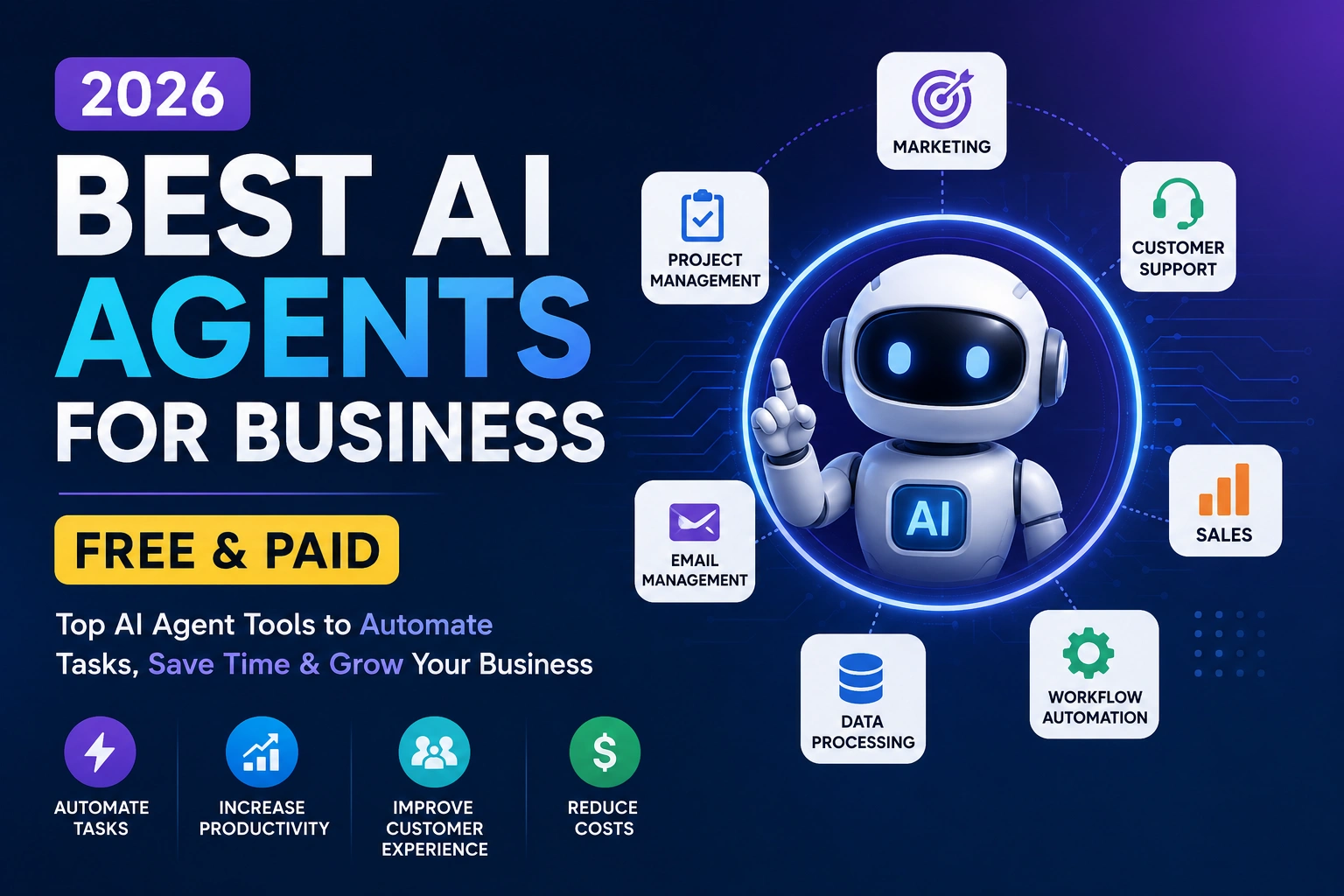
The best AI agents for business in 2026 aren’t just chatbots that answer questions — they’re software that can complete multi-step tasks on your behalf, from qualifying a lead to updating your CRM. That shift is why small business owners, marketers, and sales teams are paying attention right now. Instead of copying answers out of a chat window, an AI agent can read an email, check a calendar, take an action, and follow up with little or no human input.
This guide covers the most useful AI agent platforms available today, explains how they differ from chatbots and old-school automation, and helps you figure out which one fits your business. You’ll find honest tool reviews, a comparison table, real use cases, and a framework for choosing based on your budget and technical skill.
What Is an AI Agent?
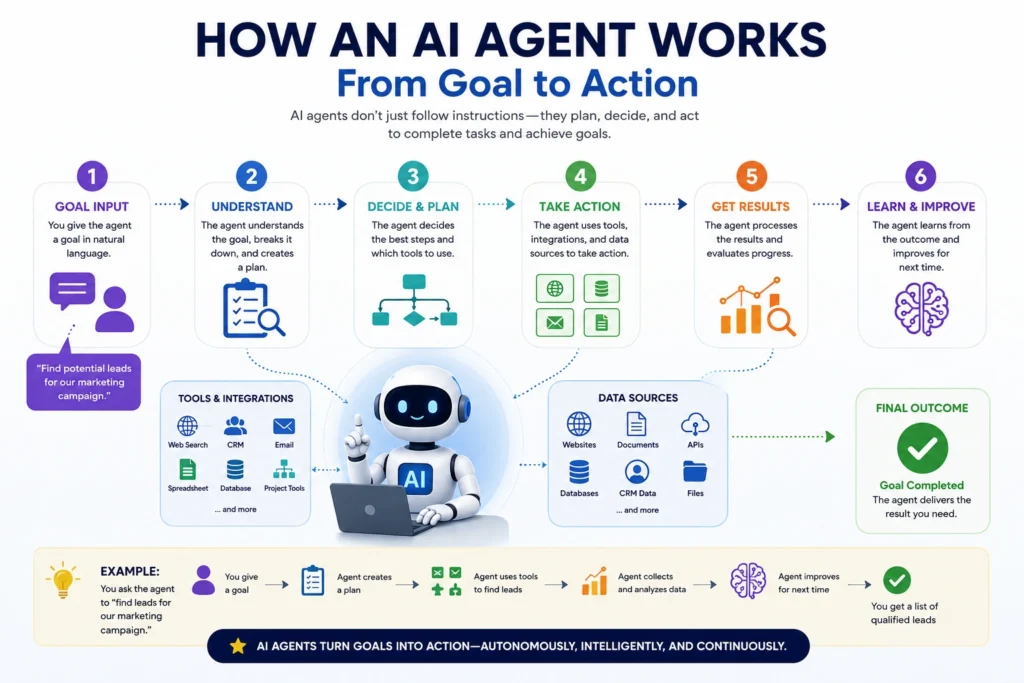
An AI agent is software built to complete a goal with minimal step-by-step instruction. Give it an objective — “qualify this lead” or “answer this support ticket” — and it figures out the steps needed, using tools and integrations along the way.
This is different from a normal chatbot. A chatbot mostly answers questions inside a conversation and doesn’t act outside the chat window unless it’s specifically wired to do so. An AI agent can search a knowledge base, send an email, update a spreadsheet, create a calendar event, or call another app’s API, often chaining several actions together without approval at each step.
It’s also different from traditional automation. Classic automation follows fixed if-this-then-that rules: if X happens, always do Y. An AI agent can handle situations that weren’t explicitly programmed, because it uses a language model to interpret context and decide what to do next.
Here’s a simple example: a new lead fills out a contact form. Traditional automation might send a generic email and add a row to a spreadsheet. An AI agent could instead read the lead’s message, check if they match your ideal customer profile, look up their company online, draft a personalized reply, and notify the right salesperson in Slack — all from one trigger, without anyone writing that specific workflow in advance.
Best AI Agents for Business in 2026
There’s no single “best” AI agent platform — the right pick depends on your technical comfort level and what you’re automating. Some tools here need zero code. Others are workflow automation platforms that need more configuration. A few are enterprise-grade systems for large companies with dedicated IT teams, and a couple are developer-oriented frameworks that trade ease of use for more control.
Below is an honest look at eight platforms, so you can see which category each falls into before comparing pricing and features.
1. Lindy
What It Does Lindy is a no-code platform for building AI agents that handle recurring knowledge work — email triage, meeting notes, CRM updates, and multi-step workflows — using a visual, drag-and-drop builder.
Best For Small business owners, founders, and non-technical teams who want to automate email and scheduling without hiring a developer.
Key Features Email and inbox management, meeting summaries pulled from Zoom or Google Meet, CRM updates, and integrations across 100+ connected apps.
Business Use Cases Triaging and drafting replies to inbound email, prepping sales reps before calls with automatic notes, and routing qualified leads into Slack or a CRM.
Pros and Cons Pros: genuinely no-code, strong at inbox and meeting-related tasks, wide integration library. Cons: there’s no free tier, just a short trial, and heavy usage can burn through plan credits quickly.
Pricing Plans start around $49.99/month, with higher tiers for more usage and features. Pricing and plans can change, so check the official website for the latest information.
2. Gumloop
What It Does Gumloop is a no-code, AI-native workflow builder that combines automation with AI agents capable of research, web scraping, and generating files — not just moving data between apps.
Best For Operations teams and agencies that need AI reasoning built directly into their automation, such as lead enrichment or document processing.
Key Features Sub-agents that can run in parallel within one pipeline, web scraping nodes, and 200+ app connectors.
Business Use Cases Enriching new leads with public company data, scraping and summarizing competitor information, and automating multi-step content or reporting pipelines.
Pros and Cons Pros: powerful for reasoning-heavy automations, flexible node-based builder. Cons: credit usage can be unpredictable, and the logic-based setup has a learning curve for non-technical users.
Pricing A free plan is available for testing, with the Pro plan starting at $37 per month. Pricing and plans can change, so check the official website for the latest information.
3. Zapier Agents
What It Does Zapier Agents brings AI agent capabilities into Zapier’s existing automation platform, letting agents make judgment calls inside workflows that already connect thousands of business apps.
Best For Businesses already using Zapier that want to add AI decision-making to existing automations without switching platforms.
Key Features Access to Zapier’s 7,000-plus app integrations, natural-language agent building, and the ability to combine agents with standard Zap workflows.
Business Use Cases Automatically triaging support tickets before routing them, summarizing form submissions before they hit your CRM, and handling simple customer questions through a connected chatbot.
Pros and Cons Pros: unmatched integration coverage, familiar interface for existing Zapier users. Cons: Agents is a separate paid add-on, not included in core plans, and costs can add up at scale.
Pricing Zapier Agents is priced separately from core Zapier plans, at roughly $20-50 per month depending on usage. Pricing and plans can change, so check the official website for the latest information.
4. Relevance AI
What It Does Relevance AI is a low-code platform for building teams of connected agents — called an “AI Workforce” — where each agent handles a specific role, like research, outreach, or CRM updates.
Best For Marketing and sales operations teams that want multiple specialized agents working together rather than one general-purpose bot.
Key Features Multi-agent “Workforces,” custom tools, knowledge bases, and support for APIs, Python steps, and MCP connections for more technical teams.
Business Use Cases Researching a prospect before a sales call, running multi-channel outbound campaigns, and building an internal support agent that escalates unusual cases to a person.
Pros and Cons Pros: flexible for both no-code and technical users, strong for coordinated multi-agent workflows. Cons: the learning curve and usage-based pricing can be unpredictable at scale.
Pricing A free plan is available, with paid plans running up to roughly $349 per month and custom enterprise pricing above that. Pricing and plans can change, so check the official website for the latest information.
5. Microsoft Copilot Studio
What It Does Copilot Studio is Microsoft’s platform for building custom AI agents that plug into Microsoft 365 apps like Outlook, Teams, and SharePoint, plus external channels like websites.
Best For Mid-size and large businesses already using Microsoft 365 that want AI agents grounded in their internal data and systems.
Key Features Low-code agent building, access to Copilot Chat and a standard harness for customizing Copilot experiences, and deep integration with Microsoft’s ecosystem.
Business Use Cases Building an internal HR assistant that answers policy questions, an IT helpdesk agent, or a customer-facing support agent trained on your documentation.
Pros and Cons Pros: deep Microsoft 365 integration, enterprise-grade security and compliance. Cons: pricing is credit-based rather than a simple flat fee, which makes costs harder to predict, and it’s overkill for very small teams.
Pricing Standalone Copilot Studio licensing starts around $200 per tenant per month, with usage-based credit consumption on top. Pricing and plans can change, so check the official website for the latest information.
6. Salesforce Agentforce
What It Does Agentforce is Salesforce’s enterprise AI agent platform, built to automate customer service, sales, and workflow tasks directly inside the Salesforce ecosystem.
Best For Larger businesses already running on Salesforce, particularly those with dedicated service or sales operations teams.
Key Features Prebuilt agents for service and sales, deep CRM data grounding, and FedRAMP High authorization for regulated industries.
Business Use Cases Autonomously resolving customer support tickets, qualifying inbound sales leads inside Salesforce, and automating case escalation for complex issues.
Pros and Cons Pros: tightly integrated with Salesforce data, strong compliance credentials. Cons: most advanced deployments require an additional Data Cloud subscription, and implementation can take months, making it a poor fit for small businesses.
Pricing Pricing starts around $2 per conversation, with usage-based Flex Credits and per-user licensing also available. Pricing and plans can change, so check the official website for the latest information.
7. n8n
What It Does n8n is an open-source workflow automation platform with built-in AI agent nodes, popular with developers who want more control than typical no-code tools allow.
Best For Technical users, developers, and agencies comfortable with self-hosting or working in a more code-friendly environment.
Key Features 400+ native integrations, JavaScript and Python code nodes, and AI Agent and LLM nodes included at no extra platform cost.
Business Use Cases Building custom lead-routing pipelines, connecting internal tools that don’t have off-the-shelf integrations, and running high-volume automations at a lower cost than task-based tools.
Pros and Cons Pros: the self-hosted Community Edition is free with unlimited workflows and executions, very cost-efficient at scale. Cons: self-hosting requires technical setup and ongoing maintenance; it’s not beginner-friendly out of the box.
Pricing Self-hosting is free aside from server costs, while managed Cloud plans start around $20 per month. Pricing and plans can change, so check the official website for the latest information.
8. Dify
What It Does Dify is an open-source platform for building LLM-powered apps and agents, combining a visual workflow builder with retrieval-augmented generation (RAG) and agent tooling.
Best For Developers and product teams building AI features or internal tools who want an open-source foundation with the option to self-host.
Key Features A visual drag-and-drop builder, native RAG pipelines, and support for chat assistants, autonomous agents, and multi-step workflows.
Business Use Cases Building a custom support chatbot trained on your documentation, creating internal research agents, and prototyping AI features before adding them to a product.
Pros and Cons Pros: a genuinely free self-hosted edition with production-ready features, strong RAG capabilities. Cons: cloud plans meter usage separately from your own LLM API costs, and self-hosting requires developer resources.
Pricing Free self-hosted Community Edition; Cloud plans start free (Sandbox) and scale to Professional at $59/month and Team at $159/month. Pricing and plans can change, so check the official website for the latest information.
Comparison Table: Best AI Agents for Business at a Glance
| Tool | Best For | Ease of Use | Free Option | No-Code | Overall |
|---|---|---|---|---|---|
| Lindy | Small teams, email/scheduling | Very Easy | Trial only | Yes | Great for non-technical users |
| Gumloop | Ops teams, data-heavy tasks | Moderate | Yes | Yes | Strong for AI-native workflows |
| Zapier Agents | Existing Zapier users | Easy | Limited | Yes | Best integration coverage |
| Relevance AI | Marketing & sales ops | Moderate | Yes | Mostly | Good for multi-agent teams |
| Copilot Studio | Microsoft 365 businesses | Moderate | Limited | Mostly | Strong enterprise fit |
| Agentforce | Large Salesforce orgs | Complex | Limited | Mostly | Enterprise-grade, costly |
| n8n | Developers, agencies | Technical | Yes (self-host) | No | Best value at scale |
| Dify | Developers, product teams | Technical | Yes (self-host) | No | Best for custom AI apps |
Which AI Agent Is Best for Your Business?
Best for beginners: Lindy. Its no-code builder and focus on email and scheduling make it the easiest starting point for someone new to automation.
Best for small businesses: Lindy or Zapier Agents. Both let you automate real work without hiring a developer, and Zapier fits naturally if you already use it for integrations.
Best for marketing: Relevance AI. Its multi-agent “Workforce” model suits research and outreach that need several coordinated tasks. For broader campaign tooling, it’s worth comparing dedicated AI marketing automation tools.
Best for workflow automation: n8n. It offers the most flexibility per dollar for AI workflow automation once you’re comfortable with a technical setup.
Best for enterprise businesses: Salesforce Agentforce or Microsoft Copilot Studio. Both suit large organizations that need deep integration with existing systems and strong compliance credentials.
Best for technical users: Dify or n8n. Both give developers direct control, self-hosting options, and custom logic no-code tools can’t match.
How Businesses Can Use AI Agents
Marketing: Research competitors, draft social posts, and summarize campaign performance without manual reporting.
Sales and lead qualification: Read an inbound lead, check it against your ideal customer profile, and route only qualified leads to a rep.
Customer support: Answer common questions from a knowledge base and escalate anything unusual to a human.
Research: Gather information from multiple sources and return a summary instead of manual searching.
Email management: Triage inboxes, draft replies in your tone, and flag what genuinely needs personal attention.
Data processing: Clean, tag, or reformat spreadsheets and documents that would otherwise take hours.
Internal operations: Onboard new hires, route internal requests, and update shared trackers automatically.
Reporting: Pull data from multiple tools and generate a weekly or monthly summary without manual work.
If you’re looking to extend agents into full customer-facing conversations, it’s worth comparing dedicated AI chatbots for customer service alongside the agent platforms above.
How AI Agents Work in Practice
Lead Qualification New lead → AI reads lead information → qualifies lead → updates CRM → notifies sales team.
The agent reads the submission, compares it against criteria you’ve set (company size, industry, budget signals), updates the CRM record, and pings the right salesperson — without anyone touching a spreadsheet.
Customer Support Customer question → AI understands request → searches knowledge base → responds → escalates complex issue.
The agent interprets the request, searches your help docs or past tickets, replies directly if confident, and hands off to a human when the question is too complex or sensitive.
Benefits of AI Agents for Business
- Time savings: Tasks that took hours can run in the background.
- Automation of repetitive tasks: Data entry, follow-ups, and routing need less manual effort.
- Faster response times: Customers and leads get replies in minutes, not hours.
- Scalability: Agents handle more volume without adding headcount.
- Productivity: Employees focus on judgment calls instead of busywork.
- Workflow efficiency: Multi-step processes with several handoffs can run as one automated flow.
Limitations and Risks of AI Agents
- Hallucinations: Agents can generate incorrect or made-up information without a solid knowledge base to ground them.
- Incorrect decisions: An agent acting autonomously can make the wrong call before anyone notices.
- Privacy and security: Agents often need access to sensitive data, which raises real data-handling questions.
- Permissions: Giving an agent unlimited access, like the ability to send emails or spend money, is risky.
- Human oversight: Most businesses still need someone reviewing agent decisions, at least early on.
- Cost: Usage-based pricing can get expensive fast if a workflow runs more than expected.
- Reliability: Agents can fail silently or behave unpredictably on edge cases they weren’t designed for.
How to Choose the Right AI Agent for Your Business
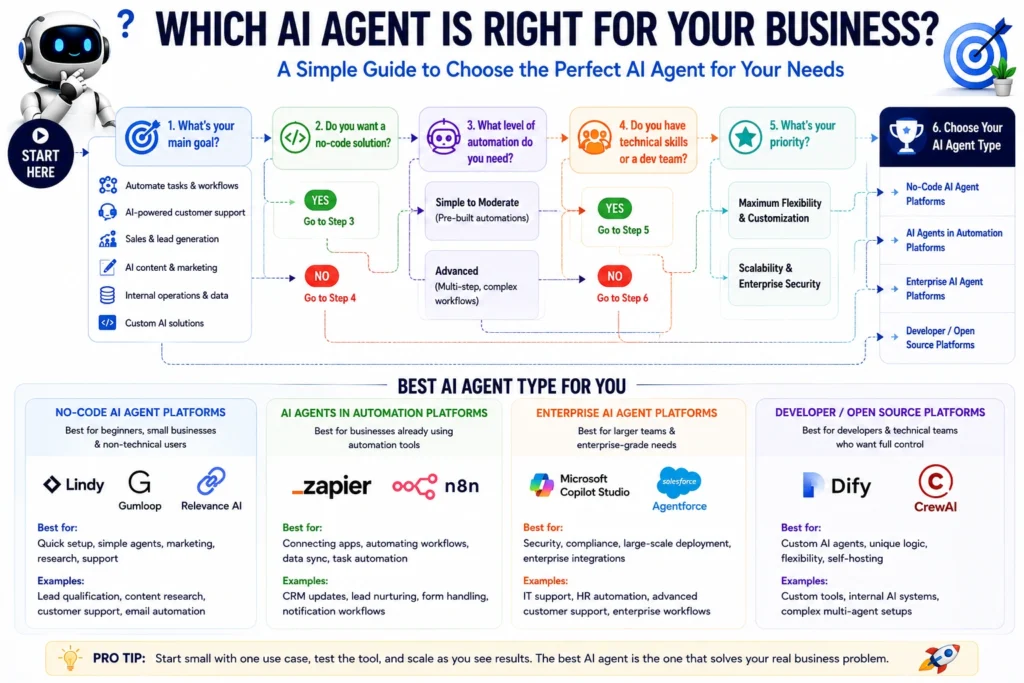
Start with budget. No-code tools like Lindy or Zapier Agents have predictable monthly pricing, while usage-based platforms like Relevance AI or Copilot Studio can scale up quickly if you’re not watching usage.
Next, be honest about technical skill. If nobody on your team can code, stick to no-code platforms. With a developer or technical operator on hand, n8n or Dify open up more flexibility for less money over time.
Consider business size. Small businesses generally do better with simple, no-code tools. Larger organizations with existing systems (Salesforce, Microsoft 365) often get more value from platforms built around those ecosystems, similar to how they’d evaluate AI project management tools.
Check required integrations — the platform should connect to the tools you already use, like your CRM, email, and support desk. Match the platform to your automation complexity: simple tasks don’t need an enterprise system, but complex, multi-agent processes might.
Finally, weigh privacy requirements and scalability. If you handle sensitive data, check security certifications and data residency options before committing.
Frequently Asked Questions
What is an AI agent for business? It’s software that completes multi-step tasks toward a goal, using tools and integrations, rather than just answering questions. It can take real actions like sending emails or updating records.
Are AI agents better than chatbots? Not universally — they serve different purposes. Chatbots are best for answering questions in conversation, while agents are built to take action across multiple systems.
Can small businesses use AI agents? Yes. No-code platforms like Lindy and Zapier Agents are built for small teams without technical staff, and most offer free trials to test before committing.
Are there free AI agents? Some platforms offer free tiers or free self-hosting, including n8n and Dify. Others, like Lindy, offer only a short free trial rather than an ongoing free plan.
Do AI agents require coding? No-code platforms like Lindy, Gumloop, and Zapier Agents don’t require coding. Developer-oriented tools like n8n and Dify are more flexible but benefit from technical skill.
Are AI agents safe for business data? It depends on the platform and how you configure permissions. Look for security certifications and clear data handling policies, and limit what an agent can do without review.
What is the difference between AI agents and automation? Traditional automation follows fixed if-this-then-that rules. AI agents use a language model to interpret context and decide what to do, even in situations not explicitly programmed in advance.
Which AI agent is best for beginners? Lindy is generally the easiest starting point thanks to its no-code builder and focus on email and scheduling, though Zapier Agents works well if you’re already using Zapier.
Final Verdict: Which AI Agent Should You Choose?
There’s no single winner, because “best” depends entirely on your situation. Beginners and small businesses will likely get the most value from Lindy or Zapier Agents, thanks to their no-code builders and manageable pricing. Marketing and sales teams that want coordinated, multi-step research should look at Relevance AI. Businesses focused on workflow automation at scale, especially technical teams, will get more mileage out of n8n. Large enterprises already invested in Salesforce or Microsoft 365 are better served by Agentforce or Copilot Studio, which plug directly into those systems. Developers building custom AI products should consider Dify.
Rather than trying to automate everything at once, start with one specific, painful business problem — a slow lead response time, an overflowing inbox, a repetitive report — and pick the tool built to solve that. Most of these platforms offer free trials or free tiers, so test one workflow before committing to a paid plan.
About the Author
Hi, We are the founders of EveryTechHub. We share beginner-friendly guides on AI tools, blogging, and technology based on hands-on testing and real experience. Read more about us.