
How to start a blog using AI is easier to understand in 2026 than it was a few years ago. You no longer need to be an expert writer, designer, or SEO specialist to get started. AI tools can assist with researching ideas, planning content, improving drafts, optimizing your workflow, and creating visuals.
However, AI does not build a successful blog on its own. You still need to choose the right niche, create genuinely useful content, review AI-generated information, and understand your audience.
In this beginner-friendly guide, you’ll learn how to start a blog using AI tools step by step, from choosing a niche and setting up WordPress to creating content, SEO, publishing, monetization, and long-term growth.
If you’re serious about blogging in 2026, this guide is for you.
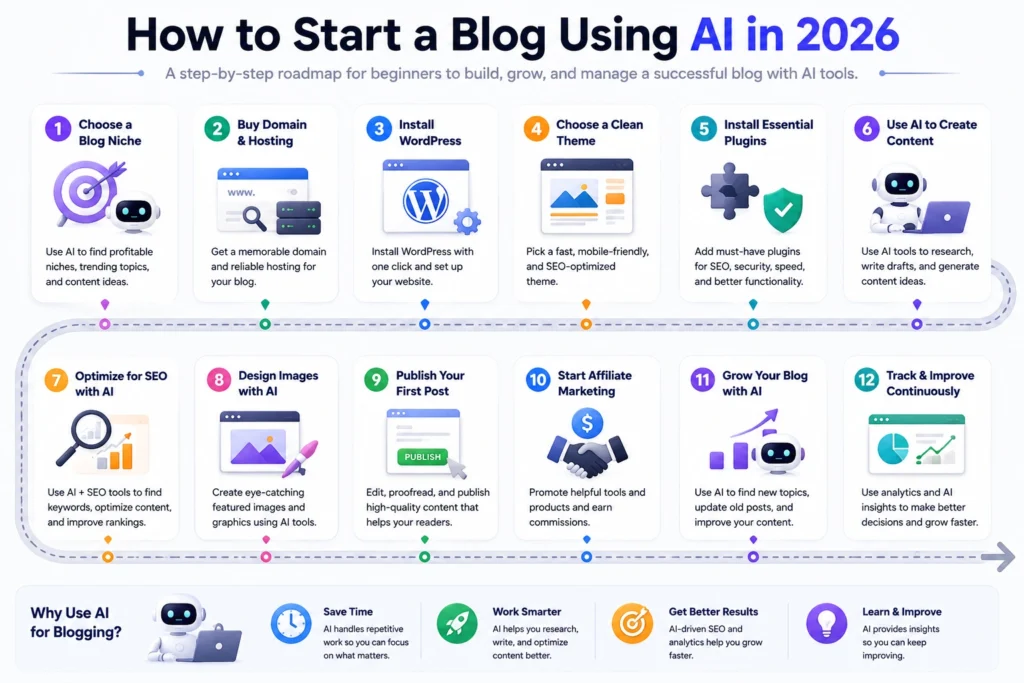
How to Start a Blog using AI in 2026
Step 1: Choose a Blog Niche (AI Can Help Here)
A niche is the main topic of your blog. Choosing the right niche is very important because it decides:
- What content you’ll write
- Who your readers are
- How you’ll make money
Popular Beginner-Friendly Niches
- AI tools & technology
- Blogging & digital tools
- Mobile & gadget reviews
- Affiliate marketing
- Online earning
How AI Helps You Choose a Niche
You can use tools like ChatGPT to:
- Find trending topics
- Check content ideas
- Validate beginner-friendly niches
Example prompt:“Suggest 10 blog niche ideas for beginners in the USA in 2026. For each niche, list the target audience, potential content categories, monetization options, and major competition risks.”
AI-generated niche ideas are only a starting point. Before committing to a niche, check whether people actually search for information about the topic, whether you can create useful content consistently, and whether there are realistic ways to monetize it. Don’t choose a niche only because an AI tool labels it “profitable.”
👉 Tip: Choose a niche you are curious about, not just money-focused.
Step 2: Buy Domain & Hosting
Once your niche is clear, you need:
- A domain name (your website name)
- Hosting (where your site lives online)
Beginner Recommendation
- Choose a .com domain
- Keep the name short & brandable
- Avoid numbers and hyphens
Example:
EveryTechHub.com (Great choice 👍)
Many hosting providers like Hostinger are beginner-friendly and affordable.
When comparing hosting providers, look beyond the introductory price. Check renewal pricing, WordPress support, performance, backups, security features, storage, and customer support. A slightly more expensive plan can be worthwhile if it provides the features and reliability your blog actually needs.
Step 3: Install WordPress
WordPress is the most popular blogging platform in the world.
Why WordPress?
- Free & flexible
- SEO-friendly
- Works perfectly with AI tools
- Thousands of themes & plugins
Most hosting providers allow 1-click WordPress installation.
If you’re still deciding which platform to use, check out our guide to the best blogging platforms for beginners before setting up your site.
Step 4: Choose a Clean Theme (AI Blogs Need Speed)
Your blog should load fast and look clean.
Best Free Themes for AI Blogs
- GeneratePress
- Astra
- Kadence
These themes:
- Are lightweight
- Work well with Elementor
- Are SEO-optimized
👉 Avoid heavy, flashy themes in the beginning.
Step 5: Install Essential Plugins
Plugins add features to your WordPress site.
Must-Have Plugins for Beginners
Useful WordPress plugins for beginners may include:
- Rank Math SEO – SEO settings and optimization
- Elementor – Page building and design
- WPForms – Contact forms
- LiteSpeed Cache – Caching and performance optimization
- Smush – Image compression
👉You don’t need every plugin listed above. Choose plugins based on your actual needs, and avoid installing multiple plugins that perform the same function.
Step 6: Use AI Tools to Create Blog Content
This is where AI becomes powerful.
For a closer look at AI-powered writing options, see our guide to the best AI tools for blog writing in 2026.
Best AI Tools for Blogging
1.ChatGPT
Use it for:
- Blog ideas
- Article outlines
- Draft writing
- Content rewriting
2.Writesonic
Use it for:
- SEO articles
- Affiliate reviews
- Product comparisons
3. Jasper AI (Optional)
Use it for:
- High-quality long blogs
- Marketing content
👉 Important: Never publish AI content without editing.
How to Create a Blog Content Strategy With AI
Starting a blog is only the first step. You also need a content strategy that tells you what to publish, who you’re writing for, and how different articles connect with each other.
AI can help you brainstorm and organize ideas, but you should make the final decisions based on your audience, search intent, competition, and your own expertise.
1. Choose Your Main Content Categories
Start with three to five closely related categories instead of trying to cover everything. This makes it easier to build topical depth and helps readers understand what your blog is about.
2. Find Supporting Topics
Ask AI to generate related questions, beginner problems, comparisons, tutorials, and practical use cases around your main topic.
3. Build Topic Clusters
Organize related articles around broader pillar topics. For example, a blogging site might have a pillar article about starting a blog, supported by articles about SEO, content writing, keyword research, affiliate marketing, and traffic growth.
4. Create a Realistic Publishing Schedule
Choose a publishing schedule you can maintain without sacrificing research, editing, or accuracy. Consistency is useful, but publishing more articles does not automatically mean better results.
Example AI prompt:
“Create a 30-day content plan for a beginner blog about [your niche]. Group the topics into content clusters, identify the main search intent for each topic, and avoid overlapping topics.”
Step 7: How to Write AI Content the Right Way
Google does not automatically treat AI-assisted content as low quality. What matters is whether the content is helpful, original, accurate, and created to genuinely serve readers rather than manipulate search rankings. For more details, see Google’s guidance on AI-generated content and its recommendations for creating helpful, people-first content.
Correct Way to Use AI
1.Generate draft using AI
2.Read it fully
3.Add human touch
4.Simplify sentences
5.Add examples & opinions
What You Should Add Manually
- Personal tone
- Beginner explanations
- Clear headings
- Honest recommendations
You should also verify important facts, product specifications, statistics, dates, pricing, and other information that may change over time. AI can produce confident-sounding mistakes, so publishing its output without checking it can reduce the reliability of your blog.
This keeps your content safe, helpful, and rank-ready.
Step 8: Create SEO-Friendly Blog Posts
SEO helps your blog appear on Google.
Basic SEO Tips for Beginners
- One main keyword per article
- Keyword in title & headings
- Short paragraphs
- Internal links
- Meta title & description
AI SEO Help
Rank Math AI can:
- Suggest keywords
- Optimize headings
- Improve readability
👉 Don’t over-optimize. Write for humans first.
SEO should support the reader experience rather than control every sentence. Use your target keyword naturally, answer the searcher’s question clearly, organize information with descriptive headings, and add internal links where they genuinely help readers explore related topics.
You can also explore our guide to the best AI tools for SEO for more ways to use AI during keyword research and content optimization.
Step 9: Design Blog Images Using AI
Images make your content more engaging.
Best AI Design Tool
Canva AI
You can create:
- Featured images
- Blog banners
- Pinterest graphics
No design experience needed.
👉 Always compress images for speed.
Step 10: Publish Your First Blog Post
Before publishing, check:
- Spelling and grammar
- Mobile and desktop layout
- Proper heading structure
- Internal links
- External sources where appropriate
- Image compression and descriptive alt text
- Meta title and meta description
- Affiliate disclosure, if applicable
- Whether the article actually answers the reader’s search intent
Your first few posts may not be perfect — and that’s okay.
Consistency matters more than perfection.
Set Up Google Search Console and Analytics
Once your blog is live, connect it to Google Search Console and an analytics platform so you can understand how your website performs.
Google Search Console can help you monitor search impressions, clicks, indexing, and the queries that bring visitors to your pages. Analytics can help you understand how visitors interact with your website.
You don’t need to obsess over the numbers when your blog is new. Instead, use the data to identify which topics are gaining visibility and which pages may need better content, titles, internal links, or search-intent alignment.
Step 11: Start Affiliate Marketing with AI Blogs
Affiliate marketing means promoting tools or products and earning commission.
If your goal is to turn your blog into a source of income, our guide on how to make money blogging with AI covers additional monetization strategies worth exploring.
Beginner-Friendly Affiliate Ideas
- AI tools
- Hosting services
- Blogging tools
- Software subscriptions
How AI Helps Affiliate Blogging
- Product reviews
- Comparison tables
- Pros & cons
- Buying guides
👉 Always disclose affiliate links clearly.
Before applying to affiliate programs, explore our guide to the best affiliate programs for beginners to understand some options and what to consider when choosing one.
Step 12: Grow Your Blog Faster Using AI
Once your blog has some content published, our guide on how to increase blog traffic can help you explore additional ways to attract and retain readers.
AI can help you:
- Update old posts
- Find new keywords
- Generate content ideas
- Improve SEO
Growth Strategy for Beginners
- Publish on a sustainable schedule that allows you to maintain quality. For some beginners, that might mean one well-researched article per week rather than several rushed posts.
- Focus on helpful content
- Build trust, not spam
Common Mistakes Beginners Should Avoid
❌ Publishing AI content without editing
❌ Copying content from others
❌ Expecting instant income
❌ Ignoring SEO basics
❌ Giving up too early
Blogging is a long-term game, but AI makes it faster.
A successful blog is not built by publishing as much as possible. It is built by consistently creating useful content, learning from readers and search data, and improving the site over time.
A Simple 30-Day Plan for Starting a Blog With AI
Week 1: Build the Foundation
Choose your niche, validate your idea, select a domain, buy hosting, install WordPress, and set up the basic design.
Week 2: Build Your Content Strategy
Choose your main content categories, research topics, create a simple content cluster, and plan your first several articles.
Week 3: Publish and Optimize
Write and edit your first articles, optimize them for search intent, add internal links, create useful images, and check the mobile experience.
Week 4: Measure and Improve
Set up Google Search Console and analytics, monitor early search data, fix technical issues, improve existing articles, and plan your next content topics.
The goal of your first 30 days is not to build a huge website. It is to create a solid foundation and establish a repeatable blogging workflow.
Final Thoughts
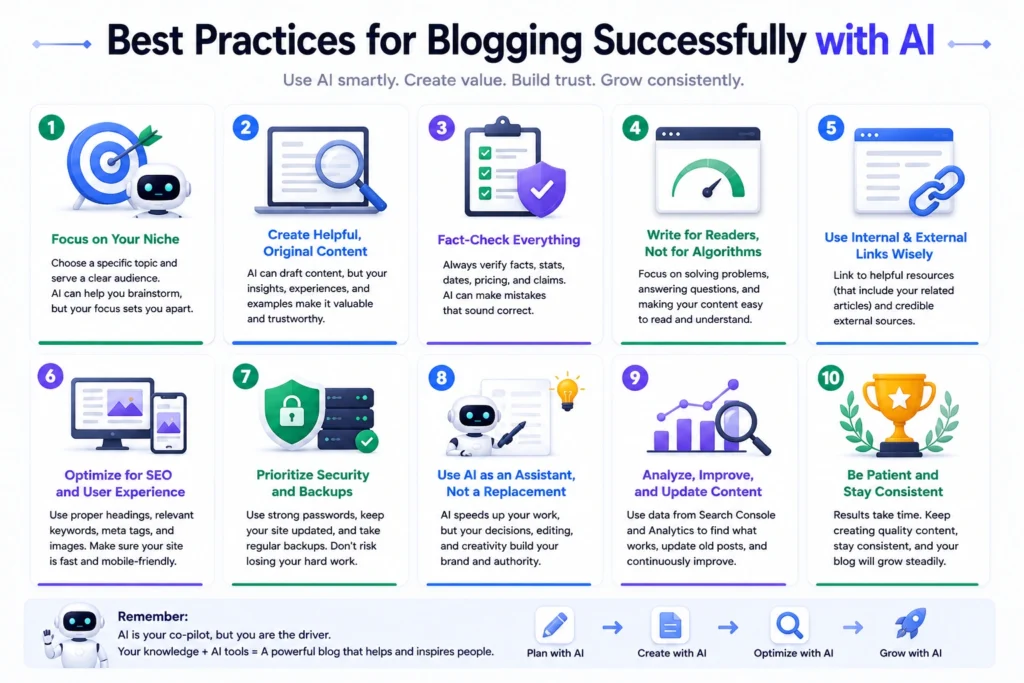
Starting a blog using AI tools can make the process more efficient, but AI should support your decisions rather than replace them.
Start with a focused niche, build a clear content strategy, use AI to speed up research and content workflows, and carefully review everything before publishing. As your blog grows, use search and analytics data to understand what readers need and where your content can improve.
If you stay focused on creating genuinely useful content and improving your website over time, you can build a stronger foundation for long-term traffic and monetization.
AI is your assistant—not your replacement.
About the Author
Hi, We are the founders of EveryTechHub. I share beginner-friendly guides on AI tools, blogging, and technology based on hands-on testing and real experience. 👉Read more about us.