
Disclosure: This article contains affiliate links. If you purchase through these links, I may earn a commission at no extra cost to you.
Creating content consistently can be difficult when you’re responsible for everything from research and writing to design, editing, publishing, and promotion. In 2026, AI tools can help content creators reduce repetitive work, generate ideas, organize projects, and speed up parts of the content-production process.
However, AI is not a replacement for creativity, expertise, or human judgment. The best results usually come from using AI for specific tasks while you remain responsible for the ideas, accuracy, editing, and final quality.
In this guide, you’ll discover some of the best AI tools for content creators in 2026, what each tool is best suited for, its strengths and limitations, and how to combine different tools into a practical content workflow.

Best AI Tools for Content Creators in 2026
- ChatGPT
- Jasper AI
- Writesonic
- Canva AI
- Pictory AI
- Notion AI
Why Content Creators Are Using AI Tools in 2026
Content creators use AI tools for very practical reasons:
- Save time on repetitive tasks like drafts and captions
- Overcome creative blocks on slow days
- Publish content more consistently
- Improve structure and clarity
- Scale output without hiring a team
👉 AI doesn’t replace creativity — it supports it.
Quick Comparison: Best AI Tools for Content Creators
| Tool | Best For | Best Use Case | Free Plan |
| ChatGPT | Ideas & drafts | Text | Yes |
| Jasper AI | Professional writing | Blogs, scripts | No |
| Writesonic | SEO content | Blogs, ads | Yes |
| Canva AI | Visual content | Images, videos | Yes |
| Pictory AI | Video creation | Videos | Yes |
| Notion AI | Planning & workflow | Notes, outlines | Yes |
1. ChatGPT – Best AI Tool for Ideas & Draft Content
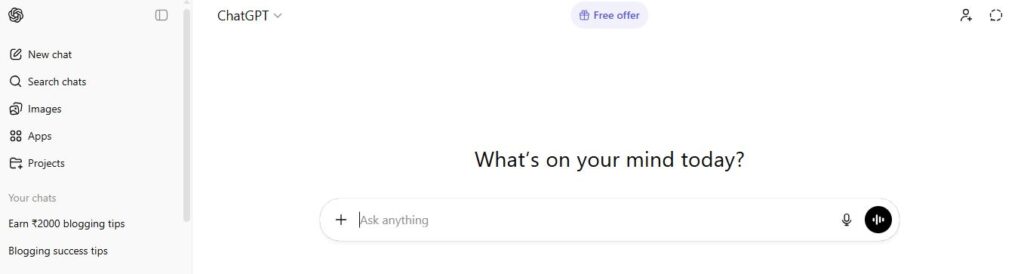
ChatGPT dashboard interface used for generating content ideas and drafts.
ChatGPT is often the first AI tool content creators try — and for good reason. It’s excellent for brainstorming ideas, writing rough drafts, and improving existing content.
Key Features
- Blog ideas and outlines
- Script writing
- Caption generation
- Content rewriting
- Prompt-based interaction
Pros
- Free version available
- Very versatile
- Easy to use
Cons
- Not SEO-focused
- Needs good prompts
- Can sound generic without editing
Best For
- Beginners
- Idea generation
- First drafts
Practical Example
A blogger could use ChatGPT to brainstorm article ideas, create a detailed outline, and generate a first draft. The blogger can then add personal insights, fact-check important information, and edit the content before publishing.
👉 ChatGPT is a great starting point, but most creators combine it with SEO or design tools for better results.
If your main focus is blogging, you can also explore our guide to the best AI tools for blog writing in 2026.
2. Jasper AI – Best for Professional Content Creators
Jasper AI is designed for creators who publish content regularly and professionally. I usually recommend Jasper when someone wants long-form blogs or scripts without burning out.
Key Features
- Long-form blog editor
- Brand voice customization
- Content expansion & rewriting
- Marketing templates
Pros
- High-quality output
- Ideal for blogs and scripts
- Saves significant time
Cons
- No free plan
- Premium pricing
Pricing
Starts around $39/month. Plans and pricing can change, so check the official website for the latest options.
Best For
- Bloggers
- Affiliate marketers
- Agencies
Practical Example
A content creator working with multiple clients could use Jasper to create initial drafts and marketing copy while maintaining a more consistent brand voice. The final content should still be reviewed and edited to match the client’s goals and audience.
👉 Jasper AI is best suited for creators who want quality + consistency.
3. Writesonic – Best AI Tool for SEO Content
Writesonic is one of the most beginner-friendly AI tools for writing SEO-focused content. It’s a strong option if you’re starting a blog or niche website.
Key Features
- AI article writer
- SEO-optimized content
- ChatGPT-style chatbot
- Blog outlines & expansions
Pros
- Free plan available
- Good for ranking content
- Easy to use
Cons
- Needs light editing
- Limited advanced controls
Pricing
Free plan available; paid plans are available with additional features. Check the official website for current pricing.
Best For
- New bloggers
- Niche websites
- Freelancers
Practical Example
A niche blogger could use Writesonic to turn a content idea into an outline and initial draft, then improve the article with original examples, accurate information, internal links, and a clear structure before publishing.
4. Canva AI – Best AI Tool for Visual Content Creators
Content isn’t just text. Canva AI helps creators design images, thumbnails, presentations, and short videos without design skills.
Key Features
- AI image generation
- Magic design
- Video editing
- Social media templates
Pros
- Extremely beginner-friendly
- Free plan available
- Huge template library
Cons
- Limited advanced editing
- AI images may need tweaking
Best For
- Instagram creators
- YouTubers
- Bloggers needing visuals
Practical Example
A YouTube creator could use Canva AI to create a video thumbnail and supporting social media graphics from the same content idea. The creator can then customize the design to match their brand style and audience.
👉 Canva AI is almost essential if you create visual or social content.
5. Pictory AI – Best AI Tool for Video Creators
Pictory AI is perfect for creators who want to turn blog posts or scripts into videos without learning video editing.
Key Features
- Text-to-video
- Blog-to-video conversion
- Automatic captions
- Stock media library
Pros
- No editing skills required
- Saves time
- Ideal for short-form videos
Cons
- Limited customization
- Branding requires paid plan
Pricing
Free trial available
paid plans are available with additional features. Check the official website for current pricing.
Best For
- YouTubers
- Faceless channels
- Reels & Shorts creators
Practical Example
A blogger could repurpose an existing article into a video by turning the main points into a script and using Pictory to create a visual draft. The creator can then review the visuals, captions, and overall accuracy before publishing.
6. Notion AI – Best for Content Planning & Workflow
Notion AI isn’t a writing tool in the traditional sense, but it’s incredibly useful for planning, organizing ideas, and managing workflows.
Key Features
- AI writing assistant
- Content planning
- Task management
- Idea organization
Pros
- Improves productivity
- Free plan available
- Works well for solo creators
Cons
- Not a full writing tool
- Requires initial setup
Best For
- Content planning
- Editorial calendars
- Workflow management
Practical Example
A solo content creator could use Notion AI to organize content ideas, create a weekly publishing schedule, track drafts, and manage tasks from research to publication in one workspace.
How to Build an AI Content Creation Workflow
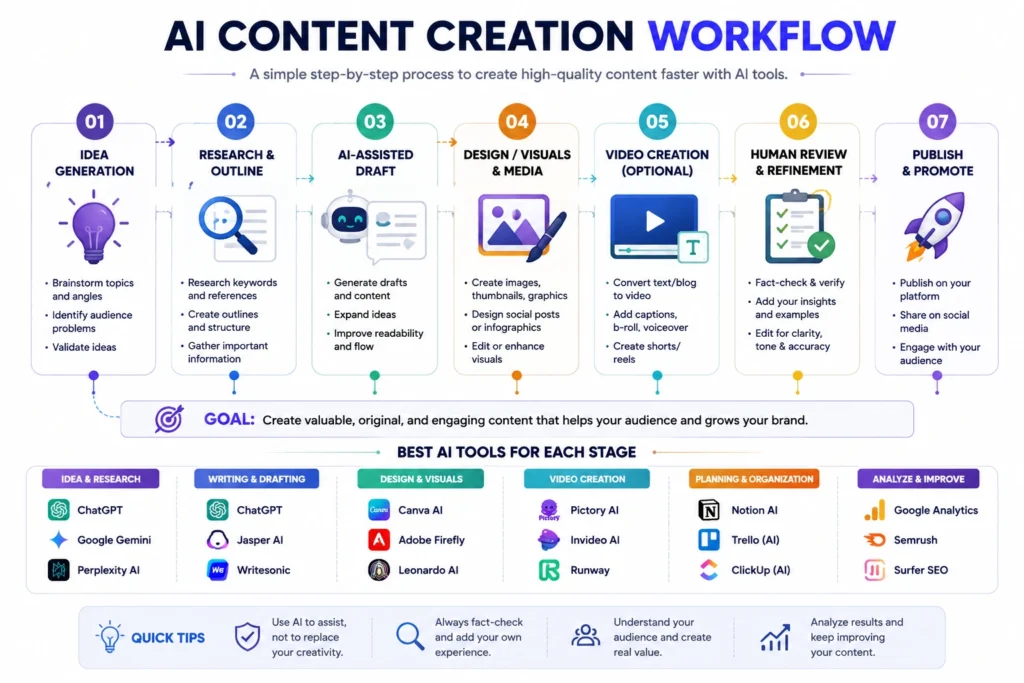
AI tools are most useful when they work together as part of a simple workflow rather than being used randomly. You don’t need a dozen tools to create content; a small combination of tools can handle different stages of the process.
1. Research & Idea Generation
Use AI to brainstorm topics, audience questions, content angles, and outlines.
2. Writing & Scripting
Use a writing assistant to create a first draft or script, then add your own expertise and examples.
3. Design & Visuals
Use a design tool to create thumbnails, social graphics, blog images, or presentations.
4. Video Creation
For video content, AI can help convert scripts or articles into videos, captions, or short-form content.
5. Planning & Organization
Store ideas, content calendars, drafts, and publishing tasks in one organized workspace.
6. Human Review
Before publishing, check facts, originality, tone, formatting, copyright considerations, and overall quality.
How to Choose the Best AI Tool for Content Creation
Ask yourself:
- What type of content do I create?
- Do I need SEO optimization?
- Am I a beginner or professional?
- What’s my budget?
The best AI tool depends less on popularity and more on the specific task you need to complete. You don’t need every tool on this list. Start with the tool that solves your biggest content-creation challenge, then add another tool only when it provides a clear benefit.
Choose based on your main content task:
- For writing and brainstorming: ChatGPT
- For brand-focused writing: Jasper AI
- For SEO-focused content: Writesonic
- For graphics and social media content: Canva AI
- For turning text into videos: Pictory AI
- For content planning and organization: Notion AI
Simple Recommendations
- Beginner: ChatGPT + Writesonic + Canva
- Blogger: Writesonic or ChatGPT + Canva
- Video creator: Pictory AI + ChatGPT
- All-rounder: ChatGPT + Canva + Notion AI
Free vs Paid AI Tools for Content Creators
Use Free Tools If:
- You’re just starting
- You publish occasionally
- You’re testing content creation
Use Paid Tools If:
- You publish consistently
- You monetize content
- You value time over money
👉 Paid AI tools can be worthwhile when they solve a recurring problem or save enough time to justify their cost. However, paying for more tools does not automatically produce better content. Start with free options, understand your workflow, and upgrade when you actually need additional features or higher usage limits.
Can AI Tools Help You Earn Money?
AI tools can support several content-based business models, but they don’t guarantee income. Your results depend on the quality of your content, audience, distribution, skills, and business model.
Examples
Bloggers
- Research and outline articles
- Create supporting visuals
- Repurpose existing content
If you’re planning to build a blog with AI, our beginner guide on how to start a blog using AI walks through the setup, content, SEO, and growth process.
YouTubers
- Brainstorm topics
- Draft scripts
- Create captions and supporting visuals
Freelancers
- Speed up research and drafts
- Create client deliverables
- Automate repetitive tasks
Freelancers can also explore our guide to the best AI tools for freelancers in 2026 for tools that can support client work and productivity.
Social media creators
- Generate content ideas
- Repurpose long-form content
- Create graphics and captions
For creators focused primarily on social platforms, see our guide to the best AI tools for social media marketing in 2026.
Digital product creators
- Research audience problems
- Outline ebooks or templates
- Create promotional content
How to Use AI Without Losing Your Creative Voice
AI can speed up parts of content creation, but publishing unedited AI output can make your content feel generic. Use AI to support your creative process while keeping your own perspective, experience, examples, and judgment at the center.
- Add your own examples and opinions
- Fact-check important claims
- Rewrite generic sections
- Avoid copying AI output blindly
- Review tone and accuracy
- Make sure the final content actually helps the audience
Frequently Asked Questions
Are AI tools good for beginners?
Yes. Many AI tools are designed for users without technical experience. Beginners can start with simple tasks such as brainstorming, summarizing, outlining, image creation, or editing before moving to more advanced workflows.
Is AI-generated content safe for Google?
Using AI does not automatically determine whether content will perform well in Google Search. What matters is whether the final content is useful, reliable, original, and created primarily for people rather than to manipulate search rankings.
Do AI tools replace content creators?
No. AI can assist with research, drafting, editing, design, and other repetitive tasks, but creators still provide strategy, creativity, judgment, expertise, and final quality control.
Can I use multiple AI tools together?
Yes. Different tools are often better suited to different tasks. For example, you might use ChatGPT for ideation, Canva for visuals, Pictory for video, and Notion for planning.
Final Thoughts
AI has made content creation faster and more accessible than ever. With the right AI tools for content creators, you can save time, stay consistent, and scale without burnout.
Start simple. Learn one tool properly. Upgrade as your content grows.
👉 Need Help Choosing the Right AI Tools?
If you’re confused about which AI tools suit your goals or need custom prompts and beginner-friendly guidance, I offer AI tool recommendation & prompt help for content creators.
👉 Contact me here → contact@everytechhub.com
About the Author
Hi, We are the founders of EveryTechHub. We share beginner-friendly guides on AI tools, blogging, and technology based on hands-on testing and real experience. 👉Read more about us.