
Want to make your blogging workflow more efficient? ChatGPT can help you brainstorm topics, organize article outlines, improve drafts, create SEO elements, and repurpose content for different platforms.
The quality of the output depends on more than the prompt alone. Clear instructions, relevant context, fact-checking, and human editing all play an important role.
In this guide, you’ll find practical ChatGPT prompts for blog ideas, article writing, SEO, business and marketing, affiliate content, social media, and content improvement. You can customize each prompt for your niche, audience, and goals.
Important: AI can support your blogging process, but it cannot guarantee search rankings, traffic, or income. Review and improve the output before publishing.
Why Bloggers Are Using ChatGPT
Blogging involves more than writing articles. Bloggers also need to research topics, organize ideas, improve drafts, optimize content for search engines, and promote their posts.
ChatGPT can assist with many of these tasks when you provide clear instructions and review the results carefully.
Here are some ways bloggers use ChatGPT:
- Brainstorm content ideas: Explore topics and angles relevant to your niche and audience.
- Organize article outlines: Turn a topic into a clear structure with headings and subheadings.
- Improve writing: Make drafts clearer, easier to read, and better organized.
- Support SEO tasks: Generate title ideas, meta descriptions, and content optimization suggestions.
- Repurpose content: Adapt blog posts into social media captions, email drafts, or short video scripts.
- Save time on repetitive tasks: Create first drafts of content briefs, checklists, and editorial plans.
ChatGPT is an assistant, not a replacement for research or editorial judgment. Always verify important facts, add relevant examples or experience, and make sure the finished content genuinely helps your readers.
For bloggers targeting a US audience, the same principle applies: understand the needs of your intended readers and create content that addresses those needs. Using ChatGPT alone does not guarantee rankings, traffic, or income.
What Are ChatGPT Prompts?
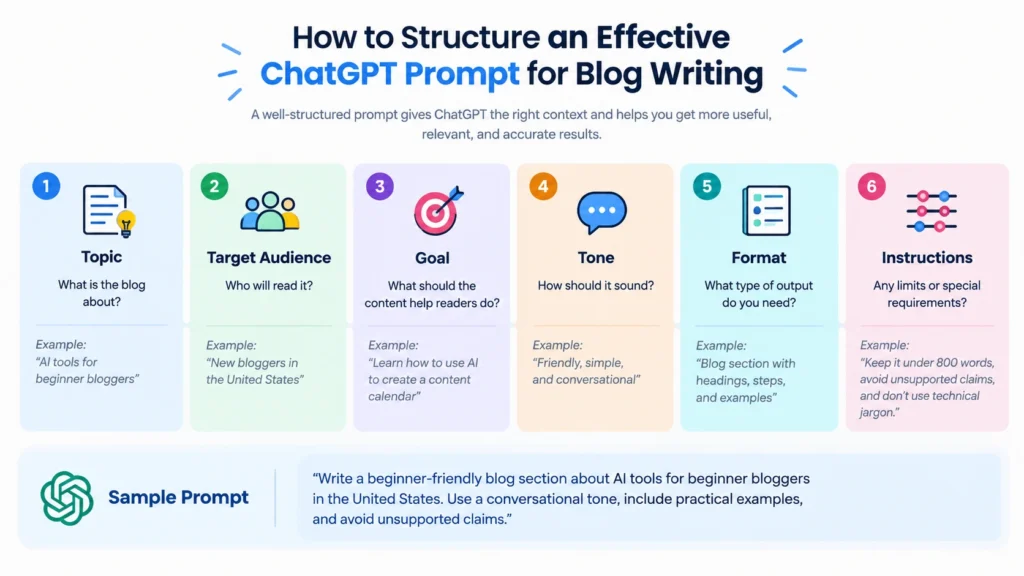
ChatGPT prompts are instructions or questions you give ChatGPT to help it complete a task. A prompt can be a simple question, a detailed request, or a set of instructions that includes your topic, audience, tone, and desired output.
For bloggers, ChatGPT prompts can help with brainstorming article ideas, creating outlines, improving drafts, writing meta descriptions, and planning content.
Example of a Basic ChatGPT Prompt
Prompt:
“Suggest 10 blog post ideas about AI tools for beginners.”
This prompt gives ChatGPT a topic and a task. However, the results may be more useful if you also specify your target audience, content goals, and preferred format.
Example of a More Specific Prompt
Prompt:
“Suggest 10 blog post ideas about AI tools for beginner bloggers in the United States. Focus on practical problems beginners want to solve. For each idea, provide a suggested title and a one-sentence explanation. Do not claim that a topic has low competition unless you have reliable data to support it.”
The second prompt provides more context and explains how the results should be presented.
Tip: A detailed prompt can help you get more relevant output, but it does not guarantee that the response will be accurate or useful. Review the results and verify important information before using them in your blog.
1. ChatGPT Prompts for Blog Ideas
Finding useful blog topics can be challenging, especially when you are just starting out. ChatGPT can help you brainstorm ideas based on your niche, target audience, and content goals.
Use the following prompts to discover potential topics for your blog.
Prompt 1: Generate Blog Post Ideas
Prompt:
“Act as a blog content strategist. Suggest 15 blog post ideas for a blog about [your niche], targeting [your target audience]. Focus on practical problems, common questions, and topics readers may want to learn about. For each idea, provide a suggested title and a one-sentence description.”
Prompt 2: Find Specific Content Angles
Prompt:
“Suggest 10 specific blog post angles about [topic] for [target audience]. Avoid broad or repetitive ideas. Focus on beginner questions, common challenges, comparisons, tutorials, and practical use cases.”
Prompt 3: Build a Topic Cluster
Prompt:
“Create a topic cluster for a blog about [your niche]. Suggest one main pillar topic and 8 related supporting article ideas. Explain how each supporting article relates to the main topic. Avoid suggesting duplicate topics.”
Prompt 4: Brainstorm Seasonal Content
Prompt:
“Suggest 10 blog post ideas related to [your niche] that may be relevant during [month, season, or event] for readers in [target country]. For each idea, explain why it may be timely and what readers could learn from it. Do not claim that a topic is trending without supporting data.”
Prompt 5: Identify Reader Questions
Prompt:
“List 15 questions that beginners interested in [topic] may ask before trying, buying, or learning about it. Group the questions into suitable blog post topics. Keep the questions specific and avoid repeating the same intent.”
Tip: Use these prompts to brainstorm ideas, not to confirm keyword difficulty or search demand. Before choosing a topic, check whether it matches your audience and validate it using keyword research and search results.
2. ChatGPT Prompts for Writing Blog Posts
Writing a helpful blog post takes more than choosing a topic and asking AI to write an article. You need a clear structure, useful information, a natural tone, and content that answers readers’ questions. ChatGPT can help with each stage of the writing process—from creating an outline to improving a draft.
The following prompts are designed for bloggers who want to use ChatGPT as a writing assistant while keeping their own expertise, experience, and editorial judgment at the center.
1. Create a Blog Post Outline
Use this prompt to organize your ideas before drafting the article.
Prompt:
“Act as an experienced blog editor. Create a detailed outline for a blog post about [TOPIC] for [TARGET AUDIENCE]. Include an engaging introduction, logical H2 and H3 headings, key points to cover under each section, and a helpful conclusion. Identify questions readers may have about this topic. Avoid repetitive headings and make the outline easy to follow.”
2. Write an Engaging Introduction
A good introduction helps readers understand what the article covers and why it may be useful to them.
Prompt:
“Write a clear, engaging introduction for a blog post about [TOPIC]. The target audience is [TARGET AUDIENCE]. Briefly explain the reader’s problem or goal, introduce what the article will cover, and set realistic expectations. Use a natural, conversational tone. Avoid exaggerated claims, unnecessary filler, and generic openings.”
3. Draft a Helpful Blog Section
Use this when you want to write one section at a time instead of generating an entire article at once.
Prompt:
“Write a detailed blog section for the heading ‘[HEADING]’ in an article about [TOPIC]. Explain the main idea in simple language for [TARGET AUDIENCE]. Include practical steps, relevant examples, and useful details where appropriate. Avoid repeating information from other sections. Do not invent statistics, personal experiences, or unsupported claims.”
4. Explain a Complex Topic in Simple Language
This prompt can help make technical or unfamiliar subjects easier for beginners to understand.
Prompt:
“Explain [COMPLEX TOPIC] in simple, beginner-friendly language. Assume the reader has no prior knowledge of the subject. Break the explanation into clear steps, define important terms, and include a relatable example. Keep the explanation accurate and avoid oversimplifying important details.”
5. Add Practical Examples to a Blog Post
Examples can help readers understand how to apply the information in real situations.
Prompt:
“Review this blog section: [PASTE SECTION]. Suggest three practical examples that would help readers understand the concepts. For each example, explain the situation, how the advice could be applied, and what the reader should learn from it. Clearly label hypothetical examples and do not present them as real case studies.”
6. Write a Clear Conclusion
A conclusion should summarize the main takeaway and give readers a useful next step.
Prompt:
“Write a concise conclusion for my blog post about [TOPIC]. Summarize the most important takeaways without repeating the introduction word for word. End with one practical next step the reader can take. Use a helpful, natural tone and avoid exaggerated promises or pushy language.”
Tip: Treat ChatGPT’s output as a first draft, not a finished article. Check factual claims, add your own insights, verify examples, and edit the content so it genuinely helps your readers.
3. ChatGPT Prompts for Writing
Good blog writing should be clear, engaging, and easy for readers to understand. ChatGPT can help you improve sentence structure, simplify complex ideas, and adapt your writing style to your target audience.
Try these prompts to improve your blog content.
Prompt 1: Make Writing Clearer
Prompt:
“Review the following text and rewrite it to make it clearer and easier to understand. Keep the original meaning, remove unnecessary wording, and use simple language suitable for [target audience].
Text: [paste your text]”
Prompt 2: Improve Readability
Prompt:
“Improve the readability of the following blog content. Break up long sentences, remove unnecessary repetition, and improve the flow between ideas. Keep the tone natural and conversational without changing the facts.
Content: [paste your text]”
Prompt 3: Simplify Complex Information
Prompt:
“Explain the following concept in simple language for beginners. Use a short explanation and one practical example. Avoid unnecessary technical terms, and explain any technical term that is important.
Concept: [insert concept]”
Prompt 4: Improve Transitions Between Paragraphs
Prompt:
“Review the following paragraphs and improve the transitions between them. Make the content flow naturally from one idea to the next without adding new claims or repeating the same information.
Text: [paste paragraphs]”
Prompt 5: Adjust the Writing Tone
Prompt:
“Rewrite the following content in a [friendly/professional/conversational] tone for [target audience]. Keep it informative and natural. Avoid exaggerated claims, unnecessary hype, and generic filler phrases.
Content: [paste your text]”
Tip: Use ChatGPT to improve your draft, not to remove your own perspective. Review the rewritten version and make sure it still reflects your intended meaning and provides accurate information.
4. ChatGPT Prompts for SEO
ChatGPT can assist with SEO-related tasks such as generating title ideas, organizing headings, drafting meta descriptions, and identifying topics to investigate. However, its suggestions should be checked against search results and reliable keyword research data.
Prompt 1: Generate SEO Title Ideas
Prompt:
“Suggest 10 SEO title ideas for a blog post about [topic], targeting [target audience]. Keep each title clear, specific, and relevant to the reader’s search intent. Avoid clickbait and unsupported claims.”
Prompt 2: Create a Meta Description
Prompt:
“Write 3 meta description options for a blog post about [topic]. The primary keyword is [keyword]. Keep each description concise, informative, and relevant to the page. Avoid keyword stuffing and exaggerated promises.”
Prompt 3: Create an SEO Heading Structure
Prompt:
“Create a clear H1, H2, and H3 outline for an article about [topic], targeting [audience]. Organize the headings around the reader’s likely questions and search intent. Avoid repetitive headings and include practical sections where relevant.”
Prompt 4: Suggest Related Keywords and Topics
Prompt:
“Suggest related search terms, subtopics, and questions connected to [main topic]. Group them by search intent, such as informational, comparison, and transactional. Treat these as brainstorming ideas, not verified search-volume or keyword-difficulty data.”
Prompt 5: Review Content for On-Page SEO
Prompt:
“Review the following article for on-page SEO and readability. Check whether it addresses the likely search intent, uses clear headings, covers relevant subtopics, and includes the primary keyword naturally. Identify areas that may need improvement, but do not add unsupported facts or recommend keyword stuffing.
Article: [paste your content]
Primary keyword: [keyword]”
Tip: ChatGPT can help generate SEO ideas, but it cannot guarantee rankings. Validate keywords and review search results before making major content decisions.
5. ChatGPT Prompts for Business & Marketing
ChatGPT can help brainstorm marketing ideas, draft promotional content, and organize business communication. The following prompts can be adapted for a blog, online store, freelance service, or small business.
Prompt 1: Create a Marketing Plan
Prompt:
“Create a 30-day marketing plan for [business or website] targeting [audience]. Include realistic weekly goals, content ideas, promotional activities, and ways to measure progress. Assume a budget of [budget]. Clearly separate suggestions from any facts that need verification.”
Prompt 2: Write Promotional Copy
Prompt:
“Write 3 versions of promotional copy for [product or service] aimed at [target audience]. Explain the main benefit, include a clear call to action, and use a [friendly/professional] tone. Do not invent features, discounts, testimonials, or guarantees.”
Prompt 3: Draft an Email Campaign
Prompt:
“Create a 3-email campaign for [product, service, or newsletter] targeting [audience]. For each email, provide a subject line, preview text, body copy, and call to action. Keep the messages useful and avoid misleading urgency or unsupported claims.”
Prompt 4: Improve a Product Description
Prompt:
“Rewrite the following product description to make it clearer and more helpful for potential customers. Highlight only the verified features and benefits. Use concise language and include a natural call to action.
Product details: [paste verified details]”
Prompt 5: Brainstorm Marketing Content
Prompt:
“Suggest 15 content ideas to promote [product, service, or website] to [target audience]. Include educational posts, common questions, use cases, and product-related content. For each idea, suggest a suitable platform and format.”
Tip: Treat AI-generated marketing copy as a draft. Confirm product details, prices, claims, and terms before publishing.
6. ChatGPT Prompts for Affiliate Blogging
Affiliate content should help readers understand a product and decide whether it fits their needs. ChatGPT can help structure reviews and comparisons, but it should not invent product testing, personal experiences, or performance claims.
Prompt 1: Create a Product Review Outline
Prompt:
“Create a detailed outline for an honest review of [product name] for [target audience]. Include who the product may suit, key features to verify, pros and cons, limitations, alternatives, pricing details to check, and questions readers may have. Do not invent hands-on experience or product claims.”
Prompt 2: Compare Two Products
Prompt:
“Create a comparison outline for [Product A] vs [Product B]. Compare them using these criteria: [list criteria]. Use only the verified product information I provide. Identify missing details that need research, and avoid declaring a winner unless the evidence and reader requirements support that conclusion.
Product information: [paste verified details]”
Prompt 3: Create a Buying Guide
Prompt:
“Create a beginner-friendly buying guide outline for [product category]. Explain the main features buyers should consider, common mistakes, budget considerations, and different user needs. Keep the advice practical and avoid unsupported product recommendations.”
Prompt 4: Write a Helpful Affiliate CTA
Prompt:
“Write 5 clear and non-pushy call-to-action options for an article about [product]. Help readers understand what they can do next. Avoid false urgency, guaranteed results, or claims that are not supported by the product information.”
Prompt 5: Review Affiliate Content for Usefulness
Prompt:
“Review the following affiliate article from a reader’s perspective. Identify missing information, unclear comparisons, unsupported claims, and places where the article could better explain who the product is or is not suitable for.
Article: [paste article]
Do not invent testing results, personal experience, or product specifications.”
Tip: Disclose affiliate relationships clearly and follow the applicable affiliate program requirements. Always verify product details and make sure the content provides value beyond simply encouraging a purchase.
7. ChatGPT Prompts for Social Media & Traffic
Repurposing blog content can help you share useful information across different platforms. ChatGPT can adapt a blog post into captions, short scripts, and promotional ideas while keeping the main message consistent.
Prompt 1: Create Pinterest Pin Titles
Prompt:
“Suggest 5 Pinterest pin titles and descriptions for a blog post about [topic]. Target [audience]. Make them clear, relevant, and specific to the article’s actual content. Avoid clickbait and claims that the article does not support.”
Prompt 2: Write an Instagram Caption
Prompt:
“Write 3 Instagram captions to promote my blog post about [topic]. Use a [friendly/educational] tone, start with an engaging but accurate hook, summarize one useful takeaway, and end with a natural call to action.”
Prompt 3: Generate Short-Form Video Ideas
Prompt:
“Suggest 10 short-form video ideas based on this blog post: [paste link or summary]. For each idea, provide a hook, the main point, and a suggested visual. Make sure each idea can stand alone and does not misrepresent the article.”
Prompt 4: Write a Short Video Script
Prompt:
“Write a 30-second video script based on [topic] for [platform]. Include a concise opening hook, 2–3 useful points, and a clear closing line. Use natural spoken language and avoid exaggerated promises.”
Prompt 5: Repurpose a Blog Post
Prompt:
“Turn the following blog post into: 1 Instagram caption, 1 Pinterest description, 1 short email newsletter, and 3 short video ideas. Keep the core information accurate, adapt the format to each platform, and do not add claims that are absent from the source.
Blog post: [paste content]”
Tip: Adapt the output to each platform instead of posting identical text everywhere. Check each platform’s current content and promotional rules before publishing.
8. ChatGPT Prompts to Improve Existing Content
Updating older articles can help you keep information relevant and improve the reader experience. ChatGPT can assist with identifying unclear sections, repetition, and missing explanations.
Prompt 1: Find Content Gaps
Prompt:
“Review the following article and identify questions or subtopics that may be missing for its intended audience. Separate essential gaps from optional additions. Do not recommend adding sections that repeat information already covered.
Article: [paste content]
Target audience: [audience]”
Prompt 2: Remove Repetition
Prompt:
“Review the following text for repeated ideas, unnecessary sentences, and filler. Suggest what to remove or combine while preserving important details and the original meaning.
Text: [paste content]”
Prompt 3: Add Practical Examples
Prompt:
“Suggest 3 practical examples that could help readers understand the following section. Clearly label them as illustrative examples, and do not present invented experiences, statistics, or outcomes as real.
Section: [paste section]”
Prompt 4: Create a Content Update Checklist
Prompt:
“Create a checklist for reviewing an older article about [topic]. Include information that may become outdated, links to check, product details to verify, readability, search intent, and opportunities to add useful examples. Do not assume the article needs a complete rewrite.”
Prompt 5: Review the Final Draft
Prompt:
“Act as a careful blog editor. Review this draft for clarity, accuracy risks, repetition, grammar, and usefulness. List the issues with suggested fixes. Do not rewrite the entire article unless I ask you to.
Draft: [paste content]”
Tip: Before updating an old post, check its current performance and identify the specific problem you want to solve. Avoid changing content that is already performing well without a clear reason.
Example: How to Use ChatGPT Prompts for Blogging
Here are a few illustrative examples showing how a blogger can customize prompts for different tasks.
Example 1: Generate Blog Ideas
Goal: Find topic ideas for a beginner-focused AI blog.
Prompt:
“Suggest 10 blog post ideas about AI tools for beginner bloggers in the United States. Focus on practical problems and questions. For each idea, provide a suggested title and a one-sentence explanation. Do not claim that any topic has low competition without supporting data.”
Example output idea:
- How to Use AI to Create a Blog Content Calendar
- How Beginners Can Use AI to Improve Blog Drafts
These are brainstorming examples, not verified keyword opportunities. Check search intent and keyword data before selecting a topic.
Example 2: Create an Article Outline
Goal: Organize an article before writing.
Prompt:
“Create a beginner-friendly outline for an article about [topic]. Include a clear introduction, logical H2 and H3 headings, practical examples, common mistakes, and FAQs based on the reader’s likely questions. Avoid repetitive sections.”
How to use the output: Review the outline, remove irrelevant headings, and make sure it covers the topic from the reader’s perspective.
Example 3: Improve an SEO Title
Goal: Make an article title clearer and more relevant.
Prompt:
“Suggest 5 clear title options for an article about [topic]. The primary keyword is [keyword]. Keep the titles accurate, readable, and aligned with the article’s content. Avoid clickbait and guaranteed-result claims.”
How to use the output: Choose or edit a title that accurately reflects the page and fits your site’s style.
Example 4: Structure an Affiliate Review
Goal: Plan a helpful product review.
Prompt:
“Create a review outline for [product name]. Include intended users, key features to verify, pros and cons, limitations, alternatives, and questions a potential buyer may have. Use only the verified information I provide.”
How to use the output: Research the product, verify its current features and pricing, and add your own genuine testing or experience if available.
How to Use ChatGPT Prompts for Blogging: Step-by-Step
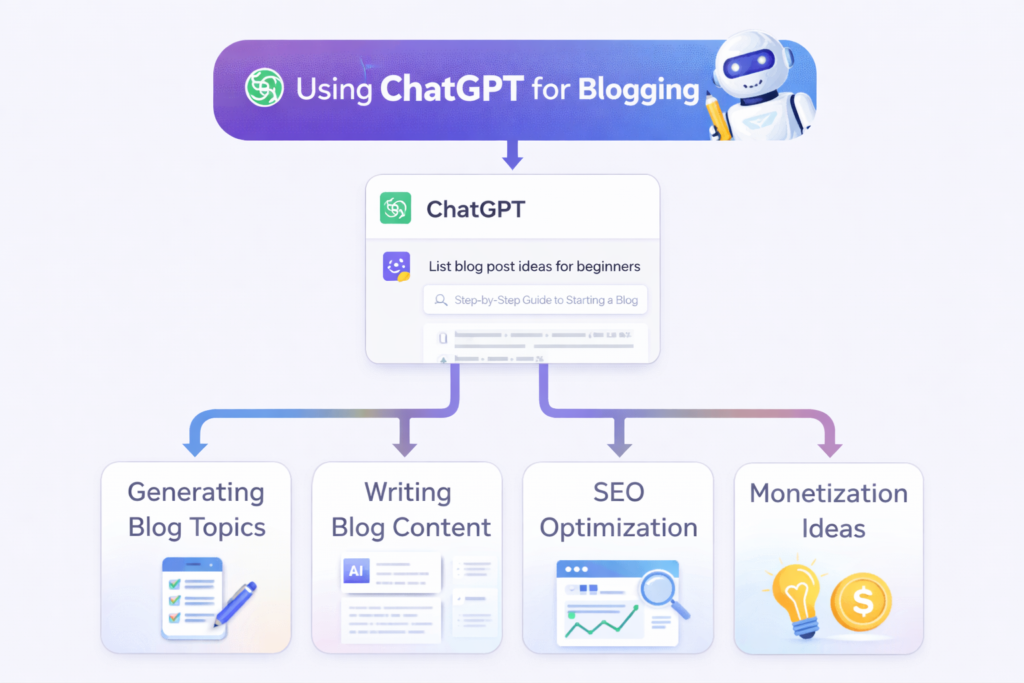
You can use ChatGPT at different stages of your blogging workflow. This simple process can help you stay organized.
Step 1: Choose a Topic
Start with a topic that fits your blog’s niche and audience.
Examples:
- AI tools for bloggers
- Beginner-friendly SEO tutorials
- Social media content planning
Before writing, check whether the topic is relevant to your readers and whether you can provide useful information about it.
Step 2: Give ChatGPT a Clear Prompt
Include the topic, audience, task, desired format, and any important limitations.
For example:
“Create a beginner-friendly outline about using AI for blog content planning. Include practical steps, examples, and common mistakes. Do not invent statistics or claim that the method guarantees traffic.”
Step 3: Review and Edit the Output
Do not publish AI-generated content without reviewing it.
- Check facts, dates, statistics, and product details.
- Improve unclear or repetitive wording.
- Add relevant examples and your own perspective.
- Remove unsupported claims and generic filler.
Step 4: Review SEO and Search Intent
Use ChatGPT to brainstorm title ideas, headings, and meta descriptions. Then check that the article answers the reader’s likely questions and uses keywords naturally.
Step 5: Publish and Promote
Once the article is complete:
- Check formatting, links, and images.
- Review the article on desktop and mobile.
- Share it through relevant channels such as Pinterest, Instagram, or your newsletter.
- Track performance and update the content when needed.
For a more detailed beginner walkthrough, read our AI blogging guide.
Common Mistakes to Avoid When Using ChatGPT
ChatGPT can be useful, but the way you use it matters. Avoid these common mistakes:
- Copying and publishing without review: AI output may contain errors, vague explanations, or unsupported claims.
- Using vague prompts: Missing context can lead to generic responses.
- Treating suggestions as verified facts: Confirm important information with reliable sources.
- Ignoring reader intent: Content should answer the reader’s actual question, not just include keywords.
- Overusing keywords: Write naturally and avoid keyword stuffing.
- Inventing personal experience: Do not claim that you tested a product or achieved a result unless it actually happened.
- Expecting automatic rankings or income: AI does not guarantee search visibility, traffic, or revenue.
The goal is to use ChatGPT to support your work while maintaining accuracy, originality, and reader value.
Best Practices for Using ChatGPT
Follow these practices to get more useful results from your prompts:
- Be specific: Clearly explain the task and desired outcome.
- Provide context: Include your niche, audience, and relevant background.
- Set the format: Tell ChatGPT whether you need a list, outline, table, or draft.
- Add constraints: Explain what it should avoid, such as unsupported claims or invented statistics.
- Work in stages: Research, outline, draft, and edit separately instead of asking for everything at once.
- Verify important information: Check facts and current product details before publishing.
- Add your own perspective: Include genuine experience, examples, analysis, or useful explanations.
- Review the final result: Make sure the content is accurate, relevant, and helpful.
If you want to explore more AI tools for content planning and creation, see our guide to best AI tools for content creators.
If your goal is to monetize a blog, you can also read our guide on making money blogging with AI.
Final Thoughts
ChatGPT prompts can help bloggers brainstorm ideas, organize content, improve writing, and support SEO and marketing tasks. The most useful prompts provide clear instructions, relevant context, and a specific output format.
However, a prompt is only a starting point. Review the results, verify important information, and add your own knowledge and judgment before publishing.
Use ChatGPT as a writing and planning assistant—not as a replacement for research, editorial review, or understanding your audience.
FAQs
1. What are the best ChatGPT prompts for blogging?
Useful prompts include those for brainstorming topics, creating article outlines, improving drafts, generating SEO title ideas, and planning content. The right prompt depends on your task and audience.
2. Can I use ChatGPT for SEO?
Yes. ChatGPT can help brainstorm keywords and related topics, suggest headings, and draft meta descriptions. Validate keyword opportunities and review search intent with appropriate research before making SEO decisions.
3. Are ChatGPT prompts useful for beginners?
Yes. Clear prompts can help beginners organize ideas, understand writing tasks, and create first drafts. Beginners should still review the output and verify important information.
4. Can ChatGPT write a complete blog post?
ChatGPT can generate a draft, but the result may need fact-checking, editing, examples, and improvements to meet the needs of your audience.
5. Is AI-generated content safe for Google?
Using AI does not automatically make content helpful or harmful. Focus on creating accurate, original, useful content for readers, and review AI-assisted drafts before publishing.
6. Can ChatGPT replace human writers?
ChatGPT can assist with some writing tasks, but it may not understand a project’s full context, expertise, or audience needs. Human judgment and editing remain important.
7. Can ChatGPT prompts help me make money blogging?
Prompts can support content planning, writing, SEO, and marketing. They do not guarantee traffic or income. Results depend on many factors, including content quality, audience needs, competition, and monetization strategy.
About the Author
Hi, we are the founders of EveryTechHub. We share beginner-friendly guides on AI tools, blogging, and technology to help readers understand and use digital tools more effectively. Read more about us.